Tell us anything

An idea, a bug, something you love. We read every note.

⌘↵ to send. The page you're on comes along.

Shiba Inu Backpack Product Sheet

Made with GPT Image 2.5 in ChatGPT by Library Shop. Promptclay never generates images.

Did it work?

No reports yet. Tell others if it worked for you.

No comments yet. Be the first.

    Shiba Inu Backpack Product Sheet

    GPT Image 2.5AI-generated

    Prompt

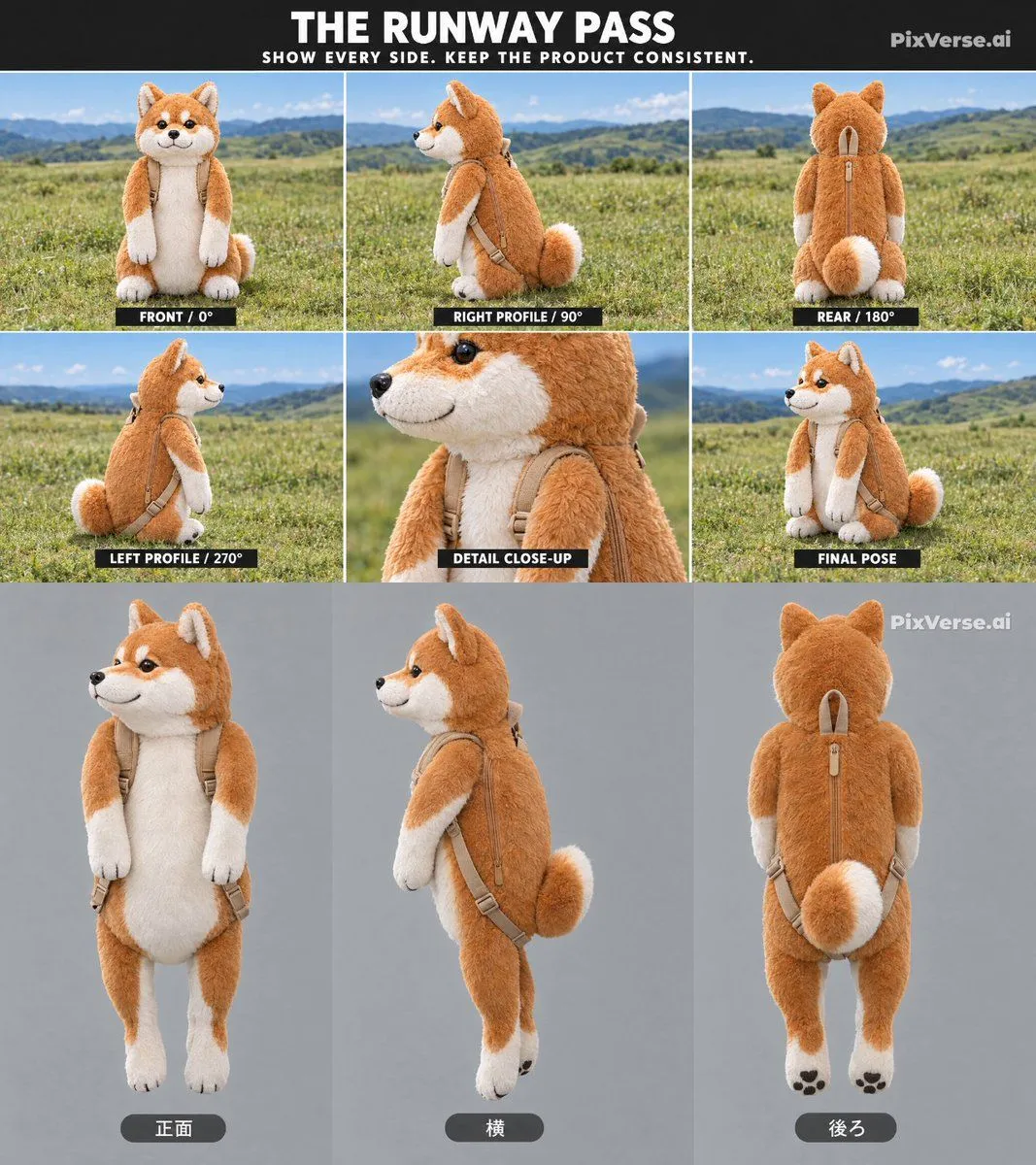
    Goal: Create a professional product design sheet for a Shiba Inu plush backpack, showcasing the item from multiple angles to ensure consistency. Canvas: A vertical layout divided into two main sections: an upper 'Runway Pass' grid and a lower studio-style turntable view. Layout: 1. Header: Black background with white text "THE RUNWAY PASS" and subtitle "SHOW EVERY SIDE. KEEP THE PRODUCT CONSISTENT." The logo "PixVerse.ai" is in the top right corner. 2. Upper Grid (6 panels): Six square images arranged in two rows of three. Each panel shows the plush backpack sitting on green grass against a backdrop of rolling hills and blue sky. - Panel 1: Front view (labeled "FRONT / 0°"). - Panel 2: Right profile view (labeled "RIGHT PROFILE / 90°"). - Panel 3: Rear view showing the zipper and tail (labeled "REAR / 180°"). - Panel 4: Left profile view (labeled "LEFT PROFILE / 270°"). - Panel 5: Close-up detail of the face and shoulder straps (labeled "DETAIL CLOSE-UP"). - Panel 6: Three-quarter front pose (labeled "FINAL POSE"). 3. Lower Section (3 panels): Three tall rectangular images arranged side-by-side against a neutral gray studio background. These show the backpack standing upright as if worn by an invisible person or propped up. - Left: Front view (labeled with Japanese text "正面"). - Center: Side profile view (labeled with Japanese text "横"). - Right: Rear view (labeled with Japanese text "後ろ"). Subject Details: - The object is a realistic, high-quality plush toy shaped like a Shiba Inu dog. - It functions as a backpack, featuring beige/tan canvas straps attached to the back of the plush body. - The fur texture should be soft and detailed, with typical orange/red coat and white markings on the muzzle, chest, belly, and paws. - The tail is fluffy and curled. Visual Style: - Photorealistic product photography. - Bright, natural lighting for the outdoor scenes. - Soft, even studio lighting for the bottom row. - Clean, modern typography for labels.

    Works in
    ChatGPT, Gemini
    Status
    Free to copy
    0
    DetailsVersions, settings and questions

    Written for

    What's in the prompt

    Subject
    Model
    GPT Image 2.5

    If your face changes

    keep my face exactly the same

    Questions

    Does this work in the ChatGPT app?
    Yes. Paste the prompt and attach your photo if it uses one.
    It changed my face. What do I do?
    Add "keep my face exactly the same" to the end and run it again.
    Can I use the images I make?
    Check the terms of the app you use. Promptclay never generates images and claims nothing you make.
    Similar prompts

    See more
    • Vacuum Sealed Toy Photography
    • Green Vinyl Monster Turnaround
    • Collectible Art Toy Character Design Sheet
    • Inuyasha Plush Toy Generation Prompt
    • Gachapon Capsule Toy Design
    • Nano Banana Pro Multi-Panel Generation
    • Chibi Phoebe Close-up Portrait with Baby-TalkVideo, 0:15
    • 18-Panel Mascot Brand Identity Document
    • Japanese Beagle Character Design Sheet
    • Trendy Little Fox IP Character Design
    • Shiba Inu Space Dream Poster
    • Transparent Chibi Shiba Duo
    • Shiba Inu Zoo Corner Poster
    • Apologizing Hamster Meme
    • Japanese Ultra Plan Promo Storyboard
    • Censored Shiba Inu Math Teacher
    • Party Sheep Character Sheet
    • Train-ad style book advertisement image
    • Anime Office Lady Reference Sheet
    • Rubber Duck Camera Head Character Sheet
    • Kung Fu Character Storyboard Sheet
    • Cinematic Shiba Squat Hero Poster
    • Cute Black Cat Japanese Sticker Sheet
    • Cozy Nighttime Pet Secret Short FilmVideo, 0:15

    Show more

    Run it on your phone

    1. Prompt copiedRead it

      Goal: Create a professional product design sheet for a Shiba Inu plush backpack, showcasing the item from multiple angles to ensure consistency. Canvas: A vertical layout divided into two main sections: an upper 'Runway Pass' grid and a lower studio-style turntable view. Layout: 1. Header: Black background with white text "THE RUNWAY PASS" and subtitle "SHOW EVERY SIDE. KEEP THE PRODUCT CONSISTENT." The logo "PixVerse.ai" is in the top right corner. 2. Upper Grid (6 panels): Six square images arranged in two rows of three. Each panel shows the plush backpack sitting on green grass against a backdrop of rolling hills and blue sky. - Panel 1: Front view (labeled "FRONT / 0°"). - Panel 2: Right profile view (labeled "RIGHT PROFILE / 90°"). - Panel 3: Rear view showing the zipper and tail (labeled "REAR / 180°"). - Panel 4: Left profile view (labeled "LEFT PROFILE / 270°"). - Panel 5: Close-up detail of the face and shoulder straps (labeled "DETAIL CLOSE-UP"). - Panel 6: Three-quarter front pose (labeled "FINAL POSE"). 3. Lower Section (3 panels): Three tall rectangular images arranged side-by-side against a neutral gray studio background. These show the backpack standing upright as if worn by an invisible person or propped up. - Left: Front view (labeled with Japanese text "正面"). - Center: Side profile view (labeled with Japanese text "横"). - Right: Rear view (labeled with Japanese text "後ろ"). Subject Details: - The object is a realistic, high-quality plush toy shaped like a Shiba Inu dog. - It functions as a backpack, featuring beige/tan canvas straps attached to the back of the plush body. - The fur texture should be soft and detailed, with typical orange/red coat and white markings on the muzzle, chest, belly, and paws. - The tail is fluffy and curled. Visual Style: - Photorealistic product photography. - Bright, natural lighting for the outdoor scenes. - Soft, even studio lighting for the bottom row. - Clean, modern typography for labels.

    2. Open your app

      This prompt is long, so it is copied instead of sent in the link. Paste it in the app.

    3. Paste and run

      Press and hold the message box, then tap Paste. Add your photo first if the prompt uses one. You may need to sign in.

    Shiba Inu Backpack Product Sheet