Tell us anything

An idea, a bug, something you love. We read every note.

⌘↵ to send. The page you're on comes along.

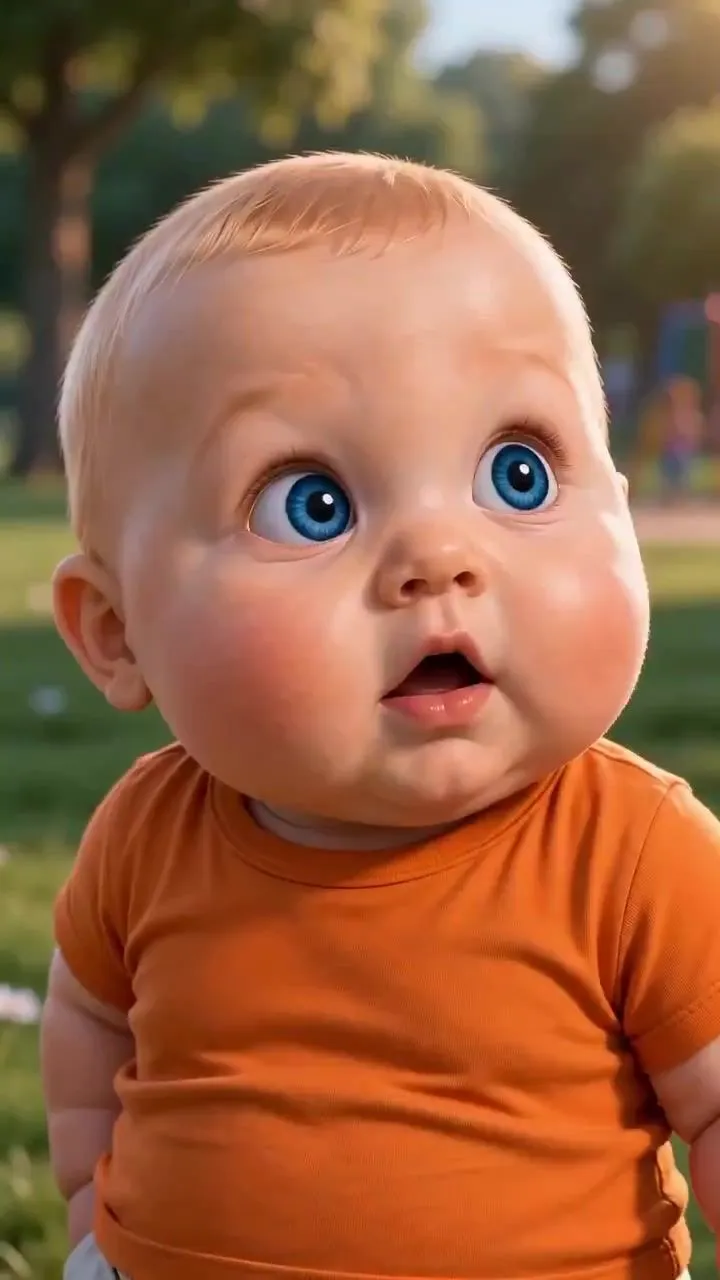
Pixar Style Baby Park Animation

Made with Seedance 2.5 in Kling by Library Cinema. Promptclay never generates images.

Did it work?

No reports yet. Tell others if it worked for you.

No comments yet. Be the first.

    Pixar Style Baby Park Animation

    Seedance 2.59:16AI-generated

    Prompt

    Create a heartwarming, ultra-detailed 3D animated short film set in a beautiful sunlit park with lush green grass, leafy trees, a wooden swing set, and warm golden-hour lighting. Use a high-quality Pixar-inspired animation style, expressive facial features, realistic fabric textures, soft shadows, cinematic depth of field, and vibrant natural colors. Scene 1 (0–2 seconds): A cute, chubby baby boy with fair skin, big sparkling blue eyes, fine blonde hair, and an orange T-shirt with beige shorts stands in a playground. He notices a little girl nearby and looks around curiously. In the background, a little girl with blonde hair tied into two ponytails, wearing a pink dress and white shoes, plays near the swings. Scene 2 (2–4 seconds): Close-up of the baby boy holding a small pink flower with a yellow center. He smiles sweetly and looks at the flower with innocent curiosity. The sunlight illuminates his soft cheeks and bright blue eyes as the camera gently pushes in. Scene 3 (4–6 seconds): Cut to a young mother with long auburn-brown hair, wearing a light-colored top. She watches the children with a warm, emotional smile, placing one hand over her chest. Her eyes sparkle with happiness as she witnesses the adorable moment. Scene 4 (6–8 seconds): The little girl approaches the baby boy and gently offers him a flower. Both toddlers stand face-to-face on the grass, looking at each other with innocent smiles. Their movements are natural, playful, and full of charm. Scene 5 (8–10 seconds): The baby boy suddenly makes a funny, slightly grumpy facial expression, puffing out his cheeks and frowning adorably. His parents watch from a nearby park bench, smiling and reacting with amusement. Use a medium close-up to emphasize his exaggerated expression. Scene 6 (10–12 seconds): The little girl smiles brightly and proudly holds up a tiny fashion doll dressed in a colorful outfit. Her blonde pigtails bounce as she moves excitedly. The camera captures her expressive blue eyes, rosy cheeks, and joyful reaction. Scene 7 (12–15 seconds): The two toddlers sit together on the grass, playing with the little doll. Their parents sit and stand nearby, watching lovingly. The baby boy leans closer to the girl, and both children smile and giggle. End with a beautiful close-up of their happy faces, warm sunlight glowing behind them, creating a tender family moment. Camera & Animation: Smooth cinematic camera movements, gentle push-ins, natural character motion, expressive eye movements, realistic toddler gestures, subtle handheld-style cinematic motion, soft background bokeh, and seamless scene transitions. Visual Quality: High-end 3D CGI animation, Pixar-inspired character design, detailed skin shading, realistic hair strands, soft global illumination, warm golden-hour lighting, vibrant colors, cinematic composition, and polished professional rendering. Audio: Gentle cheerful background music, soft birds chirping, natural toddler gi

    Works in
    Kling
    Status
    Free to copy
    0
    DetailsVersions, settings and questions

    Written for

    What's in the prompt

    Subject
    Model
    Seedance 2.5

    If your face changes

    keep my face exactly the same

    Questions

    Does this work in the Kling app?
    Yes. Paste the prompt and attach your photo if it uses one.
    It changed my face. What do I do?
    Add "keep my face exactly the same" to the end and run it again.
    Can I use the images I make?
    Check the terms of the app you use. Promptclay never generates images and claims nothing you make.
    Similar prompts

    See more
    • Pixar Style Curly Haired Girl
    • Dreamy 3D Animated Girl in Magical Cave
    • Whimsical Pixar Style Golden Hour Render
    • Pixar Style Toddler MischiefVideo, 0:30
    • Stylized 3D Animated Mother Portrait
    • Pixar-Style 3D Animated Child Portrait with Animal
    • 3D Render of Childlike Character in Puzzle Sweater
    • Stylized 3D Cartoon Character Portraits
    • 3D Jungle Adventure Poster
    • 3D Cartoon Character: Hip-Hop Boy in Pixar Style
    • Pixar Style 3D Avatar Generation Prompt
    • Pixar-Style Giant World Character Prompt
    • Pregnant Woman Fantasy Football DreamVideo, 0:20
    • Puppy and Robot Dog Ice Cream Scene
    • Chibi-Style Character Transformation
    • Neo-Skeuomorphism Crowd Scene Prompt
    • Base Prompt with Uploaded Image
    • Astronaut Beside Living Earth
    • Cinematic Sci-Fi Action Poster
    • Cricket Player Three-Angle Character Sheet
    • Glass Shard Dance Action Portrait
    • Editorial Beauty Collage Hairstyle Variations Prompt
    • The Painter Who Finished the Sky
    • Ultra-Photoreal Beauty Campaign Contact Sheet Prompt

    Show more

    Run it on your phone

    1. Prompt copiedRead it

      Create a heartwarming, ultra-detailed 3D animated short film set in a beautiful sunlit park with lush green grass, leafy trees, a wooden swing set, and warm golden-hour lighting. Use a high-quality Pixar-inspired animation style, expressive facial features, realistic fabric textures, soft shadows, cinematic depth of field, and vibrant natural colors. Scene 1 (0–2 seconds): A cute, chubby baby boy with fair skin, big sparkling blue eyes, fine blonde hair, and an orange T-shirt with beige shorts stands in a playground. He notices a little girl nearby and looks around curiously. In the background, a little girl with blonde hair tied into two ponytails, wearing a pink dress and white shoes, plays near the swings. Scene 2 (2–4 seconds): Close-up of the baby boy holding a small pink flower with a yellow center. He smiles sweetly and looks at the flower with innocent curiosity. The sunlight illuminates his soft cheeks and bright blue eyes as the camera gently pushes in. Scene 3 (4–6 seconds): Cut to a young mother with long auburn-brown hair, wearing a light-colored top. She watches the children with a warm, emotional smile, placing one hand over her chest. Her eyes sparkle with happiness as she witnesses the adorable moment. Scene 4 (6–8 seconds): The little girl approaches the baby boy and gently offers him a flower. Both toddlers stand face-to-face on the grass, looking at each other with innocent smiles. Their movements are natural, playful, and full of charm. Scene 5 (8–10 seconds): The baby boy suddenly makes a funny, slightly grumpy facial expression, puffing out his cheeks and frowning adorably. His parents watch from a nearby park bench, smiling and reacting with amusement. Use a medium close-up to emphasize his exaggerated expression. Scene 6 (10–12 seconds): The little girl smiles brightly and proudly holds up a tiny fashion doll dressed in a colorful outfit. Her blonde pigtails bounce as she moves excitedly. The camera captures her expressive blue eyes, rosy cheeks, and joyful reaction. Scene 7 (12–15 seconds): The two toddlers sit together on the grass, playing with the little doll. Their parents sit and stand nearby, watching lovingly. The baby boy leans closer to the girl, and both children smile and giggle. End with a beautiful close-up of their happy faces, warm sunlight glowing behind them, creating a tender family moment. Camera & Animation: Smooth cinematic camera movements, gentle push-ins, natural character motion, expressive eye movements, realistic toddler gestures, subtle handheld-style cinematic motion, soft background bokeh, and seamless scene transitions. Visual Quality: High-end 3D CGI animation, Pixar-inspired character design, detailed skin shading, realistic hair strands, soft global illumination, warm golden-hour lighting, vibrant colors, cinematic composition, and polished professional rendering. Audio: Gentle cheerful background music, soft birds chirping, natural toddler gi

    2. Open your app

    3. Paste and run

      Press and hold the message box, then tap Paste. Add your photo first if the prompt uses one. You may need to sign in.