Tell us anything

An idea, a bug, something you love. We read every note.

⌘↵ to send. The page you're on comes along.

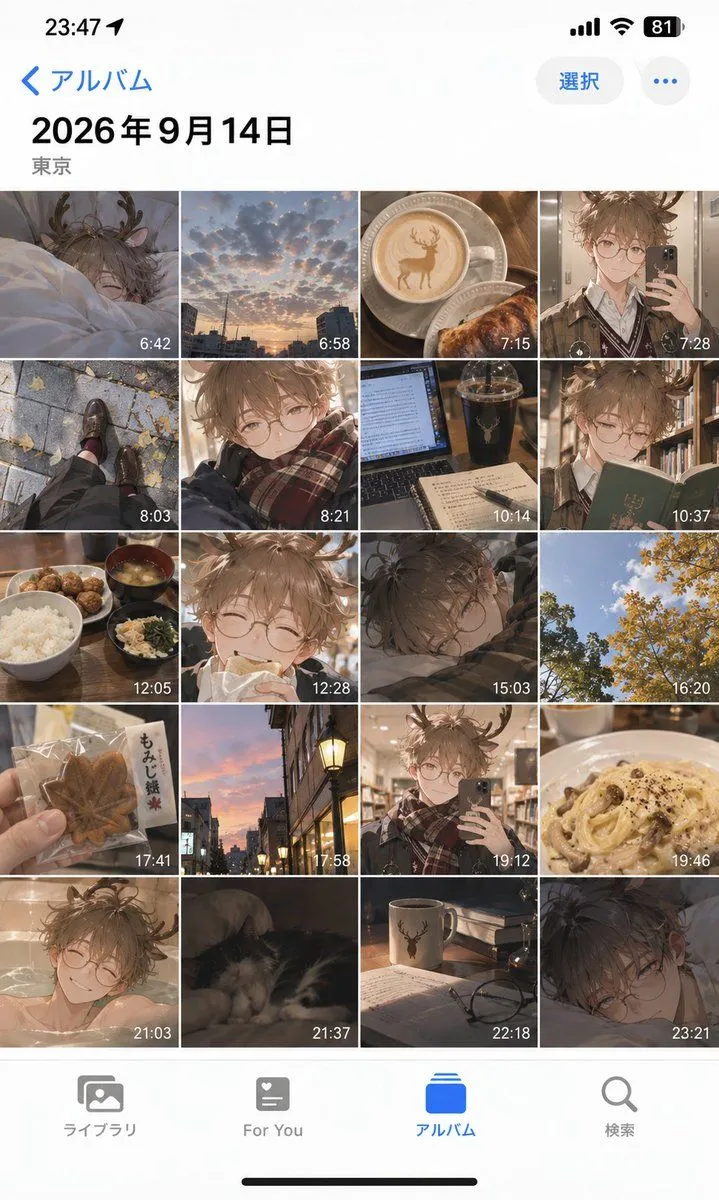
iOS Album Mockup Anime Day in Life

Made with GPT Image 2.5 in ChatGPT by Library UI Design. Promptclay never generates images.

Did it work?

No reports yet. Tell others if it worked for you.

No comments yet. Be the first.

    iOS Album Mockup Anime Day in Life

    GPT Image 2.5AI-generated

    Prompt

    Goal: Create a realistic iPhone photo album interface mockup displaying a 'day in the life' collection of anime-style photos. Canvas: Vertical smartphone aspect ratio (9:16), iOS light mode aesthetic, clean white background with standard system UI elements. Layout: Top status bar showing time '23:47', battery at 81%, and signal icons. Header area with blue back arrow text '< アルバム' (Album) on left, '選択' (Select) button and ellipsis icon on right. Large bold date header '2026年9月14日' followed by location '東京' (Tokyo). Main content is a dense 4-column grid of square thumbnails. Bottom tab bar with four icons labeled 'ライブラリ', 'For You', 'アルバム' (highlighted in blue), and '検索'. Subject details: The grid contains exactly 20 distinct images arranged chronologically from top-left to bottom-right. Each thumbnail has a small white timestamp overlay in the bottom-right corner. The images alternate between real-life photography styles and anime character illustrations featuring a young man with messy brown hair, round glasses, and deer antlers. Specific Grid Content: Row 1: Character sleeping in bed (6:42), sunset cityscape clouds (6:58), latte art coffee cup with deer design (7:15), character taking mirror selfie (7:28). Row 2: Feet walking on pavement with autumn leaves (8:03), close-up portrait of character smiling (8:21), laptop screen with dark drink (10:14), character reading a green book (10:37). Row 3: Japanese breakfast set with rice and soup (12:05), character eating bread (12:28), character resting head on desk (15:03), yellow ginkgo trees against blue sky (16:20). Row 4: Hand holding maple leaf cookie package (17:41), street lamp at dusk (17:58), character taking library mirror selfie (19:12), creamy pasta dish (19:46). Row 5: Character bathing in tub (21:03), cat sleeping on sofa (21:37), mug with deer logo and glasses on table (22:18), character lying down looking tired (23:21). Visual style: High-fidelity UI mockup. The anime images should have soft lighting and detailed shading, contrasting with the crisp vector-like quality of the phone interface.

    Works in
    ChatGPT, Gemini
    Status
    Free to copy
    0
    DetailsVersions, settings and questions

    Written for

    What's in the prompt

    Subject
    Model
    GPT Image 2.5

    If your face changes

    keep my face exactly the same

    Questions

    Does this work in the ChatGPT app?
    Yes. Paste the prompt and attach your photo if it uses one.
    It changed my face. What do I do?
    Add "keep my face exactly the same" to the end and run it again.
    Can I use the images I make?
    Check the terms of the app you use. Promptclay never generates images and claims nothing you make.
    Similar prompts

    See more
    • iPhone Camera Roll Mockup Generator
    • Ancient Style Daily Life Album Mockup
    • iOS Photos App Memory Gallery Mockup
    • iPhone Camera Roll Mockup Prompt
    • Dating App Screenshot Recreation
    • Anime Live2D Turnaround Chat Screenshot
    • Japanese Manga Creation App Screenshot
    • Dark Chat UI Anime Conversion Screenshot
    • Image Fusion Prompt Using Multiple References
    • Anime Summer Wallpaper Device Mockup
    • Japanese ES Critique App Mockup
    • Five High-Efficiency Nano Banana Pro Prompts for Business Graphics
    • Bonsai Mobile Game UI Mockup
    • Generating an Instagram Post based on Persona
    • Anime Cafe Two-Panel Comparison
    • Anime Girl Knitting in Rustic Cottage
    • Japanese Personality Map Poster
    • Personalized VTuber Avatar Prompt
    • Burgundy Anime Street Silhouette
    • Flashy X Monetization YouTube Thumbnail
    • Live E-commerce UI Mockup
    • Pixar Style Reimagined Poster
    • Rainy Cyberpunk Alley Sword Duel
    • Water Mirror Fantasy Maiden

    Show more

    Run it on your phone

    1. Prompt copiedRead it

      Goal: Create a realistic iPhone photo album interface mockup displaying a 'day in the life' collection of anime-style photos. Canvas: Vertical smartphone aspect ratio (9:16), iOS light mode aesthetic, clean white background with standard system UI elements. Layout: Top status bar showing time '23:47', battery at 81%, and signal icons. Header area with blue back arrow text '< アルバム' (Album) on left, '選択' (Select) button and ellipsis icon on right. Large bold date header '2026年9月14日' followed by location '東京' (Tokyo). Main content is a dense 4-column grid of square thumbnails. Bottom tab bar with four icons labeled 'ライブラリ', 'For You', 'アルバム' (highlighted in blue), and '検索'. Subject details: The grid contains exactly 20 distinct images arranged chronologically from top-left to bottom-right. Each thumbnail has a small white timestamp overlay in the bottom-right corner. The images alternate between real-life photography styles and anime character illustrations featuring a young man with messy brown hair, round glasses, and deer antlers. Specific Grid Content: Row 1: Character sleeping in bed (6:42), sunset cityscape clouds (6:58), latte art coffee cup with deer design (7:15), character taking mirror selfie (7:28). Row 2: Feet walking on pavement with autumn leaves (8:03), close-up portrait of character smiling (8:21), laptop screen with dark drink (10:14), character reading a green book (10:37). Row 3: Japanese breakfast set with rice and soup (12:05), character eating bread (12:28), character resting head on desk (15:03), yellow ginkgo trees against blue sky (16:20). Row 4: Hand holding maple leaf cookie package (17:41), street lamp at dusk (17:58), character taking library mirror selfie (19:12), creamy pasta dish (19:46). Row 5: Character bathing in tub (21:03), cat sleeping on sofa (21:37), mug with deer logo and glasses on table (22:18), character lying down looking tired (23:21). Visual style: High-fidelity UI mockup. The anime images should have soft lighting and detailed shading, contrasting with the crisp vector-like quality of the phone interface.

    2. Open your app

      This prompt is long, so it is copied instead of sent in the link. Paste it in the app.

    3. Paste and run

      Press and hold the message box, then tap Paste. Add your photo first if the prompt uses one. You may need to sign in.

    iOS Album Mockup Anime Day in Life