Tell us anything

An idea, a bug, something you love. We read every note.

⌘↵ to send. The page you're on comes along.

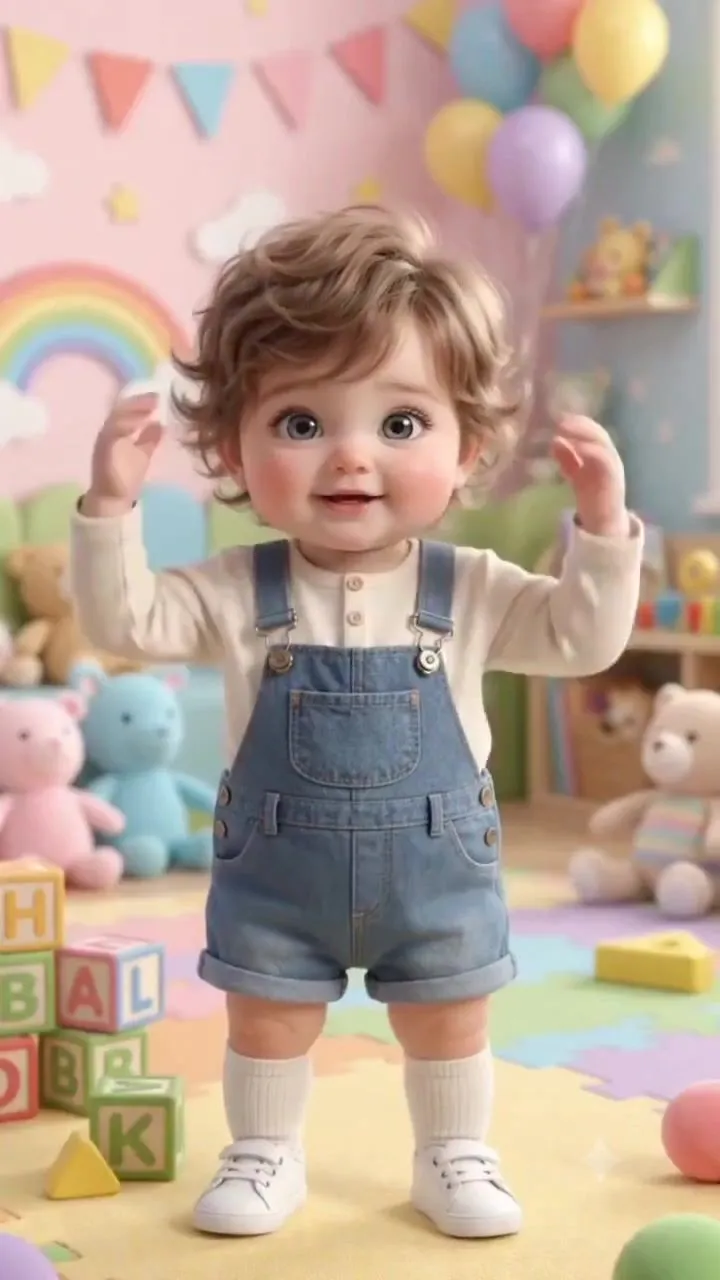
Educational Body Parts Video for Toddlers

Made with Seedance 2.5 in Kling by Library Cinema. Promptclay never generates images.

Did it work?

No reports yet. Tell others if it worked for you.

No comments yet. Be the first.

    Educational Body Parts Video for Toddlers

    Seedance 2.59:16AI-generated

    Prompt

    Create a cute, colorful, highly detailed 3D animated educational video featuring an adorable toddler boy with big expressive eyes, soft curly brown hair, rosy cheeks, and a sweet innocent expression. The toddler wears a cream-colored long-sleeve shirt underneath blue denim overalls and white socks. Keep the character's appearance consistent throughout the entire video. Set the video inside a bright, playful children's nursery/classroom filled with colorful toys, alphabet blocks, bookshelves, soft pastel walls, rainbows, balloons, stars, clouds, bunting decorations, and a colorful puzzle mat. Use a cheerful pastel color palette with soft cinematic lighting. The child stands in the center of the frame and happily teaches basic body-part names through simple gestures. He looks directly at the camera, points to or touches each body part when its name appears on screen, and uses cute natural movements and facial expressions. Show different body parts one by one, including: HEAD, NOSE, CHIN, EYEBROW, PALM, WRIST, WAIST, STOMACH, and SOLE. For every body part, display a large, bold, colorful English word near the child, synchronized with his gesture. Use playful children's educational typography with bright colors, a dark outline, and a fun cartoon-style pop-in animation. Scene progression: 1. The toddler waves and raises both hands toward the camera. 2. He points to his NOSE. 3. He smiles and gestures toward his CHIN. 4. He points to his EYEBROW. 5. He opens his hand and shows his PALM. 6. He points toward his WRIST. 7. He gestures around his WAIST. 8. He touches his STOMACH. 9. He sits down and shows the bottom of his foot while introducing SOLE. 10. End with the toddler happily waving at the camera. Camera style: vertical 9:16 composition, medium full-body framing, smooth gentle camera movement, occasional subtle push-ins, centered character, eye-level perspective. Visual style: high-quality 3D children's animation, adorable Pixar-inspired aesthetic, soft rounded features, realistic fabric textures, expressive eyes, smooth character animation, vibrant pastel colors, soft global illumination, shallow depth of field, polished cinematic rendering. Mood: cheerful, wholesome, educational, playful, and engaging for young children. Keep the character's face, hairstyle, clothing, proportions, nursery environment, lighting, and overall visual style consistent across every scene. Add a final educational message: “LEARN BODY PARTS NAMES!” “FOLLOW FOR MORE!” Format: 9:16 vertical, high resolution, smooth animation, clean composition, no watermark.

    Works in
    Kling
    Status
    Free to copy
    0
    DetailsVersions, settings and questions

    Written for

    What's in the prompt

    Subject
    Model
    Seedance 2.5

    If your face changes

    keep my face exactly the same

    Questions

    Does this work in the Kling app?
    Yes. Paste the prompt and attach your photo if it uses one.
    It changed my face. What do I do?
    Add "keep my face exactly the same" to the end and run it again.
    Can I use the images I make?
    Check the terms of the app you use. Promptclay never generates images and claims nothing you make.
    Similar prompts

    See more
    • Pixar Style Baby Park AnimationVideo, 0:15
    • Whimsical 3D Toddler Bathroom Illustration
    • Chibi Girl in Denim Overalls
    • Anonymous Kids Studio Fashion Portrait
    • Pixar-style 3D character of a cheerful girl in yellow
    • Lego Assembly Time-Lapse AnimationVideo, 0:14
    • Puppy and Robot Dog Ice Cream Scene
    • Angel in a Cradle Image Generation Prompt
    • Stylized 3D Animated Mother Portrait
    • 3D Render of Childlike Character in Puzzle Sweater
    • 3D Anthropomorphic Bunny Character Prompt
    • Hyper-Realistic Photo of Person and Pixar Double (Identity Lock)
    • Censored Monkey Kid in Denim
    • 3D Render of Boy and Furry Monster on Scooter
    • Cute Tiger Cub Wall Doodle
    • 3D Jungle Adventure Poster
    • 3D Cartoon Character Generation Prompt
    • Pixar Style 3D Character Portrait
    • Dynamic Anime Hero Figure Render
    • Song Summer 3D Anime Fashion Poster
    • Vintage Anime Figurine Portrait
    • Chibi-Style Character Transformation
    • Mermaid Healing an Injured Bird
    • Post-Apocalyptic Titan Anime Poster

    Show more

    Run it on your phone

    1. Prompt copiedRead it

      Create a cute, colorful, highly detailed 3D animated educational video featuring an adorable toddler boy with big expressive eyes, soft curly brown hair, rosy cheeks, and a sweet innocent expression. The toddler wears a cream-colored long-sleeve shirt underneath blue denim overalls and white socks. Keep the character's appearance consistent throughout the entire video. Set the video inside a bright, playful children's nursery/classroom filled with colorful toys, alphabet blocks, bookshelves, soft pastel walls, rainbows, balloons, stars, clouds, bunting decorations, and a colorful puzzle mat. Use a cheerful pastel color palette with soft cinematic lighting. The child stands in the center of the frame and happily teaches basic body-part names through simple gestures. He looks directly at the camera, points to or touches each body part when its name appears on screen, and uses cute natural movements and facial expressions. Show different body parts one by one, including: HEAD, NOSE, CHIN, EYEBROW, PALM, WRIST, WAIST, STOMACH, and SOLE. For every body part, display a large, bold, colorful English word near the child, synchronized with his gesture. Use playful children's educational typography with bright colors, a dark outline, and a fun cartoon-style pop-in animation. Scene progression: 1. The toddler waves and raises both hands toward the camera. 2. He points to his NOSE. 3. He smiles and gestures toward his CHIN. 4. He points to his EYEBROW. 5. He opens his hand and shows his PALM. 6. He points toward his WRIST. 7. He gestures around his WAIST. 8. He touches his STOMACH. 9. He sits down and shows the bottom of his foot while introducing SOLE. 10. End with the toddler happily waving at the camera. Camera style: vertical 9:16 composition, medium full-body framing, smooth gentle camera movement, occasional subtle push-ins, centered character, eye-level perspective. Visual style: high-quality 3D children's animation, adorable Pixar-inspired aesthetic, soft rounded features, realistic fabric textures, expressive eyes, smooth character animation, vibrant pastel colors, soft global illumination, shallow depth of field, polished cinematic rendering. Mood: cheerful, wholesome, educational, playful, and engaging for young children. Keep the character's face, hairstyle, clothing, proportions, nursery environment, lighting, and overall visual style consistent across every scene. Add a final educational message: “LEARN BODY PARTS NAMES!” “FOLLOW FOR MORE!” Format: 9:16 vertical, high resolution, smooth animation, clean composition, no watermark.

    2. Open your app

    3. Paste and run

      Press and hold the message box, then tap Paste. Add your photo first if the prompt uses one. You may need to sign in.