Tell us anything

An idea, a bug, something you love. We read every note.

⌘↵ to send. The page you're on comes along.

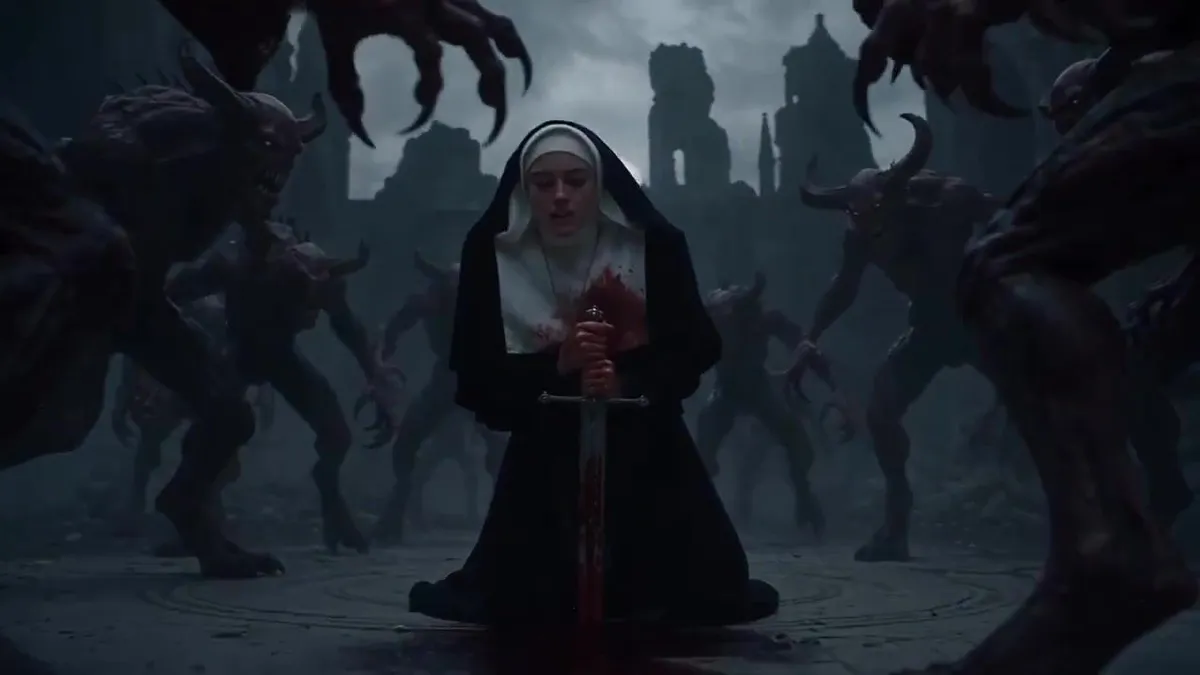
Warrior Queen Demon Fight Sequence

Made with Seedance 2.5 in Kling by Library Cinema. Promptclay never generates images.

Did it work?

No reports yet. Tell others if it worked for you.

No comments yet. Be the first.

    Warrior Queen Demon Fight Sequence

    Seedance 2.516:9AI-generated

    Prompt

    A cinematic 30-second sequence starting in a dark, ruined gothic cathedral at night with a full moon. A woman dressed as a nun is kneeling inside a glowing magical rune circle on a stone floor, holding a bloodied sword, surrounded by hordes of terrifying demonic creatures. She pulls the sword to her chest, bursting with fiery light from her ribcage, and transforms into a powerful entity with large white glowing angelic wings and a halo, her clothes changing into an ornate dark blue gown with golden embroidery. She wields glowing magical swords, fighting off and defeating the demons with fiery energy and brilliant flashes of light in an epic action sequence. Finally, she plants her glowing sword into the ground, creating a protective circle with giant glowing crosses, standing victorious as the cathedral clears. Negative Prompt: blurry, low quality, distorted, deformed, bad anatomy, extra limbs, poorly drawn face, poorly drawn hands, watermark, signature, ugly, low resolution, choppy animation

    Works in
    Kling
    Status
    Free to copy
    0
    DetailsVersions, settings and questions

    Written for

    What's in the prompt

    Subject
    Model
    Seedance 2.5

    If your face changes

    keep my face exactly the same

    Questions

    Does this work in the Kling app?
    Yes. Paste the prompt and attach your photo if it uses one.
    It changed my face. What do I do?
    Add "keep my face exactly the same" to the end and run it again.
    Can I use the images I make?
    Check the terms of the app you use. Promptclay never generates images and claims nothing you make.
    Similar prompts

    See more
    • Seedance 2.0 vs. Kling 3.0: Gothic Cathedral Battle PromptVideo, 0:15
    • Nightmare Knight and Demon
    • Cinematic Medieval Battle Attire
    • Warrior's Maniacal Transformation into a VillainVideo, 0:12
    • Kneeling Blonde Knight at Castle
    • Dark Fantasy Paladin Duel
    • Dark Gothic Ritual in Cathedral
    • Gothic Sorceress in Ruined Cathedral
    • Knight Facing Cathedral Giant
    • Short Prompt for AI Art Generation
    • Dark Fantasy Dream Kingdom Throne
    • Candlelit Occult Priestess Close-Up
    • Cinematic Portrait in Ruined Gothic Cathedral
    • Gothic Fallen Angel Queen
    • Burning Gothic Flood Escape
    • Stranger Things Inspired High-Fashion Editorial Prompt
    • Generate Realistic Character from Fantasy Image Reference Prompt
    • Armored Warrior with Black Panther
    • Blackglass Ascendant System Prompt
    • Cyberpunk Anime Fashion Magazine Cover
    • Elegant 23rd Birthday Studio Portrait
    • Cinematic Evening Event Portrait
    • Cinematic Portrait of Man in Leather Jacket and Sunglasses
    • Fan Reaction Sticker Set

    Show more

    Run it on your phone

    1. Prompt copiedRead it

      A cinematic 30-second sequence starting in a dark, ruined gothic cathedral at night with a full moon. A woman dressed as a nun is kneeling inside a glowing magical rune circle on a stone floor, holding a bloodied sword, surrounded by hordes of terrifying demonic creatures. She pulls the sword to her chest, bursting with fiery light from her ribcage, and transforms into a powerful entity with large white glowing angelic wings and a halo, her clothes changing into an ornate dark blue gown with golden embroidery. She wields glowing magical swords, fighting off and defeating the demons with fiery energy and brilliant flashes of light in an epic action sequence. Finally, she plants her glowing sword into the ground, creating a protective circle with giant glowing crosses, standing victorious as the cathedral clears. Negative Prompt: blurry, low quality, distorted, deformed, bad anatomy, extra limbs, poorly drawn face, poorly drawn hands, watermark, signature, ugly, low resolution, choppy animation

    2. Open your app

    3. Paste and run

      Press and hold the message box, then tap Paste. Add your photo first if the prompt uses one. You may need to sign in.