Tell us anything

An idea, a bug, something you love. We read every note.

⌘↵ to send. The page you're on comes along.

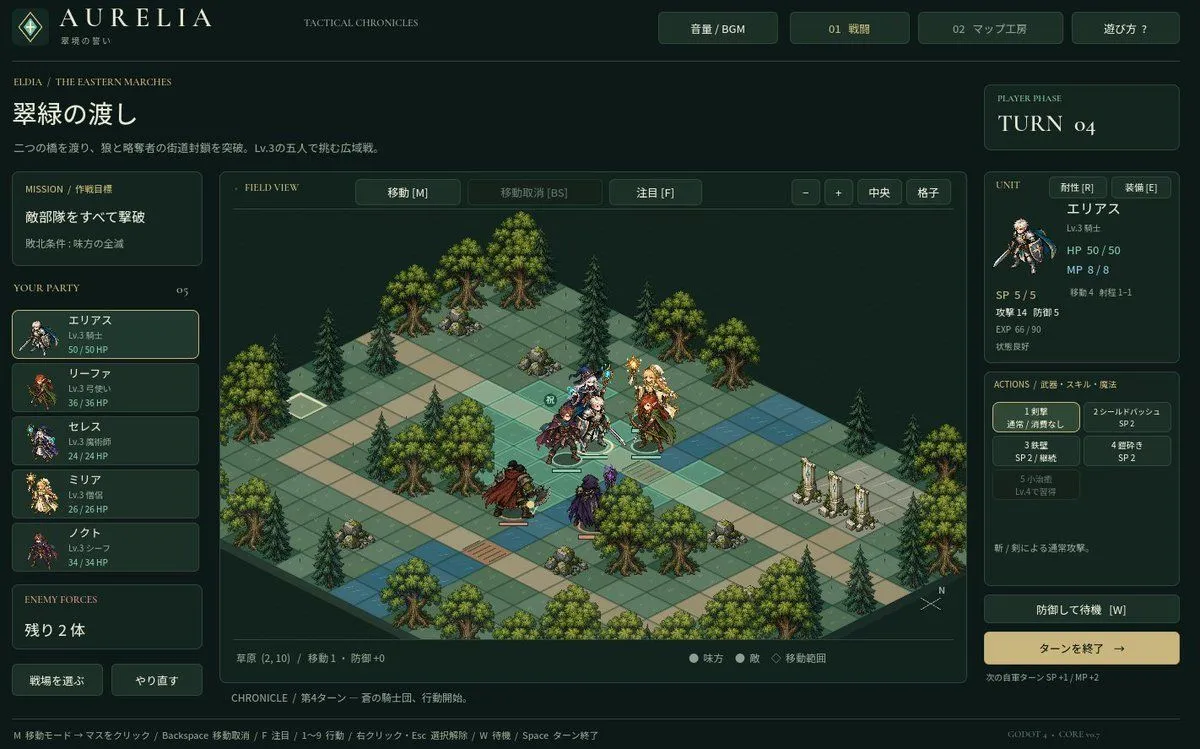
Tactical RPG Interface Mockup

Made with GPT Image 2.5 in ChatGPT by Library Game Art. Promptclay never generates images.

Did it work?

No reports yet. Tell others if it worked for you.

No comments yet. Be the first.

    Tactical RPG Interface Mockup

    GPT Image 2.5AI-generated

    Prompt

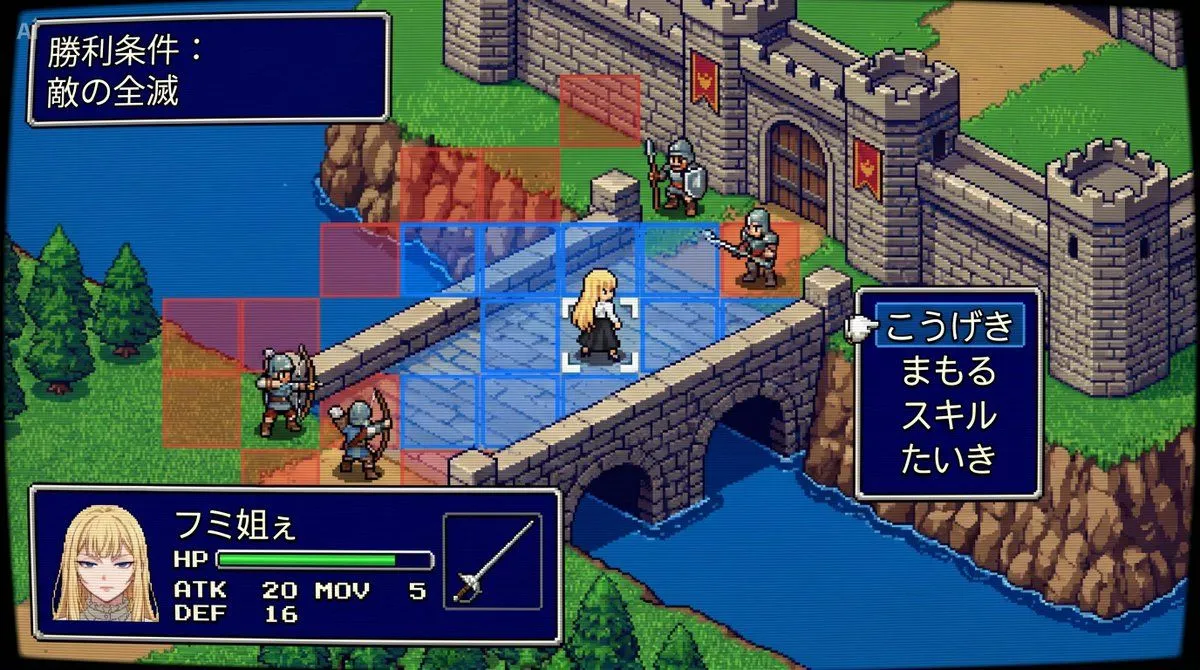
    Goal: Create a high-fidelity mockup of a tactical RPG (SLRPG) battle interface, specifically resembling the aesthetic of 'Aurelia'. Canvas: A widescreen desktop UI layout with a dark forest-green and gold color scheme. Layout: - Top Header: Logo 'AURELIA' on the left, navigation buttons 'Volume/BGM', '01 Battle', '02 Map Workshop', and 'Help?' on the right. - Left Sidebar: Mission briefing text in Japanese ('翠緑の渡し'), followed by a vertical list of 5 party members with small portraits and HP bars. Bottom section shows 'Enemy Forces' count. - Center Stage: An isometric grid map featuring grassy tiles, pine trees, rocks, and stone pillars. Several pixel-art style character sprites are positioned on the grid. - Right Sidebar: Turn counter ('TURN 04'), detailed stats for the selected unit (Elias), including HP/MP/SP and attack/defense values. Below this is an action menu with 5 skill slots and a large 'End Turn' button. - Footer: A status bar displaying tile information and keyboard shortcuts. Visual Style: Dark fantasy UI design, crisp typography, isometric perspective, retro-modern hybrid look. Text content: Use Japanese labels for all UI elements as seen in the reference image.

    Works in
    ChatGPT, Gemini
    Status
    Free to copy
    0
    DetailsVersions, settings and questions

    Written for

    What's in the prompt

    Subject
    Model
    GPT Image 2.5

    If your face changes

    keep my face exactly the same

    Questions

    Does this work in the ChatGPT app?
    Yes. Paste the prompt and attach your photo if it uses one.
    It changed my face. What do I do?
    Add "keep my face exactly the same" to the end and run it again.
    Can I use the images I make?
    Check the terms of the app you use. Promptclay never generates images and claims nothing you make.
    Similar prompts

    See more
    • Fantasy Auto-Battler Gameplay UI
    • Tactical Simulation RPG Scene Prompt
    • Ultra-realistic photo from retro game interface
    • Retro PC-98 Fantasy RPG UI
    • Annotated Isometric Mining Outpost
    • Dark Fantasy Game Event UI Mockup
    • Nano Banana Pro Prompt for a Game Strategy Guide Style
    • Tropical Wolf Boy RPG Character Sheet
    • RPG Status Screen X Profile Prompt
    • Fantasy RPG Region Map Sheet
    • Industry Jargon Christmas Tree Prompt
    • Japanese Mystery Website Mockup
    • AI Image Generator UI Mockup
    • Ginger Ale Samurai Character Sheet
    • Isometric National Park Map
    • Fantasy Character Archive Sheet
    • Cyberpunk Flash Sale Landing Hero
    • Japanese X Monetization Thumbnail
    • Kinetic News Storyboard Sheet
    • Mechanical Keyboard Product Page Mockup
    • Neito Brand Color Exploration Board
    • YouTube Live Presentation UI Mockup
    • Cozy Claymation Style World
    • Gritty VOTOMS-Style War Poster

    Show more

    Run it on your phone

    1. Prompt copiedRead it

      Goal: Create a high-fidelity mockup of a tactical RPG (SLRPG) battle interface, specifically resembling the aesthetic of 'Aurelia'. Canvas: A widescreen desktop UI layout with a dark forest-green and gold color scheme. Layout: - Top Header: Logo 'AURELIA' on the left, navigation buttons 'Volume/BGM', '01 Battle', '02 Map Workshop', and 'Help?' on the right. - Left Sidebar: Mission briefing text in Japanese ('翠緑の渡し'), followed by a vertical list of 5 party members with small portraits and HP bars. Bottom section shows 'Enemy Forces' count. - Center Stage: An isometric grid map featuring grassy tiles, pine trees, rocks, and stone pillars. Several pixel-art style character sprites are positioned on the grid. - Right Sidebar: Turn counter ('TURN 04'), detailed stats for the selected unit (Elias), including HP/MP/SP and attack/defense values. Below this is an action menu with 5 skill slots and a large 'End Turn' button. - Footer: A status bar displaying tile information and keyboard shortcuts. Visual Style: Dark fantasy UI design, crisp typography, isometric perspective, retro-modern hybrid look. Text content: Use Japanese labels for all UI elements as seen in the reference image.

    2. Open your app

    3. Paste and run

      Press and hold the message box, then tap Paste. Add your photo first if the prompt uses one. You may need to sign in.

    Tactical RPG Interface Mockup