Made with GPT Image 2 in ChatGPT, collected by Library Brand. Promptclay never generates images.
Did it work?
No reports yet. Tell others if it worked for you.
Six Embroidered Muse Patches
Prompt
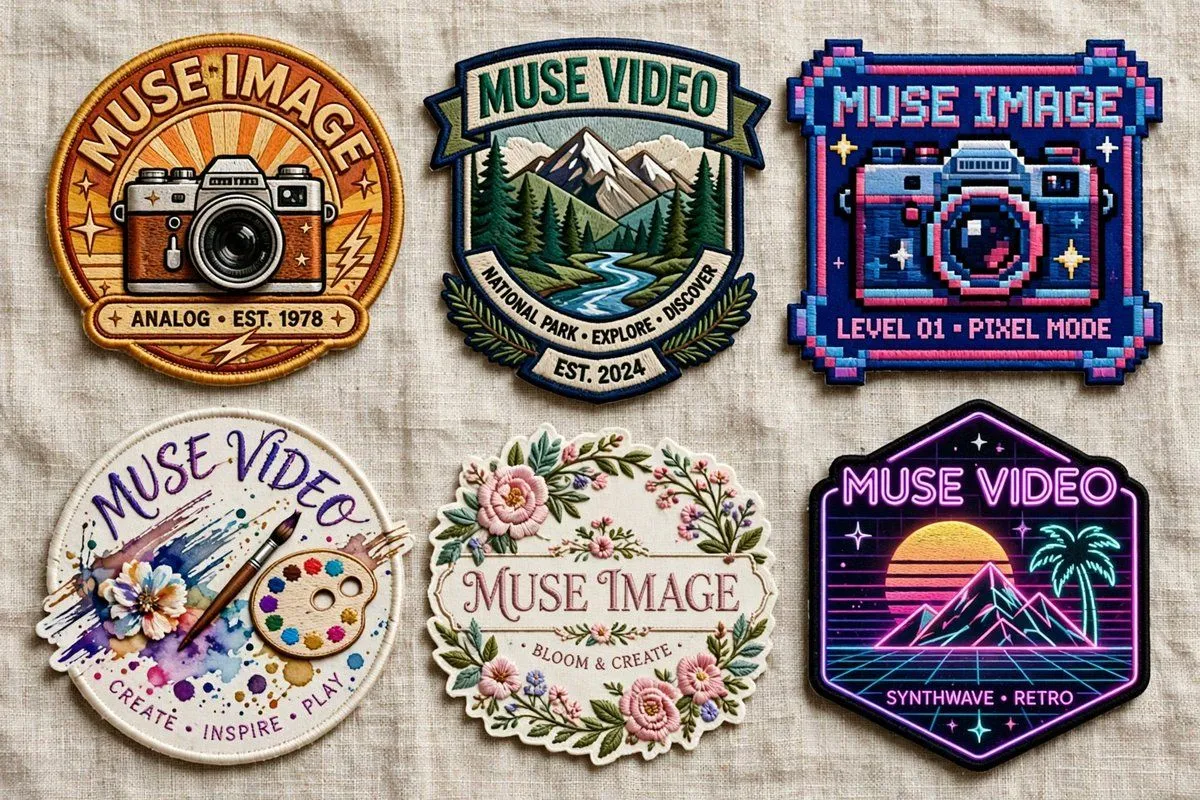
5 blanks to fillGoal: Create a realistic product-style flat lay of exactly 6 embroidered patches on a neutral wrinkled linen fabric background, showcasing different badge designs for {brand_name} and {alternate_brand_name}. The patches should look tactile and sewn, with raised thread, stitched borders, slight shadows, and varied shapes, arranged in a clean 3-column by 2-row grid. Canvas: Wide horizontal image, approximately 16:9, photographed from directly above. Use soft natural lighting, beige woven fabric texture, crisp embroidery detail, and no hands or packaging. Layout: Include exactly 6 discrete patches: 1. Top left: round vintage camera patch with warm orange sunburst background, thick golden embroidered border, retro camera illustration, large curved text “MUSE IMAGE” at the top, small text ribbon “ANALOG • EST. 1978” at the bottom, small star and lightning accents. 2. Top center: shield-shaped outdoor national park patch with mountains, pine forest, and winding river, teal and cream border, top banner text “MUSE VIDEO,” lower curved ribbon text “NATIONAL PARK • EXPLORE • DISCOVER,” and small bottom banner “EST. 2024.” 3. Top right: square pixel-art arcade patch with chunky pixel border in navy, cyan, pink, and purple, a pixelated camera in the center, top text “MUSE IMAGE,” and bottom text “LEVEL 01 • PIXEL MODE.” 4. Bottom left: circular watercolor art patch with white stitched edge, paint splashes, flower, brush, and painter palette, handwritten curved top text “MUSE VIDEO,” and bottom text “CREATE • INSPIRE • PLAY.” 5. Bottom center: ornate floral oval patch with scalloped cream border, pink flowers, green leaves, delicate garden embroidery, central serif text “MUSE IMAGE,” and small text “BLOOM & CREATE.” 6. Bottom right: black hexagonal neon synthwave patch with glowing purple border, retro sunset, wireframe grid, palm tree, mountain peaks, stars, top neon text “MUSE VIDEO,” and bottom text “SYNTHWAVE • RETRO.” Visual style: Hyper-realistic embroidered patch mockup, high-resolution thread texture, visible stitching, slightly raised edges, subtle fabric shadows, saturated but tasteful colors. Each patch should have a distinct theme: vintage analog photography, national park exploration, pixel arcade camera, creative watercolor art, floral craft, and neon retro synthwave. Text constraints: Render all visible text as clean embroidered lettering. Keep exactly 6 patches and no additional badges, labels, watermarks, or extra objects. Customize the main brand words using {primary_patch_text}, {secondary_patch_text}, and the vintage date using {vintage_year}.
Preview of your prompt
Goal: Create a realistic product-style flat lay of exactly 6 embroidered patches on a neutral wrinkled linen fabric background, showcasing different badge designs for Muse Image and Muse Video. The patches should look tactile and sewn, with raised thread, stitched borders, slight shadows, and varied shapes, arranged in a clean 3-column by 2-row grid. Canvas: Wide horizontal image, approximately 16:9, photographed from directly above. Use soft natural lighting, beige woven fabric texture, crisp embroidery detail, and no hands or packaging. Layout: Include exactly 6 discrete patches: 1. Top left: round vintage camera patch with warm orange sunburst background, thick golden embroidered border, retro camera illustration, large curved text “MUSE IMAGE” at the top, small text ribbon “ANALOG • EST. 1978” at the bottom, small star and lightning accents. 2. Top center: shield-shaped outdoor national park patch with mountains, pine forest, and winding river, teal and cream border, top banner text “MUSE VIDEO,” lower curved ribbon text “NATIONAL PARK • EXPLORE • DISCOVER,” and small bottom banner “EST. 2024.” 3. Top right: square pixel-art arcade patch with chunky pixel border in navy, cyan, pink, and purple, a pixelated camera in the center, top text “MUSE IMAGE,” and bottom text “LEVEL 01 • PIXEL MODE.” 4. Bottom left: circular watercolor art patch with white stitched edge, paint splashes, flower, brush, and painter palette, handwritten curved top text “MUSE VIDEO,” and bottom text “CREATE • INSPIRE • PLAY.” 5. Bottom center: ornate floral oval patch with scalloped cream border, pink flowers, green leaves, delicate garden embroidery, central serif text “MUSE IMAGE,” and small text “BLOOM & CREATE.” 6. Bottom right: black hexagonal neon synthwave patch with glowing purple border, retro sunset, wireframe grid, palm tree, mountain peaks, stars, top neon text “MUSE VIDEO,” and bottom text “SYNTHWAVE • RETRO.” Visual style: Hyper-realistic embroidered patch mockup, high-resolution thread texture, visible stitching, slightly raised edges, subtle fabric shadows, saturated but tasteful colors. Each patch should have a distinct theme: vintage analog photography, national park exploration, pixel arcade camera, creative watercolor art, floral craft, and neon retro synthwave. Text constraints: Render all visible text as clean embroidered lettering. Keep exactly 6 patches and no additional badges, labels, watermarks, or extra objects. Customize the main brand words using MUSE IMAGE, MUSE VIDEO, and the vintage date using 1978.
DetailsVersions, settings and questions
Written for
What's in the prompt
- Subject
- Model
- GPT Image 2
If your face changes
keep my face exactly the sameQuestions
- Does this work in the ChatGPT app?
- Yes. Paste the prompt and attach your photo if it uses one.
- It changed my face. What do I do?
- Add "keep my face exactly the same" to the end and run it again.
- Can I use the images I make?
- Check the terms of the app you use. Promptclay never generates images and claims nothing you make.