Tell us anything

An idea, a bug, something you love. We read every note.

⌘↵ to send. The page you're on comes along.

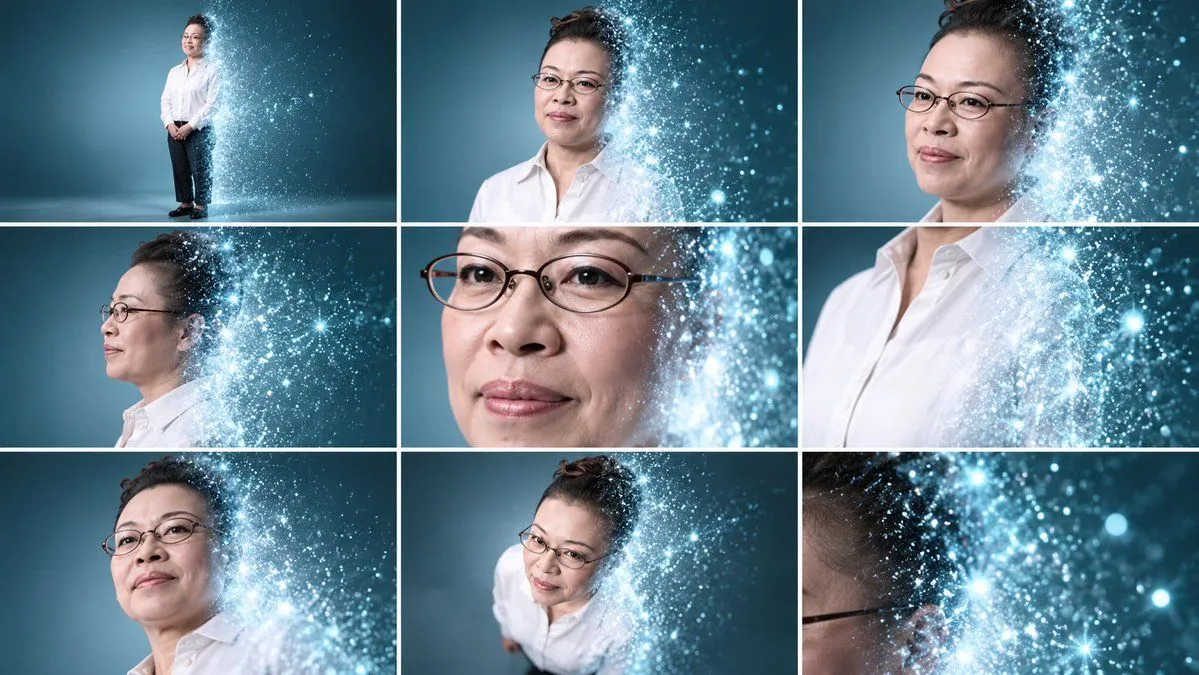
Professional Portrait Grid with Digital Particle Dissolve Effect

Made with GPT Image 2.5 in ChatGPT by Library Avatars. Promptclay never generates images.

Did it work?

No reports yet. Tell others if it worked for you.

No comments yet. Be the first.

    Professional Portrait Grid with Digital Particle Dissolve Effect

    GPT Image 2.516:9AI-generated

    Prompt

    A 3x3 grid collage of nine professional portraits featuring an Asian woman with dark hair pulled back, wearing thin oval wire-rimmed glasses and a crisp white button-down shirt. The background is a smooth, cool-toned teal-blue studio gradient. A distinctive visual effect overlays the right side of her face and body in each frame: a shimmering cascade of bright blue-white particles, sparkles, and light bokeh that resembles digital dust or a dissolving holographic projection. The panels are arranged as follows: 1. Top Left: Full-body shot, standing straight. 2. Top Center: Medium close-up, facing forward. 3. Top Right: Close-up, looking slightly to the left. 4. Middle Left: Profile view, looking left. 5. Middle Center: Extreme close-up on eyes and nose bridge. 6. Middle Right: Close-up cropped at the chin, showing the collar. 7. Bottom Left: Low-angle medium shot, looking down toward camera. 8. Bottom Center: High-angle medium shot, looking up toward camera. 9. Bottom Right: Abstract extreme close-up focusing almost entirely on the particle effect and the temple of the glasses.

    Works in
    ChatGPT, Gemini
    Status
    Free to copy
    0
    DetailsVersions, settings and questions

    Written for

    What's in the prompt

    Subject
    Model
    GPT Image 2.5

    If your face changes

    keep my face exactly the same

    Questions

    Does this work in the ChatGPT app?
    Yes. Paste the prompt and attach your photo if it uses one.
    It changed my face. What do I do?
    Add "keep my face exactly the same" to the end and run it again.
    Can I use the images I make?
    Check the terms of the app you use. Promptclay never generates images and claims nothing you make.
    Similar prompts

    See more
    • Futuristic Hologram Portrait Prompt
    • Woman in Digital Space with Cinematic CameraVideo, 0:10
    • Black and White Studio Portrait Collage (3x3 Grid)
    • Editorial Portrait Photo Grid
    • Hyper-Realistic 3x3 Grid Portrait with Fixed Identity
    • Korean Idol Photobook Collage
    • Nano Banana Pro 3x3 Photo Collage Prompt
    • Nine-Panel AI Beauty Face Collage
    • Pink Holographic Sweet Peas VideoVideo, 0:06
    • Photorealistic Portrait with Ukiyo-e and Industrial Fusion
    • Multi Hairstyle Portrait Collage
    • Deconstructed High-Fashion Collage Portrait
    • K-Pop Idol Style Grid Portrait Collage
    • Gen Z Summer Photo Dump Collage
    • 3x3 Grid Collage of Emotions in 3D Cartoon Style
    • Consistent Facial Symmetry Photo Collage for Accessories
    • High-End Digital Painting Portrait
    • Korean Photoism Photobooth Grid
    • Japanese Boys High School Admissions Poster
    • Tense Romantic Drama Collage
    • Lady Death Fighting Demons
    • Melancholic Storm Editorial Fashion
    • Monochrome Scribble Ink Sketch
    • Risograph Style Poetic Illustration

    Show more

    Run it on your phone

    1. Prompt copiedRead it

      A 3x3 grid collage of nine professional portraits featuring an Asian woman with dark hair pulled back, wearing thin oval wire-rimmed glasses and a crisp white button-down shirt. The background is a smooth, cool-toned teal-blue studio gradient. A distinctive visual effect overlays the right side of her face and body in each frame: a shimmering cascade of bright blue-white particles, sparkles, and light bokeh that resembles digital dust or a dissolving holographic projection. The panels are arranged as follows: 1. Top Left: Full-body shot, standing straight. 2. Top Center: Medium close-up, facing forward. 3. Top Right: Close-up, looking slightly to the left. 4. Middle Left: Profile view, looking left. 5. Middle Center: Extreme close-up on eyes and nose bridge. 6. Middle Right: Close-up cropped at the chin, showing the collar. 7. Bottom Left: Low-angle medium shot, looking down toward camera. 8. Bottom Center: High-angle medium shot, looking up toward camera. 9. Bottom Right: Abstract extreme close-up focusing almost entirely on the particle effect and the temple of the glasses.

    2. Open your app

    3. Paste and run

      Press and hold the message box, then tap Paste. Add your photo first if the prompt uses one. You may need to sign in.

    Professional Portrait Grid with Digital Particle Dissolve Effect