Tell us anything

An idea, a bug, something you love. We read every note.

⌘↵ to send. The page you're on comes along.

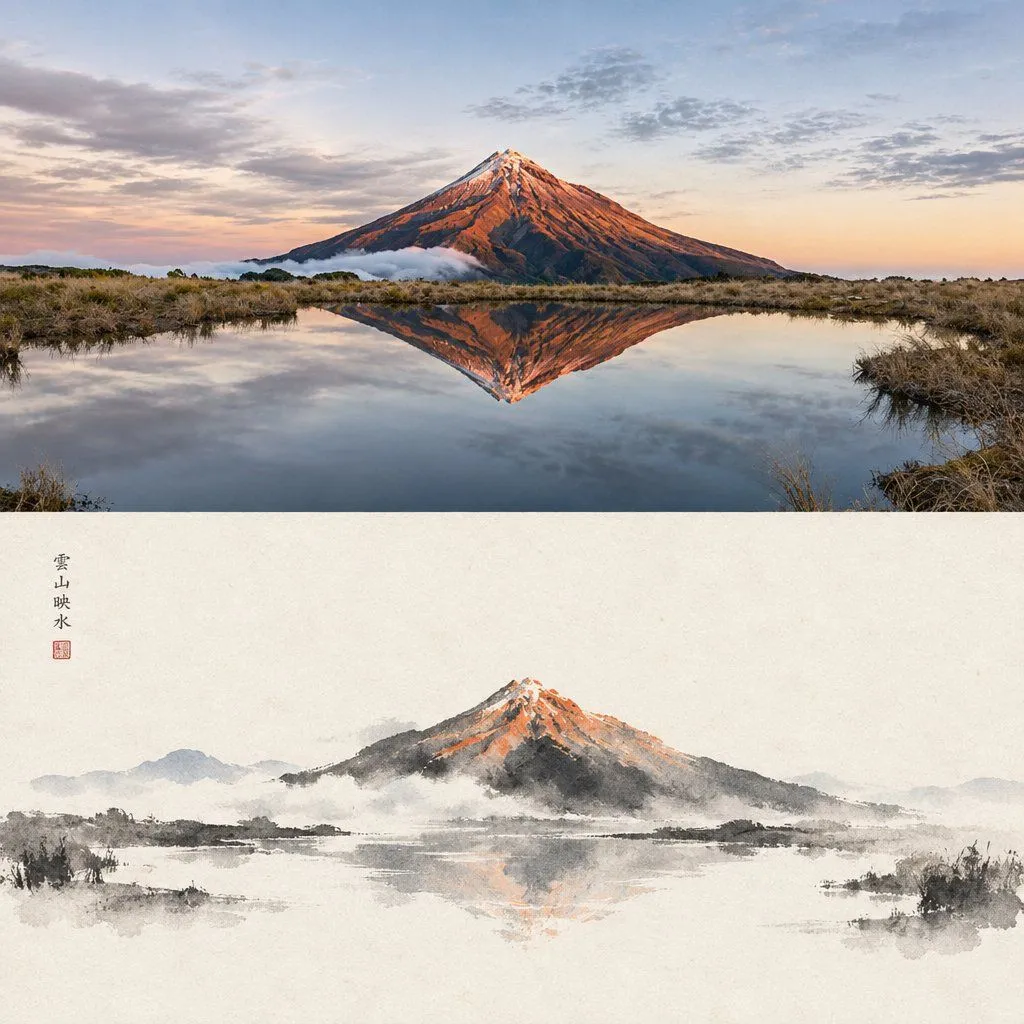
Photo and Ink Wash Diptych

Made with GPT Image 2.5 in ChatGPT by Library Lifestyle. Promptclay never generates images.

Did it work?

No reports yet. Tell others if it worked for you.

No comments yet. Be the first.

    Photo and Ink Wash Diptych

    GPT Image 2.51:1AI-generated

    Prompt

    Create a vertical diptych image composed of two distinct panels stacked on top of each other, depicting the same mountain landscape scene. Top Panel: A photorealistic landscape photograph of a majestic snow-capped volcano (resembling Mount Fuji) during sunset. The sky features soft pastel hues of pink and blue with scattered clouds. The mountain is reflected perfectly in a calm, dark lake in the foreground, surrounded by dry, golden-brown grasses along the shoreline. Bottom Panel: A traditional East Asian ink wash painting (sumi-e style) interpretation of the exact same scene above. Use black ink brushstrokes on textured white rice paper to depict the mountain and its reflection. Apply subtle watercolor washes of orange and red to the peak to mimic the sunset glow seen in the photo. Include faint grey mist effects at the base of the mountain. In the upper left corner, include vertical Chinese calligraphy characters "雲山映水" followed by a small square red seal stamp.

    Works in
    ChatGPT, Gemini
    Status
    Free to copy
    0
    DetailsVersions, settings and questions

    Written for

    What's in the prompt

    Subject
    Model
    GPT Image 2.5

    If your face changes

    keep my face exactly the same

    Questions

    Does this work in the ChatGPT app?
    Yes. Paste the prompt and attach your photo if it uses one.
    It changed my face. What do I do?
    Add "keep my face exactly the same" to the end and run it again.
    Can I use the images I make?
    Check the terms of the app you use. Promptclay never generates images and claims nothing you make.
    Similar prompts

    See more
    • Illustration based on the poem “Song of Everlasting Regret”
    • Cinematic Chinese Ink Landscape
    • Chinese poetic and crossover character prompts
    • Moonlit Chinese Seascape
    • Chinese style mountains video promptVideo, 0:10
    • Zen Lake Stillness Poster
    • Landscape Painting with Color Palette for Nano-Banana-Pro
    • Same Sea Different Light Diptych
    • Buddhist Mural Composition Diptych
    • Cinematic Scene Prompt: Bullet Train RaceVideo, 0:12
    • Ink-Wash Samurai Landscape
    • Sumi-e Samurai Poster Art
    • East Asian Samurai Graphic Poster
    • Eastern Ink Fantasy Illustration
    • Mecha Ink Wash Landscape Painting
    • Ink Wash Cherry Blossom Portrait
    • Traditional Japanese Ink Children Illustration
    • Black Brush Calligraphy Conversion
    • Double Exposure Mountain Dawn Portrait
    • Porcelain Court Painter
    • Anime Sunset Mountain Landscape
    • Misty Sunrise Heron Lake
    • Risograph Style Poetic Illustration
    • Zen-Style Oolong Tea Ecommerce Detail Page

    Show more

    Run it on your phone

    1. Prompt copiedRead it

      Create a vertical diptych image composed of two distinct panels stacked on top of each other, depicting the same mountain landscape scene. Top Panel: A photorealistic landscape photograph of a majestic snow-capped volcano (resembling Mount Fuji) during sunset. The sky features soft pastel hues of pink and blue with scattered clouds. The mountain is reflected perfectly in a calm, dark lake in the foreground, surrounded by dry, golden-brown grasses along the shoreline. Bottom Panel: A traditional East Asian ink wash painting (sumi-e style) interpretation of the exact same scene above. Use black ink brushstrokes on textured white rice paper to depict the mountain and its reflection. Apply subtle watercolor washes of orange and red to the peak to mimic the sunset glow seen in the photo. Include faint grey mist effects at the base of the mountain. In the upper left corner, include vertical Chinese calligraphy characters "雲山映水" followed by a small square red seal stamp.

    2. Open your app

    3. Paste and run

      Press and hold the message box, then tap Paste. Add your photo first if the prompt uses one. You may need to sign in.

    Photo and Ink Wash Diptych