Tell us anything

An idea, a bug, something you love. We read every note.

⌘↵ to send. The page you're on comes along.

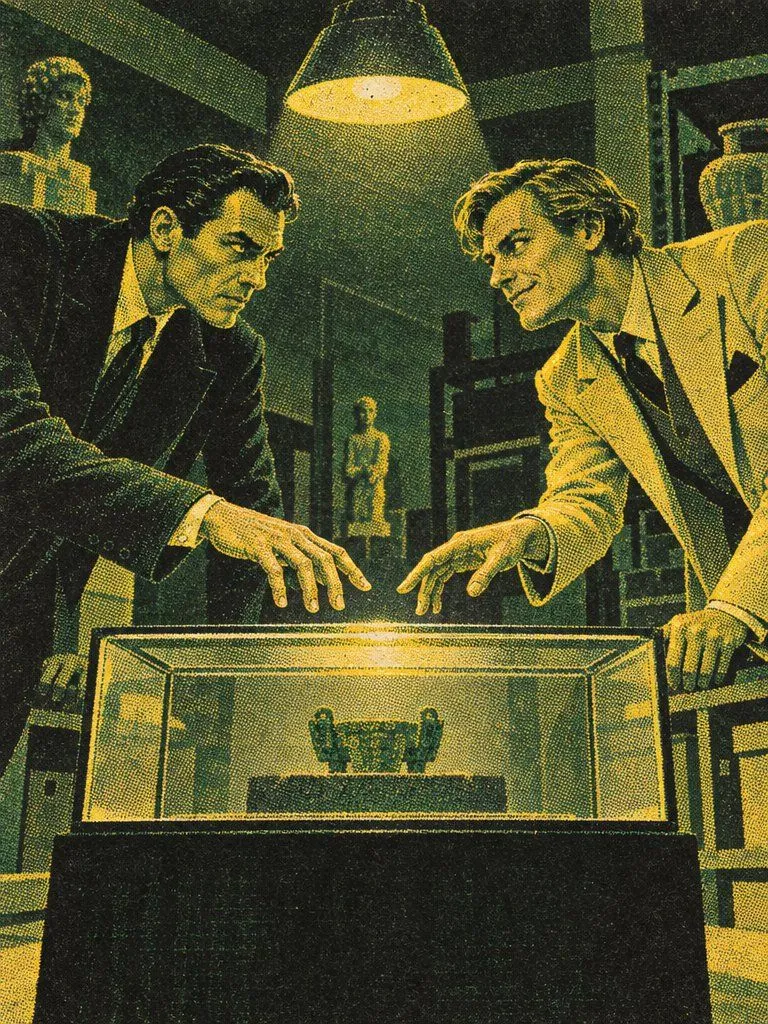
Museum Rivals Silkscreen Scene

Made with GPT Image 2.5 in ChatGPT by Library Typography. Promptclay never generates images.

Did it work?

No reports yet. Tell others if it worked for you.

No comments yet. Be the first.

    Museum Rivals Silkscreen Scene

    GPT Image 2.53:4AI-generated

    Prompt

    Using the provided reference image as a style guide, generate a new scene featuring two rival collectors in a museum archive. Keep the vintage silkscreen aesthetic, heavy halftone dot texture, and the specific color palette of deep forest green, mustard yellow, and black ink. Subject: Two men leaning over a glass display case containing a small artifact. The man on the left is dressed in a dark suit with slicked-back hair, looking intensely at the object. The man on the right wears a lighter-colored suit (rendered in yellow tones) with wavy hair, smiling confidently while reaching for the same object. Setting: A dimly lit museum storage room or gallery background. Include shelves with pottery and busts in the shadows. A single hanging lamp illuminates the central display case from above. Style Constraints: Ensure the lighting creates dramatic contrast using only the limited color palette. Maintain the grainy, printed look of the reference.

    Works in
    ChatGPT, Gemini
    Status
    Free to copy
    0
    DetailsVersions, settings and questions

    Written for

    What's in the prompt

    Subject
    Model
    GPT Image 2.5

    If your face changes

    keep my face exactly the same

    Questions

    Does this work in the ChatGPT app?
    Yes. Paste the prompt and attach your photo if it uses one.
    It changed my face. What do I do?
    Add "keep my face exactly the same" to the end and run it again.
    Can I use the images I make?
    Check the terms of the app you use. Promptclay never generates images and claims nothing you make.
    Similar prompts

    See more
    • Vintage Halftone Poster Illustration
    • Museum Robot Art Duel
    • Vintage Mascot Explorer Dossier Poster
    • Vintage Noir Ink Illustration
    • Building Pyramids in Excel Poster
    • Vintage Monochrome Illustration Prompt
    • Retro Interior Editorial Poster
    • Retro CRT TV Display Portrait Collage
    • Museum Poster Design Template
    • Asimov Visionary Split-Scene Concept Art Prompt
    • Vintage Travel-Journal Scrapbook Page
    • Retro Glitch Fashion Poster
    • Vintage Brass Hanging Lantern
    • Split-Screen Cinematic Shot for Time Travel Comparison
    • Split Pixel Art Canvas
    • Abstract Expressionist Boxing Match
    • Detailed anime battle scene prompt for Seedance 2.0Video, 0:15
    • Chibi Staring Contest Manga Page
    • Martial Arts Tournament Scene with Image InputsVideo, 0:10
    • Anime Lunar Eclipse Swordswoman Poster
    • Blurry Retro Pixel Parrot Jungle
    • Crimson Accent Gothic Bridal Gown
    • Darwin Tree of Life Podcast Cover
    • Female Android vs Robotic Scorpion

    Show more

    Run it on your phone

    1. Prompt copiedRead it

      Using the provided reference image as a style guide, generate a new scene featuring two rival collectors in a museum archive. Keep the vintage silkscreen aesthetic, heavy halftone dot texture, and the specific color palette of deep forest green, mustard yellow, and black ink. Subject: Two men leaning over a glass display case containing a small artifact. The man on the left is dressed in a dark suit with slicked-back hair, looking intensely at the object. The man on the right wears a lighter-colored suit (rendered in yellow tones) with wavy hair, smiling confidently while reaching for the same object. Setting: A dimly lit museum storage room or gallery background. Include shelves with pottery and busts in the shadows. A single hanging lamp illuminates the central display case from above. Style Constraints: Ensure the lighting creates dramatic contrast using only the limited color palette. Maintain the grainy, printed look of the reference.

    2. Open your app

    3. Paste and run

      Press and hold the message box, then tap Paste. Add your photo first if the prompt uses one. You may need to sign in.

    Museum Rivals Silkscreen Scene