Tell us anything

An idea, a bug, something you love. We read every note.

⌘↵ to send. The page you're on comes along.

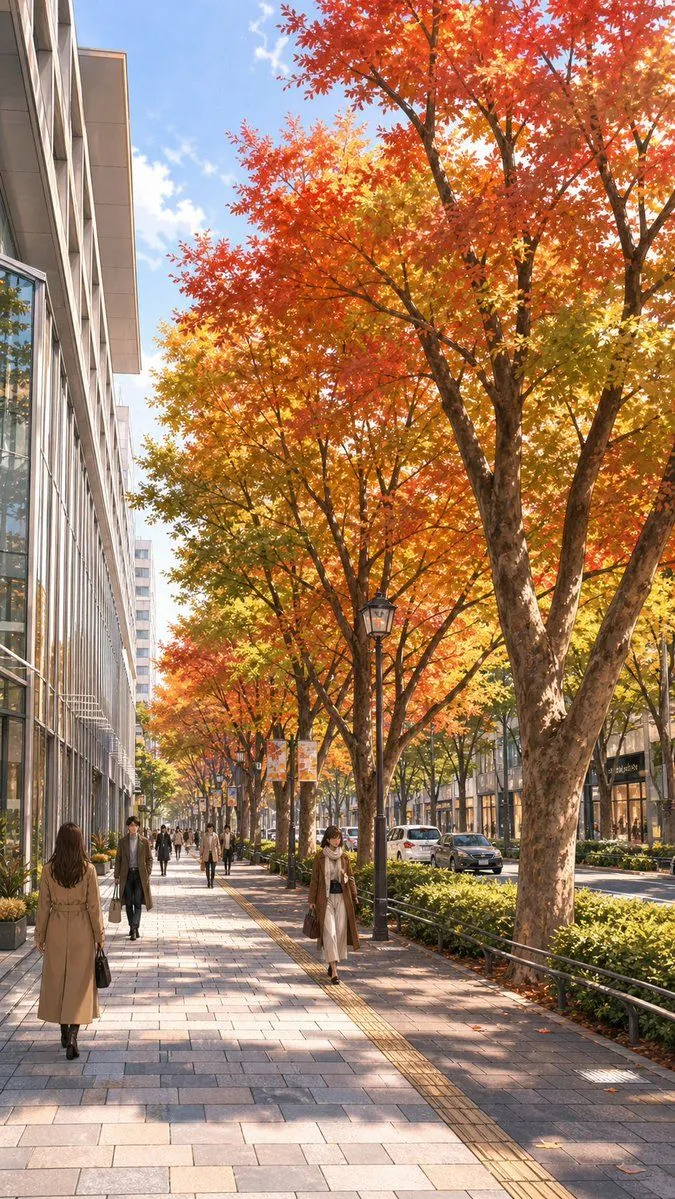
Google Maps Street to Autumn Illustration

Made with GPT Image 2 in ChatGPT by Library Lifestyle. Promptclay never generates images.

Did it work?

No reports yet. Tell others if it worked for you.

No comments yet. Be the first.

    Google Maps Street to Autumn Illustration

    GPT Image 29:16AI-generated

    Prompt

    Using the provided reference image of the city sidewalk, transform the scene into a polished illustration-style urban streetscape in peak autumn. Keep the same viewpoint, street layout, tree placement, sidewalk perspective, road on the right, and building massing on the left, but replace the green summer foliage with vivid fall leaves in red, orange, and golden yellow. Change the overcast look to a bright, clear daytime sky with warm sunlight and soft directional shadows. Clean up the Google Maps screenshot artifacts and regenerate the whole scene as a refined, realistic anime-style background illustration. Preserve the feeling of a busy shopping street, but redraw the pedestrians as stylish modern city walkers and make the storefronts and cars look more elegant and coherent.

    Works in
    ChatGPT, Gemini
    Status
    Free to copy
    0
    DetailsVersions, settings and questions

    Written for

    What's in the prompt

    Subject
    Model
    GPT Image 2

    If your face changes

    keep my face exactly the same

    Questions

    Does this work in the ChatGPT app?
    Yes. Paste the prompt and attach your photo if it uses one.
    It changed my face. What do I do?
    Add "keep my face exactly the same" to the end and run it again.
    Can I use the images I make?
    Check the terms of the app you use. Promptclay never generates images and claims nothing you make.
    Similar prompts

    See more
    • Extreme low-angle shot
    • Anime Fashion Girls in City Street
    • Monochrome Elegant Autumn Outfit
    • Nano Banana Pro Prompt for 'Scramble Spring' Fan Art
    • Custom Character-Wrapped Streetcar Illustration
    • Pop Anime Street Sketch Transformation
    • Weathered Japanese Crossing Signs
    • Sunlit Riverside City Fantasy
    • Moonlit Rainy City Overpass
    • 4K Anime Illustration of Girl in Rain
    • Anime Chibi Character Transformation
    • Autumn Leaves with Handwritten Japanese Text
    • Hand-drawn Photo Annotation
    • Faceless Anime Neon City Night
    • Four Seasons Japanese Panorama
    • Japanese Anime Poster Transformation
    • Multi-Tool Workflow for Animation Production
    • Girl Beneath Giant Sky Ring
    • Aerial View of Modern Transit Hub
    • Google Maps to Illustration Transformation
    • Tokyo Tilt-Shift Miniature Diorama
    • Ultra-Photorealistic Luxury Pop-Up Store Prompt
    • Tokyo Time-Blend Split-Screen
    • Realistic Aerial Bamboo Grove Landscape

    Show more

    Run it on your phone

    1. Prompt copiedRead it

      Using the provided reference image of the city sidewalk, transform the scene into a polished illustration-style urban streetscape in peak autumn. Keep the same viewpoint, street layout, tree placement, sidewalk perspective, road on the right, and building massing on the left, but replace the green summer foliage with vivid fall leaves in red, orange, and golden yellow. Change the overcast look to a bright, clear daytime sky with warm sunlight and soft directional shadows. Clean up the Google Maps screenshot artifacts and regenerate the whole scene as a refined, realistic anime-style background illustration. Preserve the feeling of a busy shopping street, but redraw the pedestrians as stylish modern city walkers and make the storefronts and cars look more elegant and coherent.

    2. Open your app

    3. Paste and run

      Press and hold the message box, then tap Paste. Add your photo first if the prompt uses one. You may need to sign in.

    Google Maps Street to Autumn Illustration