Tell us anything

An idea, a bug, something you love. We read every note.

⌘↵ to send. The page you're on comes along.

Cinematic Studio Lighting Showcase

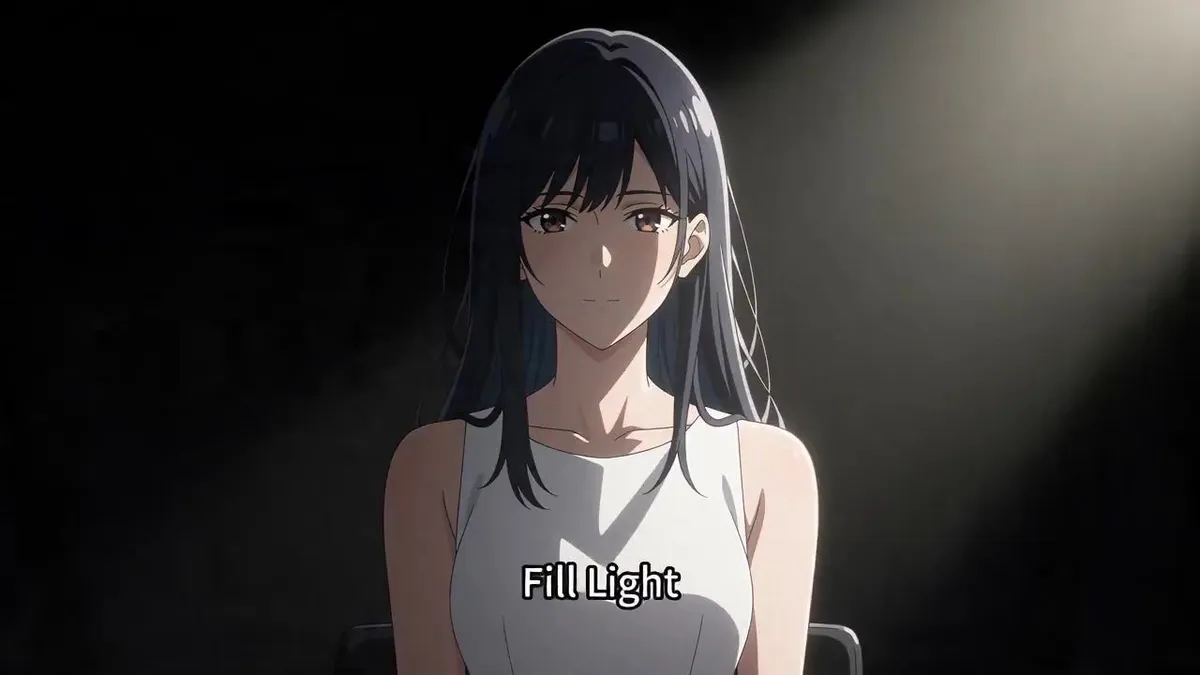
Made with Seedance 2.5 in Kling by Library Cinema. Promptclay never generates images.

Did it work?

No reports yet. Tell others if it worked for you.

No comments yet. Be the first.

    Cinematic Studio Lighting Showcase

    Seedance 2.516:9AI-generated

    Prompt

    This is a technical showcase of 15 lighting techniques. A cute girl sits in a studio with a black background facing the camera. She remains still while different lighting styles cycle through in rapid cuts. Stationary camera. One continuous shot. [1s] Key Light from left. The text "Key Light" appears at the bottom center of the frame. [1s] Fill Light is added from right. The text "Fill Light" appears at the bottom center of the frame. [1s] Both lights shuts off and back light turn on. The text "Back Light" appears at the bottom center of the frame. [1s] Key light and fill light both turn on again while the backlight remains on. The text "Three Point Light" appears at the bottom center of the frame. [1s] Change to High Key Light from the front. The text "High Key Light" appears at the bottom center of the frame. [1s] Dim to Low key lighting from the front. The text "Low Key Light" appears at the bottom center of the frame. [1s] Change to Rembrandt lighting from the right. The text "Rembrandt Lighting" appears at the bottom center of the frame. [1s] Chagne to Butterfly lighting. The text "Butterfly Lighting" appears at the bottom center of the frame. [1s] Chagne to Silhouette with strong light from behind. The text "Silhouette" appears at the bottom center of the frame. [1s] Change to Chiaroscuro Lighting. Extremely high contrast between light and dark areas. The text "Chiaroscuro" appears at the bottom center of the frame. [1s] Change to Left side lighting. The text "Side Lighting" appears at the bottom center of the frame. [1s] Change to rim lighting. The text "Rim Lighting" appears at the bottom center of the frame. [1s] Change to top lighting. The text "Top Lighting" appears at the bottom center of the frame. [1s] Change to bottom lighting. The text "Bottom Lighting" appears at the bottom center of the frame. [1s] All lights turn off, the backdrop falls to reveal a window with bright sunlight shining in from the outside. Camera tracks the girl turning to look outside and smile. The text "Natural Light" appears at the bottom center of the frame. Must show all lighting techniques precisely as noted. The character is a professional model.

    Works in
    Kling
    Status
    Free to copy
    0
    DetailsVersions, settings and questions

    Written for

    What's in the prompt

    Subject
    Model
    Seedance 2.5

    If your face changes

    keep my face exactly the same

    Questions

    Does this work in the Kling app?
    Yes. Paste the prompt and attach your photo if it uses one.
    It changed my face. What do I do?
    Add "keep my face exactly the same" to the end and run it again.
    Can I use the images I make?
    Check the terms of the app you use. Promptclay never generates images and claims nothing you make.
    Similar prompts

    See more
    • Anime Studio Photoshoot Transformation
    • Fashion Show Model Prompt
    • Rainy Studio Artist with Black Cats
    • Character Workspace Generator
    • Pastel Anime Nail Artist at Desk
    • Anime Girl in Cross-Leg Fashion Pose
    • Stylish Anime Fashion Portrait
    • Anime Chalkboard Character Formula
    • Vlogger Thumbnail Image Generation Prompt
    • Line Art Correction Prompt for Nano Banana Pro
    • Character Prompt with Drinking Action for Anifusion/Nano Banana
    • Three-Scene Anime Teacher Portrait
    • Manga to Anime Style Transformation
    • Silver-Haired Anime Fashion Girl
    • Image Overlay Text Removal Test
    • Image Refinement and Denoisng Prompt
    • Anime Sci-Fi SoC Factory Inspection
    • Anime Streetwear Character Concept
    • Anime Sportswear Girl Illustration
    • Nano Banana 2 prompt for creating packaged figures
    • Anime cyberpunk woman videoVideo, 0:10
    • Seedance 2.0 generation based on a short promptVideo, 0:15
    • Chaotic Maximalist Anime Poster Prompt (100 Girls)
    • Cinematic Storyboard Generation Prompt

    Show more

    Run it on your phone

    1. Prompt copiedRead it

      This is a technical showcase of 15 lighting techniques. A cute girl sits in a studio with a black background facing the camera. She remains still while different lighting styles cycle through in rapid cuts. Stationary camera. One continuous shot. [1s] Key Light from left. The text "Key Light" appears at the bottom center of the frame. [1s] Fill Light is added from right. The text "Fill Light" appears at the bottom center of the frame. [1s] Both lights shuts off and back light turn on. The text "Back Light" appears at the bottom center of the frame. [1s] Key light and fill light both turn on again while the backlight remains on. The text "Three Point Light" appears at the bottom center of the frame. [1s] Change to High Key Light from the front. The text "High Key Light" appears at the bottom center of the frame. [1s] Dim to Low key lighting from the front. The text "Low Key Light" appears at the bottom center of the frame. [1s] Change to Rembrandt lighting from the right. The text "Rembrandt Lighting" appears at the bottom center of the frame. [1s] Chagne to Butterfly lighting. The text "Butterfly Lighting" appears at the bottom center of the frame. [1s] Chagne to Silhouette with strong light from behind. The text "Silhouette" appears at the bottom center of the frame. [1s] Change to Chiaroscuro Lighting. Extremely high contrast between light and dark areas. The text "Chiaroscuro" appears at the bottom center of the frame. [1s] Change to Left side lighting. The text "Side Lighting" appears at the bottom center of the frame. [1s] Change to rim lighting. The text "Rim Lighting" appears at the bottom center of the frame. [1s] Change to top lighting. The text "Top Lighting" appears at the bottom center of the frame. [1s] Change to bottom lighting. The text "Bottom Lighting" appears at the bottom center of the frame. [1s] All lights turn off, the backdrop falls to reveal a window with bright sunlight shining in from the outside. Camera tracks the girl turning to look outside and smile. The text "Natural Light" appears at the bottom center of the frame. Must show all lighting techniques precisely as noted. The character is a professional model.

    2. Open your app

    3. Paste and run

      Press and hold the message box, then tap Paste. Add your photo first if the prompt uses one. You may need to sign in.