Tell us anything

An idea, a bug, something you love. We read every note.

⌘↵ to send. The page you're on comes along.

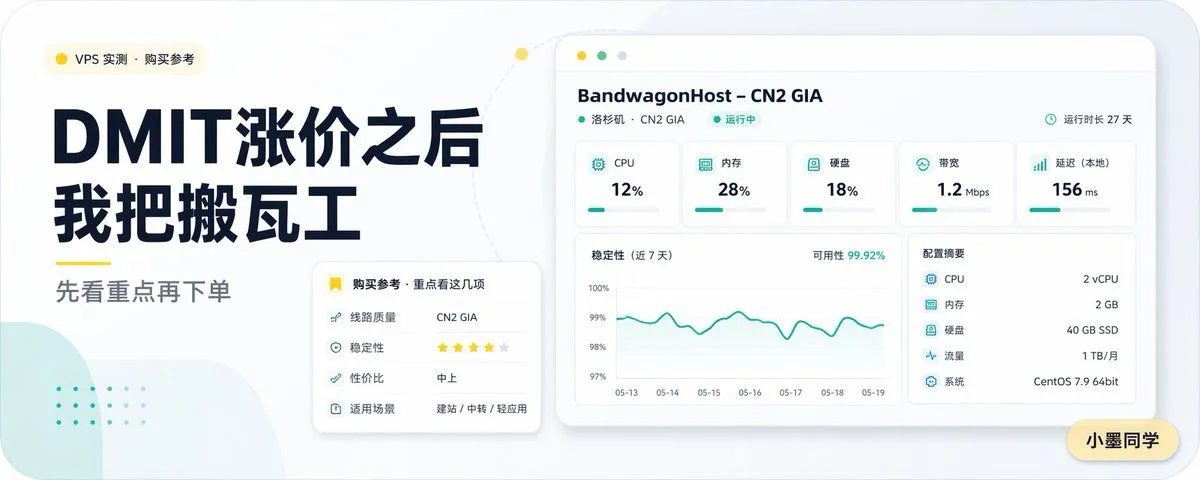
Chinese VPS Comparison Cover

Made with GPT Image 2 in ChatGPT by Library Lifestyle. Promptclay never generates images.

Did it work?

No reports yet. Tell others if it worked for you.

No comments yet. Be the first.

    Chinese VPS Comparison Cover

    GPT Image 25:2AI-generated

    Prompt

    Create a clean modern Chinese tech blog cover in a wide 16:9 layout with a soft light-gray background, rounded-corner canvas, and minimalist dashboard aesthetic. On the left, place a small rounded category pill near the top with a yellow dot icon and the text “VPS 实测 · 购买参考”. Below it, set a very large bold dark navy Chinese headline in two stacked lines: “DMIT涨价之后” and “我把搬瓦工”. Under the headline, add a short yellow underline accent and then a medium-gray subheading reading “先看重点再下单”. The typography should feel premium, editorial, and highly legible, with strong contrast and generous spacing. On the right, show a floating desktop-app style server monitoring panel with a white card body, subtle shadow, rounded corners, and a pale beige browser top bar with three small circular window buttons. The panel header should read “BandwagonHost – CN2 GIA”, with a smaller line underneath “洛杉矶 · CN2 GIA” and a green status label “运行中”, plus on the top-right a small clock icon and the text “运行时长 27 天”. Inside the panel, include exactly 5 metric cards across the top row labeled “CPU” showing “12%”, “内存” showing “28%”, “硬盘” showing “18%”, “带宽” showing “1.2 Mbps”, and “延迟(本地)” showing “156 ms”, each with a small teal icon and a thin teal progress bar. Below, place a large line chart card on the left titled “稳定性(近 7 天)” with a top-right annotation “可用性 99.92%”, a teal fluctuating line, a vertical scale from 97% to 100%, and date labels from “05-13” through “05-19”. To the right of the chart, add a specs card titled “配置摘要” listing exactly 5 rows: “CPU 2 vCPU”, “内存 2 GB”, “硬盘 40 GB SSD”, “流量 1 TB/月”, and “系统 CentOS 7.9 64bit”. In the lower-left area overlapping between the text block and the dashboard, add a smaller white recommendation card with rounded corners and shadow. Its title line should include a yellow bookmark icon and read “购买参考 · 重点看这几项”. Inside, list exactly 4 rows: “线路质量 CN2 GIA”, “稳定性 ★★★★☆”, “性价比 中上”, and “适用场景 建站 / 中转 / 轻应用”. Add soft decorative elements in the background: a pale mint abstract rounded shape in the bottom-left corner, a faint dotted mint pattern above it, and a light dotted curved connector line arcing from the left text area toward the top of the dashboard, with a small yellow dot on the curve. Place a small rounded yellow name tag in the bottom-right corner of the canvas with the text “小墨同学”. Use a restrained palette of dark navy, teal, yellow, white, and light gray, with crisp vector-style rendering, subtle shadows, spacious composition, and a polished AI-generated editorial cover look for a VPS comparison article.

    Works in
    ChatGPT, Gemini
    Status
    Free to copy
    0
    DetailsVersions, settings and questions

    Written for

    What's in the prompt

    Subject
    Model
    GPT Image 2

    If your face changes

    keep my face exactly the same

    Questions

    Does this work in the ChatGPT app?
    Yes. Paste the prompt and attach your photo if it uses one.
    It changed my face. What do I do?
    Add "keep my face exactly the same" to the end and run it again.
    Can I use the images I make?
    Check the terms of the app you use. Promptclay never generates images and claims nothing you make.

    Similar prompts

    See more
    • Glossy Codex vs Hermes Tech Thumbnail
    • NOVALITH SaaS Landing Page Hero
    • Anime Story Generation Prompt Template
    • Selective Material Image Editing
    • Minimal AI Lock-In Comparison Slide
    • 1980s classy magazine ad with Rolex and Riesling
    • Minimalist Educational Infographic Template
    • System Prompt for Nano Banana Pro Image Prompt Deconstruction
    • Tech Magazine Spatial Computing Cover
    • Designer-Grade Brand Moodboard Generation Prompt
    • Chinese Wellness Recovery App UI
    • AI Comic Production Workflow and Infographic Prompt
    • Minimalist Brand Quote Poster
    • Local Web App Annotation Demo
    • Creative Typography Poster Prompt for Nano Banana Pro
    • High-Quality Flat Design Slide Generation Prompt
    • Professional Workbench Cover Banner
    • Prompt
    • Geometric Milestone Celebration Poster
    • Japanese Branding Strategy Infographic
    • Tech Tutorial Thumbnail with UI Mockup
    • ChatGPT Game Asset Generation Screenshot
    • Cyberpunk Flash Sale Landing Hero
    • Mechanical Keyboard Product Page Mockup

    Show more

    Run it on your phone

    1. Prompt copiedRead it

      Create a clean modern Chinese tech blog cover in a wide 16:9 layout with a soft light-gray background, rounded-corner canvas, and minimalist dashboard aesthetic. On the left, place a small rounded category pill near the top with a yellow dot icon and the text “VPS 实测 · 购买参考”. Below it, set a very large bold dark navy Chinese headline in two stacked lines: “DMIT涨价之后” and “我把搬瓦工”. Under the headline, add a short yellow underline accent and then a medium-gray subheading reading “先看重点再下单”. The typography should feel premium, editorial, and highly legible, with strong contrast and generous spacing. On the right, show a floating desktop-app style server monitoring panel with a white card body, subtle shadow, rounded corners, and a pale beige browser top bar with three small circular window buttons. The panel header should read “BandwagonHost – CN2 GIA”, with a smaller line underneath “洛杉矶 · CN2 GIA” and a green status label “运行中”, plus on the top-right a small clock icon and the text “运行时长 27 天”. Inside the panel, include exactly 5 metric cards across the top row labeled “CPU” showing “12%”, “内存” showing “28%”, “硬盘” showing “18%”, “带宽” showing “1.2 Mbps”, and “延迟(本地)” showing “156 ms”, each with a small teal icon and a thin teal progress bar. Below, place a large line chart card on the left titled “稳定性(近 7 天)” with a top-right annotation “可用性 99.92%”, a teal fluctuating line, a vertical scale from 97% to 100%, and date labels from “05-13” through “05-19”. To the right of the chart, add a specs card titled “配置摘要” listing exactly 5 rows: “CPU 2 vCPU”, “内存 2 GB”, “硬盘 40 GB SSD”, “流量 1 TB/月”, and “系统 CentOS 7.9 64bit”. In the lower-left area overlapping between the text block and the dashboard, add a smaller white recommendation card with rounded corners and shadow. Its title line should include a yellow bookmark icon and read “购买参考 · 重点看这几项”. Inside, list exactly 4 rows: “线路质量 CN2 GIA”, “稳定性 ★★★★☆”, “性价比 中上”, and “适用场景 建站 / 中转 / 轻应用”. Add soft decorative elements in the background: a pale mint abstract rounded shape in the bottom-left corner, a faint dotted mint pattern above it, and a light dotted curved connector line arcing from the left text area toward the top of the dashboard, with a small yellow dot on the curve. Place a small rounded yellow name tag in the bottom-right corner of the canvas with the text “小墨同学”. Use a restrained palette of dark navy, teal, yellow, white, and light gray, with crisp vector-style rendering, subtle shadows, spacious composition, and a polished AI-generated editorial cover look for a VPS comparison article.

    2. Open your app

      This prompt is long, so it is copied instead of sent in the link. Paste it in the app.

    3. Paste and run

      Press and hold the message box, then tap Paste. Add your photo first if the prompt uses one. You may need to sign in.

    Chinese VPS Comparison Cover