Tell us anything

An idea, a bug, something you love. We read every note.

⌘↵ to send. The page you're on comes along.

Baby Dragon Hatching Storyboard

Made with GPT Image 2.5 in ChatGPT by Library Anime. Promptclay never generates images.

Did it work?

No reports yet. Tell others if it worked for you.

No comments yet. Be the first.

    Baby Dragon Hatching Storyboard

    GPT Image 2.51:1AI-generated

    Prompt

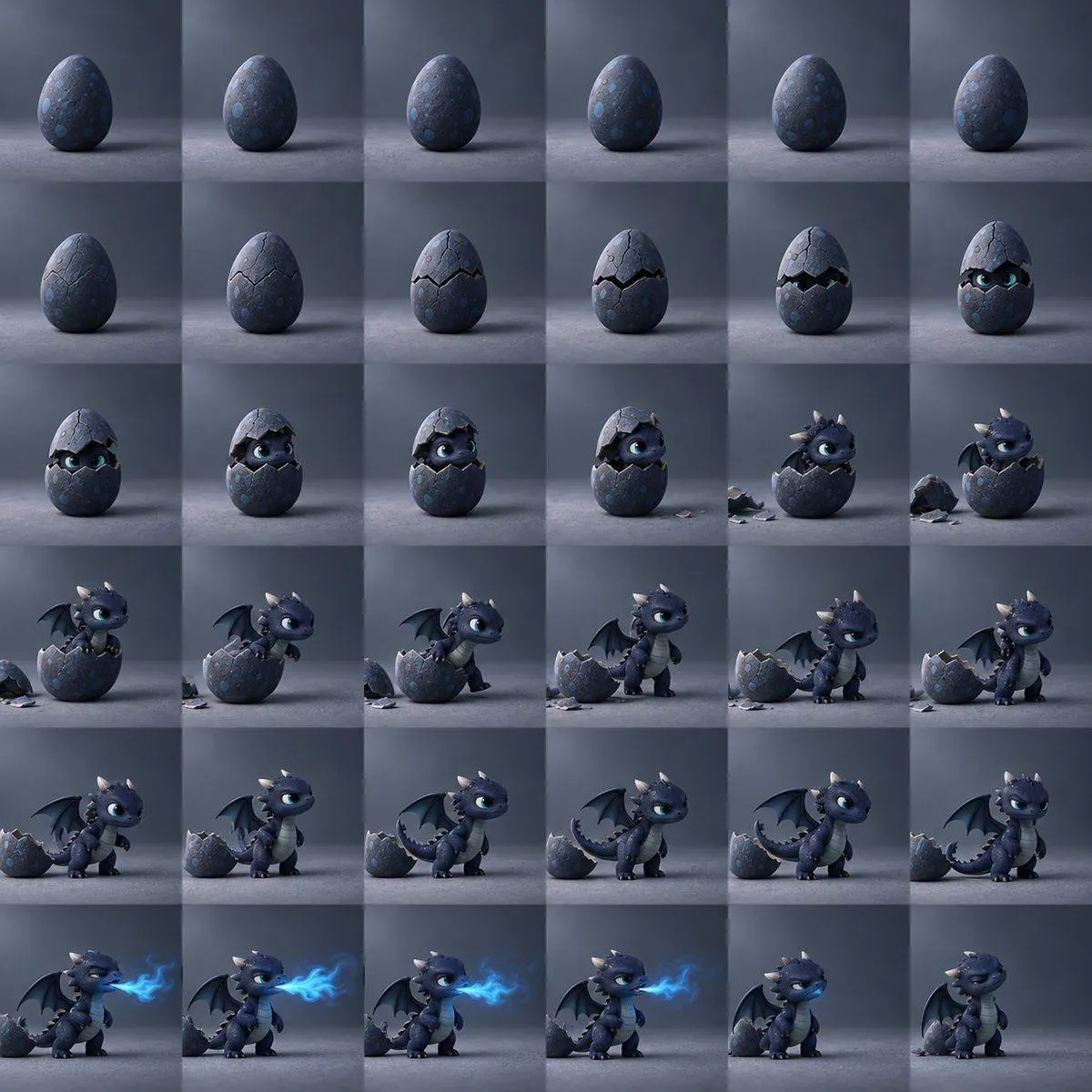
    Goal: Create a cinematic 6 by 6 storyboard contact sheet showing exactly 36 square frames of a baby dragon hatching from an egg, progressing left to right and top to bottom like a time-lapse animation sequence. Canvas: Square image, arranged as an even grid of 36 equal square panels with thin seamless boundaries, no captions or text. Each panel uses the same moody studio setup: dark blue-gray background, cool directional light from the upper left, soft floor shadows, subtle misty atmosphere, shallow depth of field, high-quality 3D animated fantasy style. Subject details: The egg is dark slate-blue with rough stone-like texture, faint circular blue spots, and a slightly glossy surface. The baby dragon is cute and stylized, with dark navy-blue scales, large expressive cyan-blue eyes, small cream-colored horns and spikes, tiny bat wings, a pale gray-blue segmented belly, little claws, and a curled tail. The dragon should look mischievous and adorable, like a polished family-friendly fantasy animation character. Storyboard progression: Include exactly 36 discrete panels. Panels 1 to 6 show the intact spotted dragon egg standing alone. Panels 7 to 12 show cracks forming and widening around the upper third of the egg, with dark gaps and glimpses of glowing cyan eyes. Panels 13 to 18 show the baby dragon peeking out, lifting the shell cap, then pushing through as broken shell pieces fall around the egg. Panels 19 to 24 show the dragon climbing out of the egg, sitting on the broken shell, then stepping onto the floor beside it. Panels 25 to 30 show the dragon fully outside, standing next to the cracked shell, stretching its wings, gaining confidence, and posing with its tail curled near the shell. Panels 31 to 36 show the dragon breathing a small bright blue flame plume in several frames, then relaxing with a satisfied expression in the final panel. Visual style: Ultra-detailed 3D render, Pixar-like character appeal but darker fantasy lighting, soft volumetric blue light, realistic shell fragments, smooth animation continuity between frames, consistent character proportions, consistent camera angle at low eye level, centered composition in every panel. Constraints: Use exactly 36 panels in a 6 by 6 grid; no text, no labels, no watermark, no extra characters, no hands, no humans, no duplicate random poses that break the sequence. Keep the background and lighting consistent across every frame.

    Works in
    ChatGPT, Gemini
    Status
    Free to copy
    0
    DetailsVersions, settings and questions

    Written for

    What's in the prompt

    Subject
    Model
    GPT Image 2.5

    If your face changes

    keep my face exactly the same

    Questions

    Does this work in the ChatGPT app?
    Yes. Paste the prompt and attach your photo if it uses one.
    It changed my face. What do I do?
    Add "keep my face exactly the same" to the end and run it again.
    Can I use the images I make?
    Check the terms of the app you use. Promptclay never generates images and claims nothing you make.
    Similar prompts

    See more
    • Claymation Stop Motion Sequence
    • Tiny Dragon Rainbow Flame Storyboard
    • Glass Horse Figurine Transformation Cinematic (Video Prompt)
    • Cyber Idol VTuber Teaser Storyboard
    • Grid of four camera angles from reference image
    • Storyboard from childhood photo
    • Cinematic Storyboard Contact Sheet
    • 3D Cartoon Character Emotion Grid
    • Chibi Penguin Expression Grid
    • 3D Pixar-Style Character Emotion Grid Prompt
    • Disney-Pixar Style Hybrid Sloth-Dragon Creature
    • Magical Sketchbook Art Coming to Life
    • FACS Facial Expression 3x3 Grid
    • Baby Dragon Fantasy InteractionVideo, 0:30
    • Nano Banana 2 Eastern Dragon Prompt
    • Shogi Piece Transforming into a Dragon in SpaceVideo, 0:06
    • 3D Animated Scene of Chicks and a Monster on Lily Pads
    • 3D Pixar-Style Character Grid
    • Technical Prompt for 3x2 Robot Character Matrix
    • Glowing Totoro Robot Figure Diorama
    • Rainy Dragon Comparison Sheet
    • Chunky Cinematic Pop Culture Character
    • Basic Product Shot Prompt for Moving Parts
    • Filmmaking Eras Typographic Grid

    Show more

    Run it on your phone

    1. Prompt copiedRead it

      Goal: Create a cinematic 6 by 6 storyboard contact sheet showing exactly 36 square frames of a baby dragon hatching from an egg, progressing left to right and top to bottom like a time-lapse animation sequence. Canvas: Square image, arranged as an even grid of 36 equal square panels with thin seamless boundaries, no captions or text. Each panel uses the same moody studio setup: dark blue-gray background, cool directional light from the upper left, soft floor shadows, subtle misty atmosphere, shallow depth of field, high-quality 3D animated fantasy style. Subject details: The egg is dark slate-blue with rough stone-like texture, faint circular blue spots, and a slightly glossy surface. The baby dragon is cute and stylized, with dark navy-blue scales, large expressive cyan-blue eyes, small cream-colored horns and spikes, tiny bat wings, a pale gray-blue segmented belly, little claws, and a curled tail. The dragon should look mischievous and adorable, like a polished family-friendly fantasy animation character. Storyboard progression: Include exactly 36 discrete panels. Panels 1 to 6 show the intact spotted dragon egg standing alone. Panels 7 to 12 show cracks forming and widening around the upper third of the egg, with dark gaps and glimpses of glowing cyan eyes. Panels 13 to 18 show the baby dragon peeking out, lifting the shell cap, then pushing through as broken shell pieces fall around the egg. Panels 19 to 24 show the dragon climbing out of the egg, sitting on the broken shell, then stepping onto the floor beside it. Panels 25 to 30 show the dragon fully outside, standing next to the cracked shell, stretching its wings, gaining confidence, and posing with its tail curled near the shell. Panels 31 to 36 show the dragon breathing a small bright blue flame plume in several frames, then relaxing with a satisfied expression in the final panel. Visual style: Ultra-detailed 3D render, Pixar-like character appeal but darker fantasy lighting, soft volumetric blue light, realistic shell fragments, smooth animation continuity between frames, consistent character proportions, consistent camera angle at low eye level, centered composition in every panel. Constraints: Use exactly 36 panels in a 6 by 6 grid; no text, no labels, no watermark, no extra characters, no hands, no humans, no duplicate random poses that break the sequence. Keep the background and lighting consistent across every frame.

    2. Open your app

      This prompt is long, so it is copied instead of sent in the link. Paste it in the app.

    3. Paste and run

      Press and hold the message box, then tap Paste. Add your photo first if the prompt uses one. You may need to sign in.

    Baby Dragon Hatching Storyboard