Made with GPT Image 2 in ChatGPT by Library Lifestyle. Promptclay never generates images.
Did it work?
No reports yet. Tell others if it worked for you.
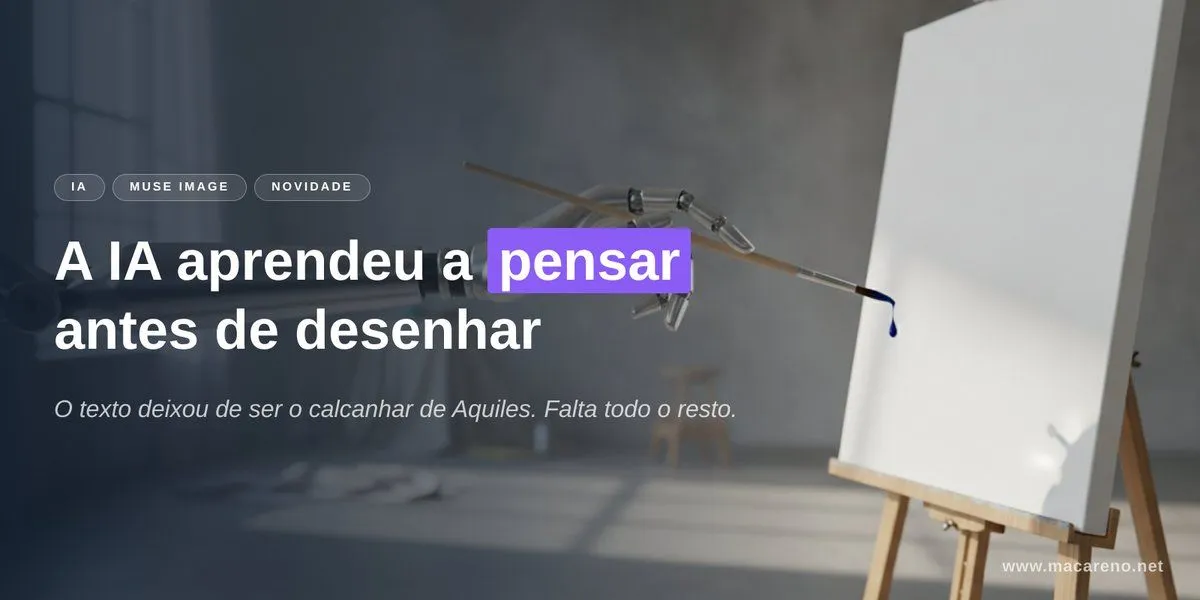
AI Thinking Before Drawing Banner
Prompt
5 blanks to fillGoal: Create a cinematic horizontal website/social banner about AI image generation and accurate text rendering, with a moody studio atmosphere and clear Portuguese typography. Canvas: Wide 2:1 banner, approximately 1200×600 px. Dark, soft-focus photographic background with strong depth of field. Leave the left half for text and the right half for the visual metaphor. Background and subject: A dim artist studio with cool gray-blue lighting, a blurred window on the far left, concrete wall, soft shadows on the floor, and an easel on the right holding a blank white canvas. In the upper center-right, show a delicate mechanical drawing arm or robotic brush holder reaching toward the canvas, holding a thin brush that has a single dark blue paint droplet at its tip. The canvas should be bright white and mostly empty, slightly angled, with a subtle shadow. Use realistic lighting, shallow depth of field, and a premium editorial tech aesthetic. Layout: Place all main text on the left side over a dark translucent gradient overlay for legibility. Use exactly 3 small rounded pill tags above the headline, aligned horizontally: “IA”, “MUSE IMAGE”, and “NOVIDADE”. Below them, place a large bold headline in two lines: “A IA aprendeu a pensar” on the first line and “antes de desenhar” on the second line. Highlight only the word “pensar” with a vivid purple rectangular label behind the word, white text on purple. Under the headline, add one smaller italic subtitle: “O texto deixou de ser o calcanhar de Aquiles. Falta todo o resto.” Add a small website URL in the bottom-right corner: “www.macareno.net”. Text content: Use {headline_text}, with the word {highlighted_word} highlighted in purple. Use {subtitle_text}. Use {tag_labels}. Use {website_url}. Visual style: Minimal, polished, cinematic, realistic, high contrast between white typography and dark background, with a modern tech-news landing-page feel. Typography should be clean sans serif; headline extra bold, subtitle light italic, tags uppercase with letter spacing. Keep text sharp and perfectly spelled. Constraints: Include exactly 3 pill tags, exactly 1 highlighted word, exactly 1 subtitle line, exactly 1 URL, exactly 1 easel canvas, exactly 1 robotic drawing arm, exactly 1 brush, and exactly 1 visible paint droplet. Do not add extra logos, people, icons, or additional text.
Preview of your prompt
Goal: Create a cinematic horizontal website/social banner about AI image generation and accurate text rendering, with a moody studio atmosphere and clear Portuguese typography. Canvas: Wide 2:1 banner, approximately 1200×600 px. Dark, soft-focus photographic background with strong depth of field. Leave the left half for text and the right half for the visual metaphor. Background and subject: A dim artist studio with cool gray-blue lighting, a blurred window on the far left, concrete wall, soft shadows on the floor, and an easel on the right holding a blank white canvas. In the upper center-right, show a delicate mechanical drawing arm or robotic brush holder reaching toward the canvas, holding a thin brush that has a single dark blue paint droplet at its tip. The canvas should be bright white and mostly empty, slightly angled, with a subtle shadow. Use realistic lighting, shallow depth of field, and a premium editorial tech aesthetic. Layout: Place all main text on the left side over a dark translucent gradient overlay for legibility. Use exactly 3 small rounded pill tags above the headline, aligned horizontally: “IA”, “MUSE IMAGE”, and “NOVIDADE”. Below them, place a large bold headline in two lines: “A IA aprendeu a pensar” on the first line and “antes de desenhar” on the second line. Highlight only the word “pensar” with a vivid purple rectangular label behind the word, white text on purple. Under the headline, add one smaller italic subtitle: “O texto deixou de ser o calcanhar de Aquiles. Falta todo o resto.” Add a small website URL in the bottom-right corner: “www.macareno.net”. Text content: Use A IA aprendeu a pensar antes de desenhar, with the word pensar highlighted in purple. Use O texto deixou de ser o calcanhar de Aquiles. Falta todo o resto.. Use IA, MUSE IMAGE, NOVIDADE. Use www.macareno.net. Visual style: Minimal, polished, cinematic, realistic, high contrast between white typography and dark background, with a modern tech-news landing-page feel. Typography should be clean sans serif; headline extra bold, subtitle light italic, tags uppercase with letter spacing. Keep text sharp and perfectly spelled. Constraints: Include exactly 3 pill tags, exactly 1 highlighted word, exactly 1 subtitle line, exactly 1 URL, exactly 1 easel canvas, exactly 1 robotic drawing arm, exactly 1 brush, and exactly 1 visible paint droplet. Do not add extra logos, people, icons, or additional text.
DetailsVersions, settings and questions
Written for
What's in the prompt
- Subject
- Model
- GPT Image 2
If your face changes
keep my face exactly the sameQuestions
- Does this work in the ChatGPT app?
- Yes. Paste the prompt and attach your photo if it uses one.
- It changed my face. What do I do?
- Add "keep my face exactly the same" to the end and run it again.
- Can I use the images I make?
- Check the terms of the app you use. Promptclay never generates images and claims nothing you make.