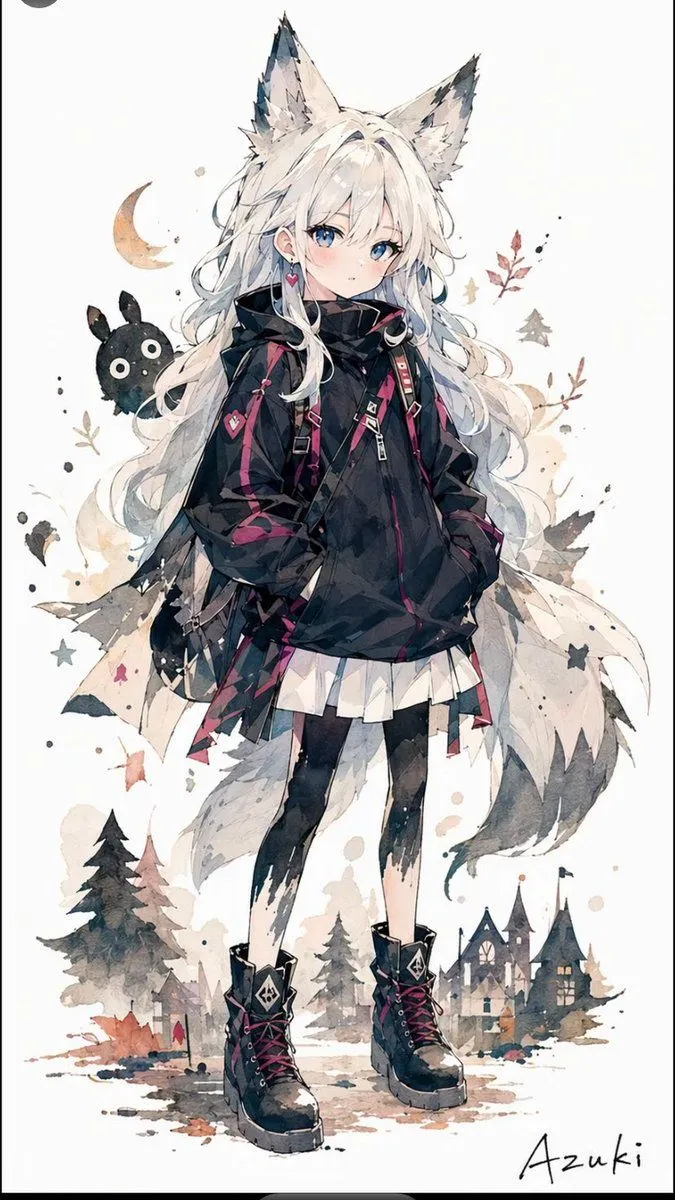
Solitary Wolf-Girl Fantasy Character
Create a full-body fantasy anime character illustration on a clean off-white vertical canvas, watercolor and ink style with soft splashes and delicate sketch lines. The subject is one lonely wolf-girl runaway named character_name, standing front-facing with a shy, slightly melancholic expression, pale skin, large blue eyes, faint blush, and very long flowing hair_color hair. She has exactly two tall fluffy wolf ears with dark tips and one large pale wolf tail sweeping behind her. Dress her in an oversized black hooded techwear jacket with magenta accents, straps, buckles, zipper details, and long sleeves partly covering her hands; add a short white pleated skirt, black asymmetrical torn tights, and chunky black lace-up combat boots with magenta laces and small emblem patches. Include exactly two visible heart-themed accessories: one pink heart earring and one pink heart charm on a strap. Around her, add whimsical fantasy background motifs: one small crescent moon on the left, one floating black rabbit-like mascot with two ears and round white eyes, scattered autumn leaves, tiny stars, ink dots, and watercolor stains. At the bottom, paint a miniature storybook village scene with cottages and church-like peaked roofs, plus exactly three prominent dark evergreen trees, all in muted gray, beige, and dusky autumn tones. Keep the composition airy with lots of white space, the character centered and occupying most of the height, with translucent layered tail and hair shapes. Add a handwritten signature reading signature_text in the lower right. Style: high-detail Japanese fantasy character art, delicate watercolor wash, fashionable gothic streetwear, cute but solitary wolf motif, no speech bubbles, no panel borders, no extra characters.