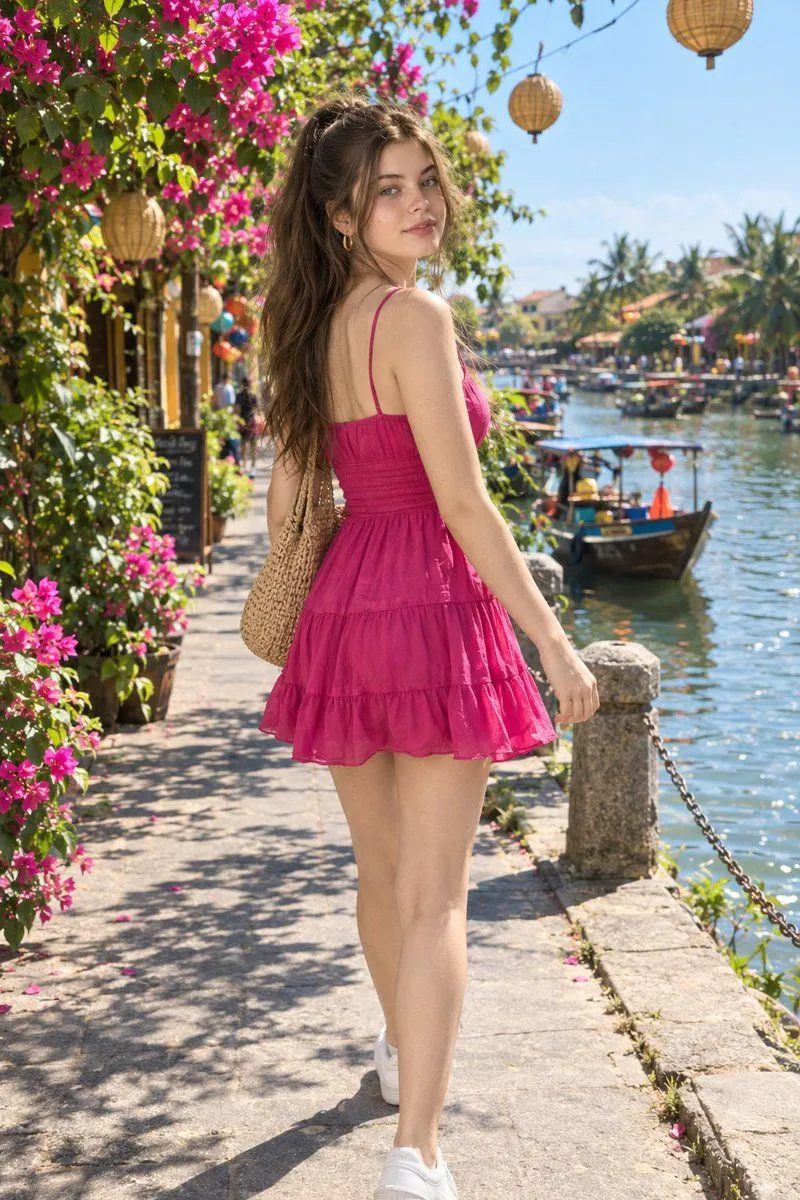
Riverside Fashion Photo with Identity Lock
Use the uploaded female reference image as the ONLY identity reference. Create an ultra-realistic cinematic lifestyle fashion photograph of the same woman. Preserve her exact facial identity, facial structure, eyes, eyebrows, nose, lips, skin tone, natural skin texture, hairstyle and overall appearance. Do not change or redesign her face. She is walking along a beautiful sunlit riverside pedestrian street in a charming tropical Asian town. She turns naturally over her shoulder toward the camera with a gentle confident smile. OUTFIT: vibrant magenta-pink sleeveless tiered mini dress with thin shoulder straps, fitted ruched waist, soft gathered fabric and a flowing multi-layer skirt. Carry a natural woven straw shoulder bag. Wear clean white casual sneakers and minimal gold hoop earrings. HAIR: dark naturally wavy hair pulled into a high ponytail with loose strands framing the face. ENVIRONMENT: lush bougainvillea flowers overflowing around the pathway, green trees, colorful riverside buildings, traditional hanging bamboo lanterns, small boats on the river, bright blue sky and peaceful vacation atmosphere. LIGHTING: bright natural midday sunlight, soft realistic shadows, subtle warm highlights, natural skin tones. CAMERA: full-body lifestyle fashion photograph, eye-level slightly behind-the-subject perspective, 50mm lens, realistic depth of field, sharp subject with naturally softened background. STYLE: luxury travel editorial photography, photorealistic, realistic skin pores, authentic fabric texture, natural body proportions, cinematic color grading, high dynamic range, 4K/8K detail. STRICT IDENTITY LOCK — preserve the woman's exact face from the uploaded reference.