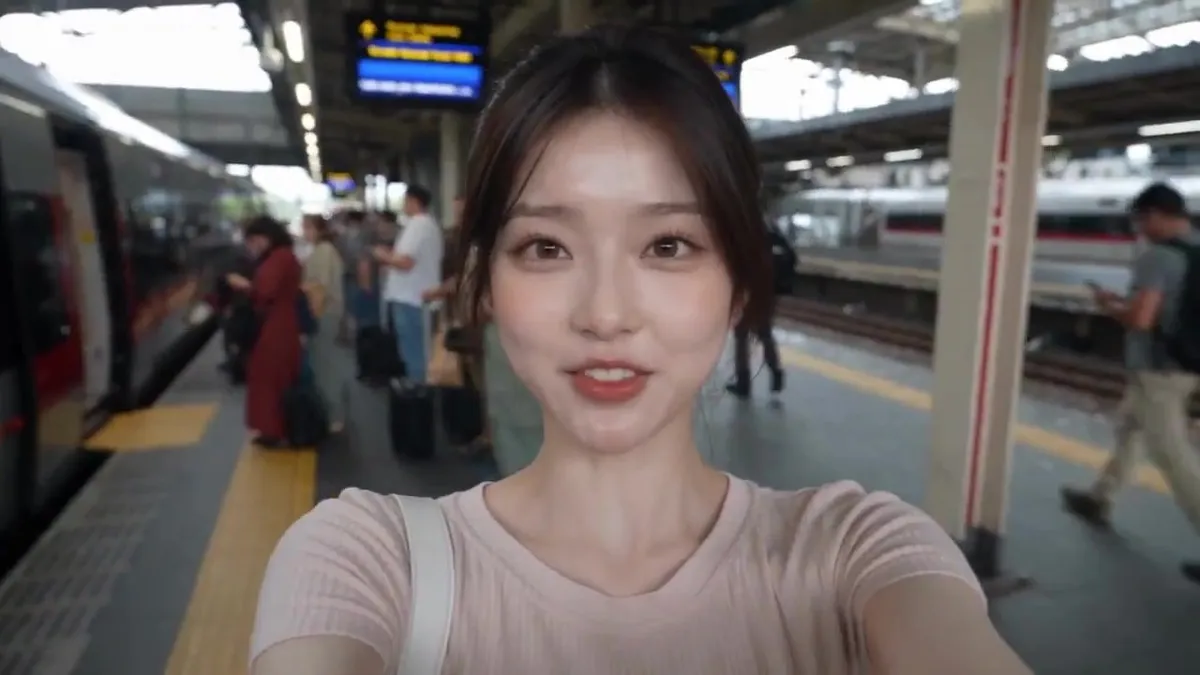
Realistic Train Travel Vlog
Ultra-realistic casual smartphone travel vlog of one consistent young Korean woman in her early 20s taking a train journey for the first time, speaking natural fluent English with accurate lip synchronization. Everything is filmed by her own hand on a real smartphone and must feel like an authentic personal social-media vlog, never cinematic or professionally filmed. Use mostly arm-length selfie footage with occasional natural switches to the rear camera, including slight hand shakes, awkward framing, walking jolts, autofocus hunting, exposure changes, motion blur, fingers near the lens, realistic train vibrations, window reflections, and authentic phone-camera quality. She starts at a busy station platform and excitedly says, “Okay guys, I’m taking the train today! Let’s go!” while showing the arriving train, then boards saying, “I made it!” She finds her window seat and says, “And I got a window seat!” As the train starts moving, she films outside and says, “We’re moving!” She casually shows a snack and drink, takes a bite, and says, “Everything tastes better on a train.” She then films beautiful passing scenery of trees, small towns, and distant mountains, quietly saying, “This view is so beautiful.” Finally, back in selfie mode with the moving scenery behind her, she smiles and says, “I think train journeys might be my new favorite thing. See you guys next time. Bye!” before waving and lowering the phone. Include realistic station announcements, train sounds, footsteps, passenger conversations, blinking, breathing, and spontaneous reactions. The same woman must remain perfectly consistent throughout, with no identity changes or duplicate people.