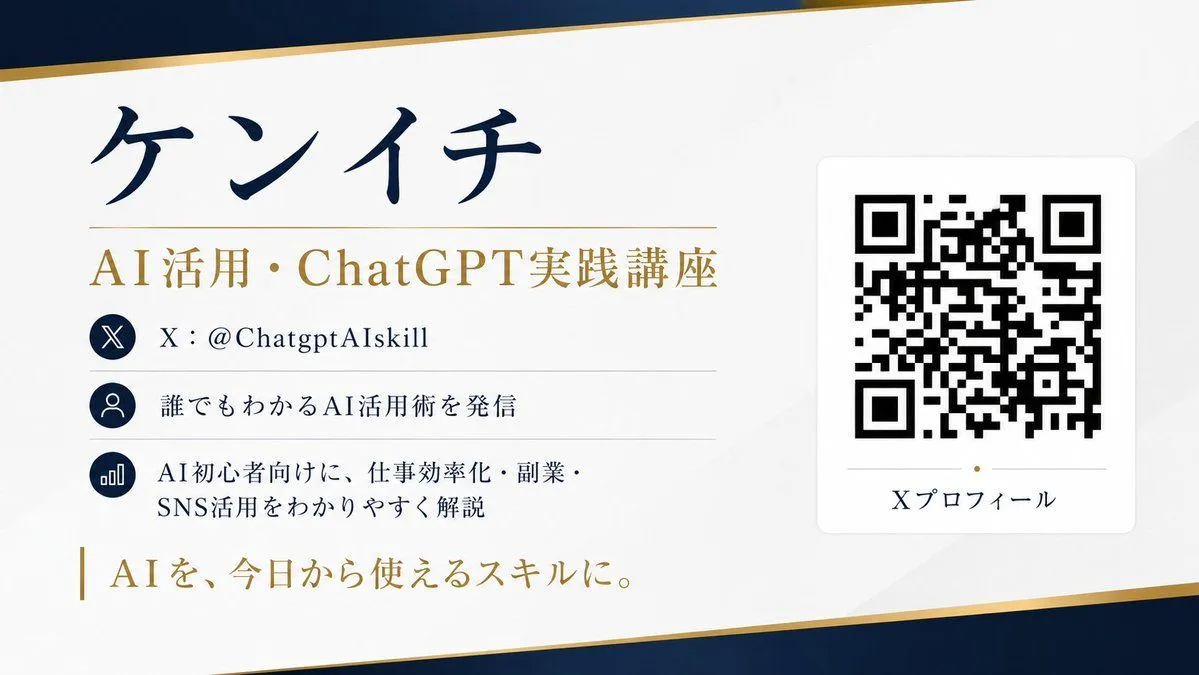
QR Code Business Card Designer
Please create a business card design with a scannable QR code based on SNS (X) profile information. [Purpose] Summarize the X account profile information into a single sophisticated horizontal business card. The design, color scheme, layout, margin design, and font atmosphere of the business card should be automatically suggested by AI so that the whole looks most beautiful. [Information to be posted] - Name: name - Title: title - X account: @account_name - Profile text: XXXX - Achievements/Features: XXXX - One-word catchphrase: XXXX - QR code link destination: https://t.co/OQINcuK6wHXXXX [About QR codes] - The QR code should not be for decoration, but should be scannable with a smartphone. - Embed the link accurately. - Place the QR code in a sufficient size and prioritize scanning accuracy. - Ensure sufficient margins around the QR code. - Do not overlap text or decorations on the QR code. - Do not distort or excessively process the QR code. - Prioritize high contrast with the background for easy reading. [Design conditions] - Horizontal business card design. - Convey a sense of luxury/sophistication/trust/professionalism. - Minimalist and beautiful layout utilizing white space. - All text in Japanese, clear and easy to read. - Clear priority of information, making name and title most prominent. - AI automatically decides the best background color, accents, and font balance. - Avoid a cheap template feel. - Elegant finish suitable for actual printing. [Important] - AI should suggest designs beautifully and naturally, not fixed layouts. - However, prioritize practicality for the QR code. - Avoid garbled characters and ensure all text is legible. - Organize information for maximum readability. Aspect ratio 16:9. Create in high resolution.