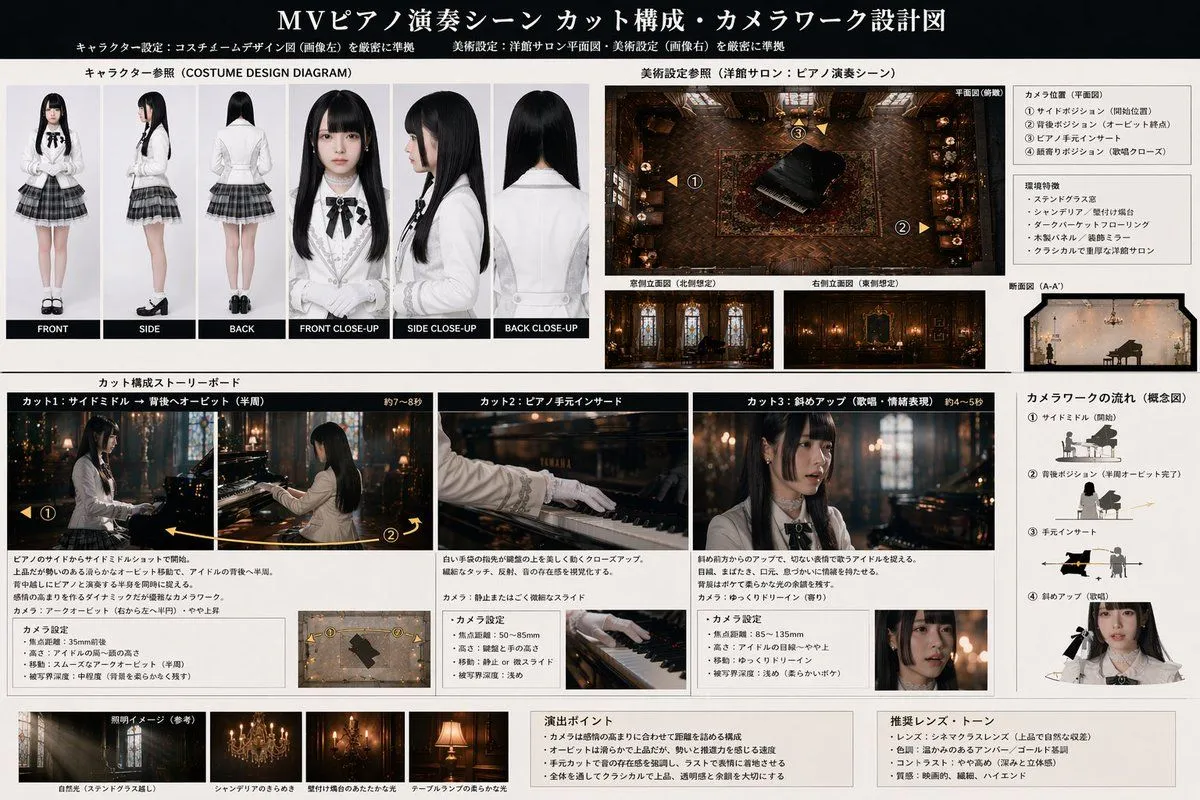
Music Video Production Storyboard Blueprint
"type": "production design and storyboard blueprint", "header": "title": "argument name=\"project title\" default=\"MVピアノ演奏シーン カット構成・カメラワーク設計図\"", "subtitles": ["キャラクター設定", "美術設定"] , "character_reference": "title": "キャラクター参照 (COSTUME DESIGN DIAGRAM)", "description": "argument name=\"character description\" default=\"young woman with long black hair, white blouse, black ribbon, plaid skirt\"", "views_count": 6, "labels": ["FRONT", "SIDE", "BACK", "FRONT CLOSE-UP", "SIDE CLOSE-UP", "BACK CLOSE-UP"] , "art_setting": "title": "美術設定参照", "setting": "argument name=\"scene setting\" default=\"classic western-style salon with stained glass and chandelier\"", "diagrams_count": 4, "diagram_types": ["top-down floor plan with camera nodes", "North elevation", "East elevation", "cross-section"], "text_boxes": ["カメラ位置", "環境特徴"] , "storyboard": "title": "カット構成ストーリーボード", "action": "argument name=\"action\" default=\"playing a grand piano\"", "panels_count": 3, "panels": [ "cut": "Cut 1", "description": "Side middle to back orbit", "elements": ["main image", "descriptive text", "camera settings box", "small diagram"], "cut": "Cut 2", "description": "Piano hand insert", "elements": ["main image", "descriptive text", "camera settings box", "small diagram"], "cut": "Cut 3", "description": "Diagonal close-up", "elements": ["main image", "descriptive text", "camera settings box", "small diagram"] ] , "camera_workflow": "title": "カメラワークの流れ (概念図)", "steps_count": 4, "descriptions": ["Side middle", "Back position", "Hand insert", "Diagonal close-up"] , "lighting_reference": "title": "照明イメージ (参考)", "images_count": 4, "labels": ["自然光", "シャンデリア", "壁付け燭台", "テーブルランプ"] , "notes": "boxes_count": 2, "labels": ["演出ポイント", "推奨レンズ・トーン"]