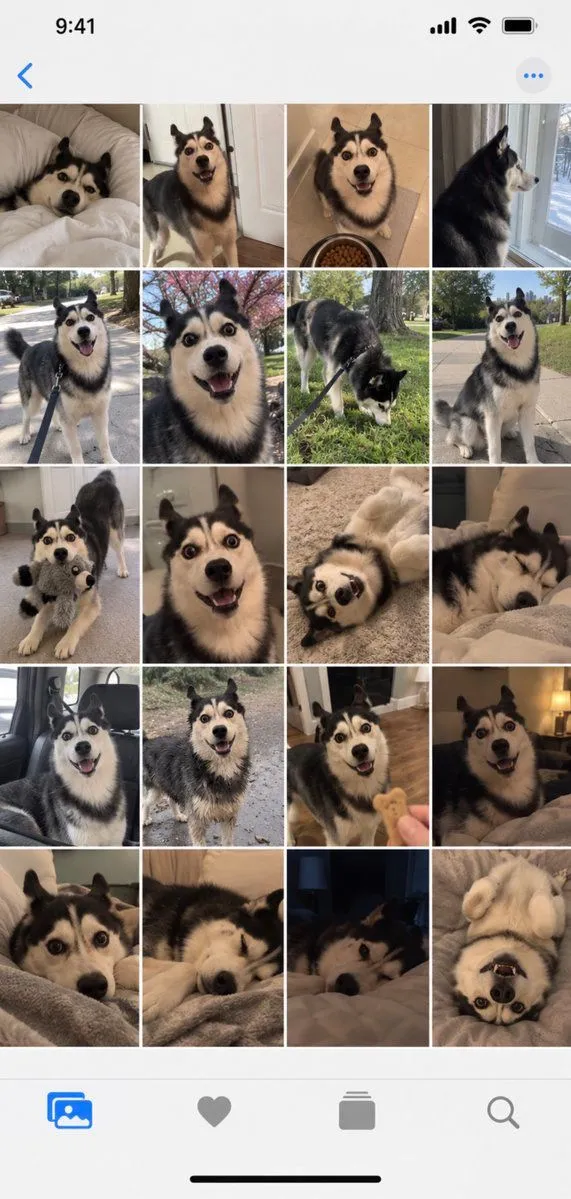
iPhone Gallery Screenshot of Husky Dog Photos
Goal: Create a realistic iPhone photo gallery screenshot showing a grid of 20 photos of a single Siberian Husky dog, capturing various moments and expressions. Canvas: Vertical smartphone aspect ratio (9:16) with iOS interface elements visible at top and bottom. Layout: - Top status bar showing time "9:41", signal bars, WiFi icon, and battery indicator - Navigation bar with back arrow and menu dots - Main content area: 5 rows × 4 columns grid of square photos - Bottom navigation bar with four icons: photo library (selected), favorites heart, albums stack, search magnifying glass Sections - Photo Grid Content: Row 1: Dog lying on white bed looking up | Dog standing in doorway smiling | Dog sitting next to food bowl looking happy | Dog profile view by window Row 2: Dog on leash outdoors walking | Close-up face shot with wide eyes | Dog sniffing grass on leash | Dog sitting outside panting happily Row 3: Dog holding stuffed toy in mouth | Extreme close-up face shot | Dog lying on back playing | Dog sleeping curled up Row 4: Dog in car seat looking out | Dog standing outside alert | Dog receiving treat from hand | Dog lying down relaxed indoors Row 5: Dog peeking over blanket edge | Dog resting head on surface | Dark room shot of dog's face | Dog lying on back with paws up Visual style: Natural home photography aesthetic, candid shots, warm indoor lighting mixed with outdoor daylight. Photos should look authentic and unposed, like real pet owner snapshots. Subject details: Consistent black-and-white Siberian Husky with blue/brown eyes across all photos, showing different moods: playful, sleepy, curious, hungry, content. Various home environments including bedroom, living room, kitchen, backyard, and car interior. Constraints: Maintain realistic iPhone UI proportions, ensure dog appears consistent across all 20 images, use natural color grading typical of phone cameras, no professional studio lighting effects.