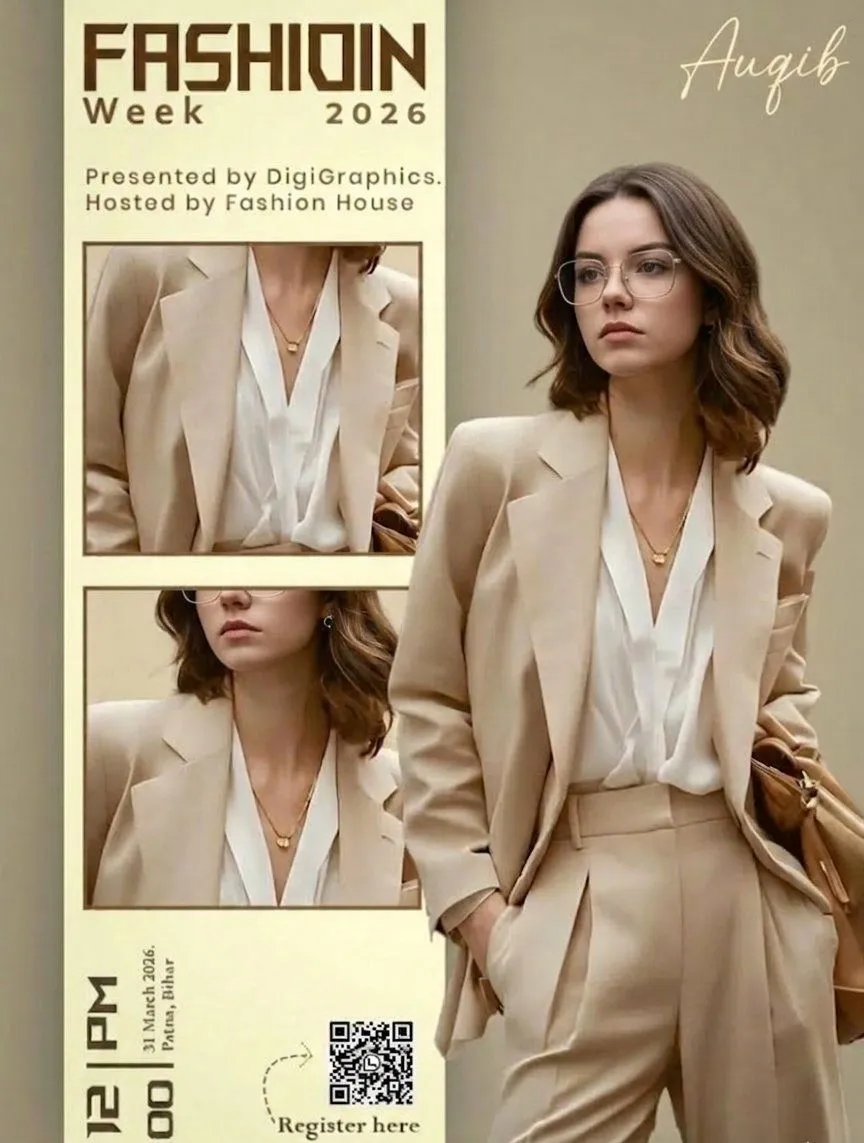
Editorial Fashion Ad Poster Prompt with Face Replacement
Ultra-realistic high-end fashion advertisement poster, minimalist editorial magazine style. STRICT LAYOUT (do not change anything): Vertical split composition. Right side: full-body fashion model. Left side: beige editorial panel with text + image frames. MODEL (KEEP EVERYTHING SAME, ONLY CHANGE FACE As GIVEN IN REFRANCE IMAGE): A stylish young woman standing in a relaxed confident pose, body slightly turned sideways, head turned to the right (looking away from camera). One hand inside pant pocket, other hand holding a brown leather bag. Outfit (exact): outfit_piece_1 Soft white V-neck blouse High-waisted beige tailored trousers Minimal gold necklace Small earrings FACE REPLACEMENT (VERY IMPORTANT): Use the face from the provided reference image. Seamlessly blend the reference face onto the model’s head. Match skin tone, lighting, shadows, and color grading perfectly. Keep same head angle and expression as original pose. Ensure realistic identity preservation (no distortion, no mismatch). Ultra-clean face integration, professional fashion photography quality. LIGHTING & STYLE: Soft warm studio lighting, diffused, subtle shadows, luxury editorial look. Beige neutral tones, clean premium aesthetic. LEFT PANEL (COPY EXACT): Top text: “FASHIOIN Week 2026” (same spelling, bold modern sans-serif, brown) Below: “Presented by DigiGraphics. Hosted by Fashion House” Image frames: Two stacked rectangular frames showing cropped outfit close-ups (same outfit, same lighting) Bottom: Vertical text: “12 PM” “31 March 2026, Patna, Bihar” QR code placeholder “Register here” with small arrow STYLE KEYWORDS: ultra-realistic, editorial fashion poster, luxury branding, minimal, soft shadows, high detail, magazine layout.