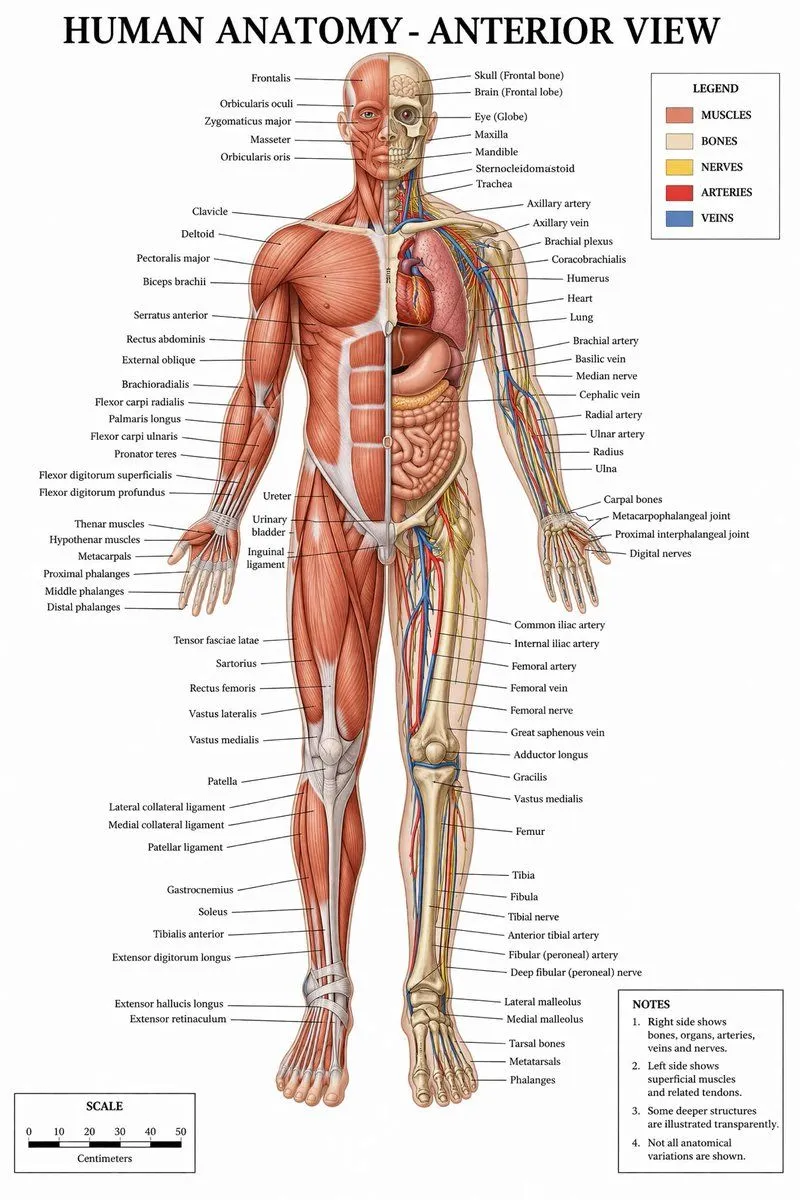
Detailed Medical Anatomy Infographic
"type": "medical infographic poster", "title": "argument name=\"main title\" default=\"HUMAN ANATOMY - ANTERIOR VIEW\"", "subject": "description": "Full-body argument name=\"subject type\" default=\"male human figure\", anterior view, split vertically down the midline.", "viewer_left_side": "argument name=\"left side focus\" default=\"superficial muscles\"", "viewer_right_side": "argument name=\"right side focus\" default=\"bones, internal organs, arteries, veins, and nerves\"", "style": "argument name=\"color palette\" default=\"clinical medical textbook colors\"" , "layout": "centerpiece": "The anatomical figure stands centrally, arms slightly away from the body, palms facing forward.", "labeling_system": "Thin black leader lines connect anatomical structures to text labels arranged neatly on the left and right margins.", "label_counts": "head_and_neck": 12, "torso_and_arms": 29, "hands": 10, "pelvis_and_legs": 34, "feet": 5 , "panels": [ "title": "LEGEND", "position": "top-right", "count": 5, "items": [ "color": "red/brown", "label": "MUSCLES", "color": "beige", "label": "BONES", "color": "yellow", "label": "NERVES", "color": "red", "label": "ARTERIES", "color": "blue", "label": "VEINS" ] , "title": "NOTES", "position": "bottom-right", "count": 4, "items": [ "1. Right side shows bones, organs, arteries, veins and nerves.", "2. Left side shows superficial muscles and related tendons.", "3. Some deeper structures are illustrated transparently.", "4. Not all anatomical variations are shown." ] , "title": "SCALE", "position": "bottom-left", "count": 6, "description": "A horizontal bar scale with 6 numeric markers (0, 10, 20, 30, 40, 50) labeled 'Centimeters'." ]