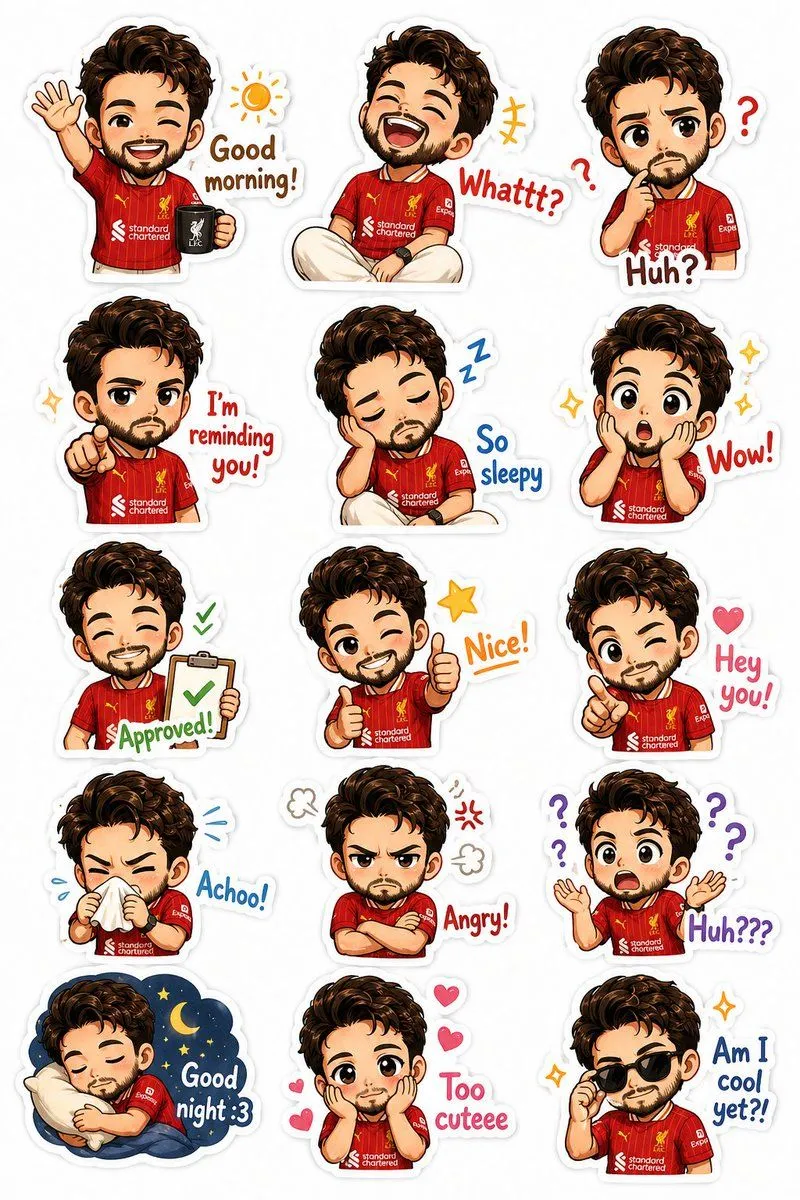
Custom Chibi Sticker Pack
Create a premium chibi sticker pack based on the uploaded photo of the subject. Preserve his recognizable features: features, outfit, and smartwatch. Transform him into an adorable super-cute chibi character with a large head, expressive eyes, tiny body, soft shading, and clean cartoon illustration style. Layout & Style Vertical sticker sheet format (4:5 ratio) Clean white background Each sticker has a thick white die-cut border High-resolution digital illustration Bright, cheerful colors Cute doodles around stickers (hearts, stars, sparkles, question marks, motion lines) Professional messaging-app sticker pack style Consistent character design across all stickers Expressions & Poses Create 15 separate chibi stickers: 1. Waving with coffee ☀ — “Good morning!” 2. Laughing hard 😂 — “Whattt?” 3. Thinking/confused 🤔 — “Huh?” 4. Pointing seriously 👉 — “I’m reminding you!” 5. Sleepy with droopy eyes 😴 — “So sleepy” 6. Shocked with sparkling eyes 😲 — “Wow!” 7. Holding approval clipboard ✅ — “Approved!” 8. Double thumbs up 👍 — “Nice!” 9. Winking and pointing 👉 — “Hey you!” 10. Sneezing with tissue 🤧 — “Achoo!” 11. Arms crossed, grumpy 😠 — “Angry!” 12. Completely confused 🙃 — “Huh???” 13. Sleeping with pillow 🌙 — “Good night :3” 14. Hands on cheeks, adorable 🥺 — “Too cuteee” 15. Wearing sunglasses 😎 — “Am I cool yet?!” Art Direction Ultra-cute kawaii style Sticker-pack quality suitable for WhatsApp, Telegram, LINE, Discord Soft highlights and blush on cheeks Crisp linework Clean typography integrated into each sticker Dynamic and varied poses Charming, wholesome, playful mood White die-cut border around every sticker No background elements except sticker decorations Studio-quality illustration, highly detailed, polished, professional sticker design sheet.