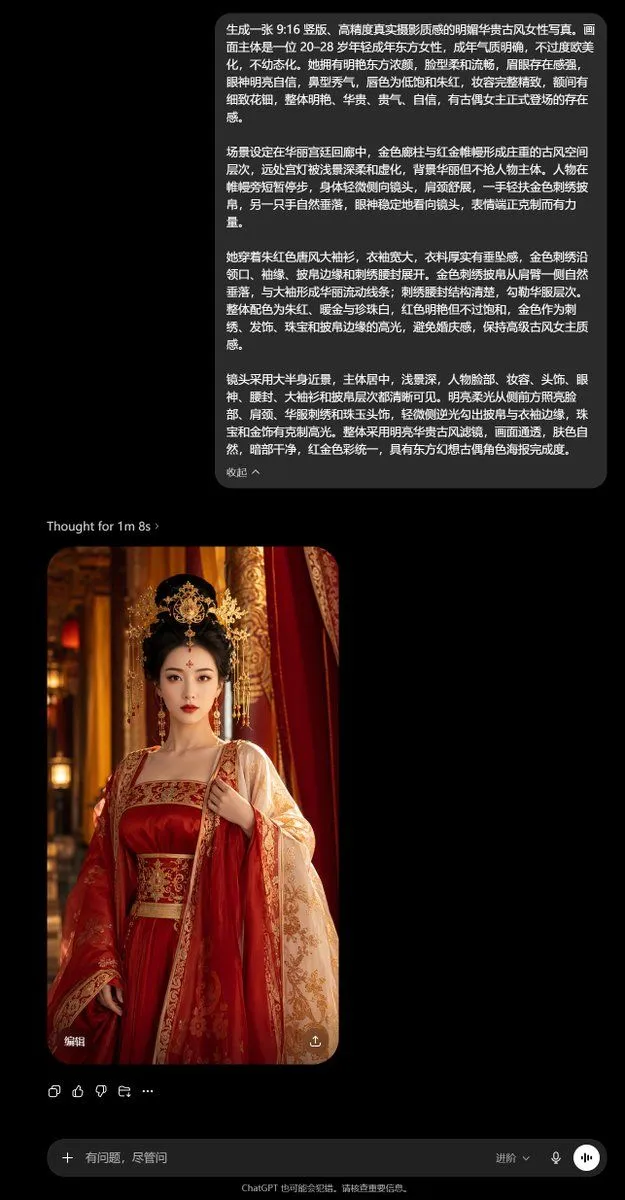
ChatGPT Ancient Palace Portrait Screenshot
Goal: Create a realistic vertical smartphone screenshot of the ChatGPT mobile app in dark mode, showing a text-to-image generation workflow for a Chinese ancient palace portrait. Canvas: 9:16 vertical phone screenshot, black background, approximately 640 × 1136 px. Use rounded UI cards, small sans-serif interface text, and iOS-style spacing. No phone frame, just the app screen. Layout: At the top center, place one large dark-gray rounded user message bubble containing a long Chinese prompt in white text. Below it, aligned left, place a small status line reading “Thought for 1m 8s ›”. Under that, place one generated image card with rounded corners, portrait orientation, positioned left of center. Beneath the image card, place a row of exactly 5 small interface icons: copy/share-style icon, thumbs up, thumbs down, regenerate/loop arrow, and ellipsis. At the bottom, place one rounded input bar with a plus icon on the left, placeholder Chinese text, a “deep thinking” control with a dropdown, a microphone icon, and one circular voice button on the right. Include the small footer text centered below the input bar. Top message text: Use the following Chinese text inside the user bubble, preserving line wrapping naturally: top_prompt_text Generated image content: The generated card shows a photorealistic young adult East Asian woman, character_age, standing in a lavish imperial palace corridor. She wears an ornate dress_color_palette ancient Chinese-inspired gown with wide sleeves, gold embroidery, a structured embroidered waist belt, and a pale embroidered draped shawl. Her styling includes black hair in an elaborate updo, a large golden floral crown-like hair ornament, dangling earrings, a small forehead ornament, refined red lip makeup, bright confident eyes, and a calm frontal gaze. The palace background contains golden pillars, red drapery, warm lantern bokeh, and shallow depth of field. The portrait is vertically cropped from head to below the waist, with soft cinematic lighting and polished realistic photography texture. Image card UI details: The generated image has exactly 2 overlay controls: white Chinese text “编辑” at the lower-left corner and a small circular share/download icon at the lower-right corner. The image card corners are rounded and the card casts no visible shadow against the black chat background. Bottom UI text: The input placeholder reads input_placeholder_text. The footer reads “ChatGPT 也可能会犯错。请核查重要信息。” Visual style: Authentic ChatGPT mobile dark theme screenshot, black background, charcoal message bubble, white Chinese text, minimal gray interface icons, realistic generated photo thumbnail. Keep the composition clean and vertically spaced like a real app screen. Constraints: Show exactly 1 user prompt bubble, 1 thought status line, 1 generated portrait image, 5 action icons under the image, 1 bottom input bar, and 2 overlay controls on the generated image. Do not add extra chat messages, watermarks, browser chrome, or unrelated UI panels.