Beauty Vlogger Christmas Makeup Tutorial Interface
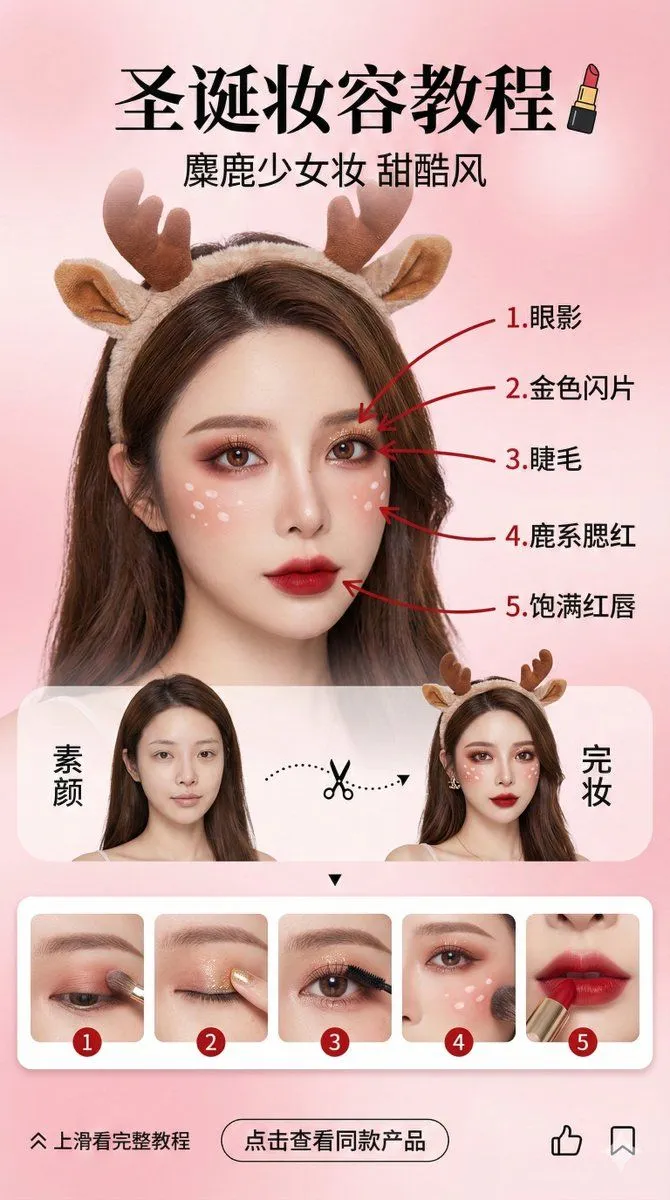
Vertical social media story design (9:16 aspect ratio), beauty vlogger Christmas makeup tutorial interface. Background is a soft, high-end pink gradient, creating a sweet and dreamy atmosphere. Core Visual: Character Consistency (Highest Weight): The center of the image features an Asian female beauty vlogger. Facial features, features, and hairstyle must strictly and perfectly replicate the person in the uploaded reference image. Makeup and Accessories: Extremely delicate “Christmas Reindeer Sweet Cool Makeup.” Eye makeup is red-brown blending, with white fawn spots on the face, wearing a fluffy reindeer antler headband. Red Pen Markings and Step Correspondence (Core Logic): On the face of the finished character on the right, use a striking red ink pen to draw 5 indicator lines, pointing to 5 key parts of the makeup, and label them sequentially in Chinese: 1. Eyeshadow; 2. Gold Glitter; 3. Eyelashes; 4. Reindeer Blush; 5. Full Red Lips. Layout: Top: Chinese title “Christmas Makeup Tutorial,” paired with a lipstick icon. Subtitle “Reindeer Girl Makeup Sweet Cool Style.” Middle (Comparison Area): Split-screen design. The left side is the character “Bare Face,” the right side is “Finished Makeup.” Connected by a dashed line and a scissor icon in the middle. Bottom (Strongly Associated Step Preview Area): Set a horizontally scrolling rounded card bar, displaying 5 step images that strictly correspond to the facial markings: Card 1: Close-up of applying eyeshadow to the eye area; Card 2: Close-up of dotting gold glitter with a finger; Card 3: Close-up of curling or brushing eyelashes; Card 4: Close-up of sweeping blush and drawing fawn spots on the cheek; Card 5: Close-up of lips applying red lipstick. Each card's top-left corner must clearly label numbers 1-5, corresponding to the red pen markings on the face. Bottom (Interaction Area): “Swipe up for full tutorial” arrow, “Click to view product” button, like and save icons. Style: High-definition commercial photography texture combined with UI design, transparent light and shadow, vivid colors, delicate and realistic skin texture, fashion magazine layout style. --ar 9:16