Anime Wedding Dress Character Sheet
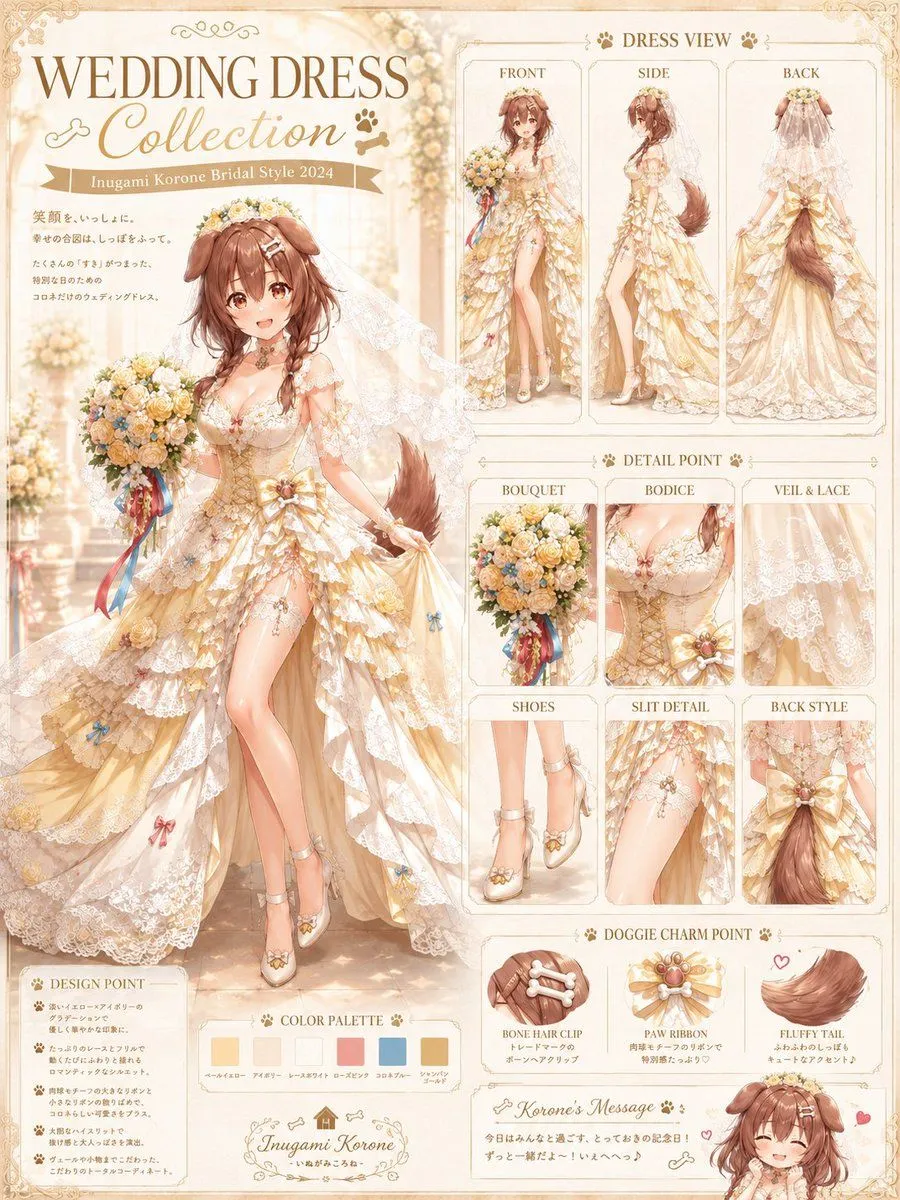
Goal: Create a detailed vertical anime fashion design sheet for character_name in an ornate bridal outfit, titled “WEDDING DRESS Collection” with a warm cream-and-gold wedding catalog aesthetic. Canvas: Portrait 3:4 layout, high-resolution illustration, ivory parchment background with delicate gold filigree corners, soft cathedral-like wedding hall lighting, bokeh flowers, lace textures, and elegant tan/gold typography. Use a polished Japanese anime art style with soft watercolor shading, fine linework, glossy highlights, and luxury bridal magazine presentation. Main subject: One large full-body anime dog-girl bride on the left side, front-facing in a playful elegant pose. She has hair_color medium-long wavy hair, floppy dog ears, a fluffy dog tail, floral headpiece, soft bridal veil, and a joyful idol-like personality. Her face should be clearly visible and expressive. She wears a cream, champagne, and pale-gold wedding dress with layered ruffled lace, floral appliqués, corset bodice, off-shoulder lace sleeves, thigh-high slit, ribbon bows, tiny paw/bone-themed ornaments, and white-gold bridal heels. She holds a round bouquet of cream, peach, yellow, and blue flowers with long red, blue, and gold ribbons. Top-left title area: Large serif headline “WEDDING DRESS” and elegant script subtitle “Collection”. Add a ribbon label reading “style_ribbon_text”. Include a small Japanese-style message block beneath it with decorative spacing, but keep it secondary and delicate. Right-side fashion sheet layout: Create exactly 3 tall “DRESS VIEW” panels across the upper right, labeled “FRONT”, “SIDE”, and “BACK”. Each panel shows the same bride outfit from that angle: front with bouquet, side profile showing slit and tail, back view showing veil, lace train, bow, and fluffy tail. Middle-right detail grid: Create exactly 6 boxed “DETAIL POINT” panels labeled “BOUQUET”, “BODICE”, “VEIL & LACE”, “SHOES”, “SLIT DETAIL”, and “BACK STYLE”. Show close-up illustrations for each: bouquet flowers and ribbons; corset bodice with lace and flower jewel; translucent veil lace pattern; ankle-strap heels with floral paw-like decoration; thigh slit with lace and small blue bow; back waist bow and tail. Lower-right charm section: Create exactly 3 “DOGGIE CHARM POINT” panels labeled “BONE HAIR CLIP”, “PAW RIBBON”, and “FLUFFY TAIL”. Show one bone-shaped hair clip, one ornate paw-themed ribbon brooch, and one fluffy brown tail with a small heart accent. Bottom-left and bottom-center sections: Add one “DESIGN POINT” box with exactly 5 short bullet lines and tiny paw icons. Add one “COLOR PALETTE” strip with exactly 6 rectangular swatches labeled in small elegant text: ivory beige, honey gold, lace white, peach pink, soft blue, and champagne brown. Add a small ornate nameplate reading “nameplate_text”. Bottom-right: Add one small chibi version of the bride, smiling with closed happy eyes, dog ears, veil, small hearts, and a handwritten message panel titled “message_title”. Constraints: Maintain a cohesive cream, gold, peach, and soft blue palette; use exactly 1 main full-body bride, 3 dress-view panels, 6 detail panels, 3 charm panels, 6 color swatches, 5 design bullets, and 1 chibi character. Make the sheet information-dense but readable, with ornate borders and no watermark.