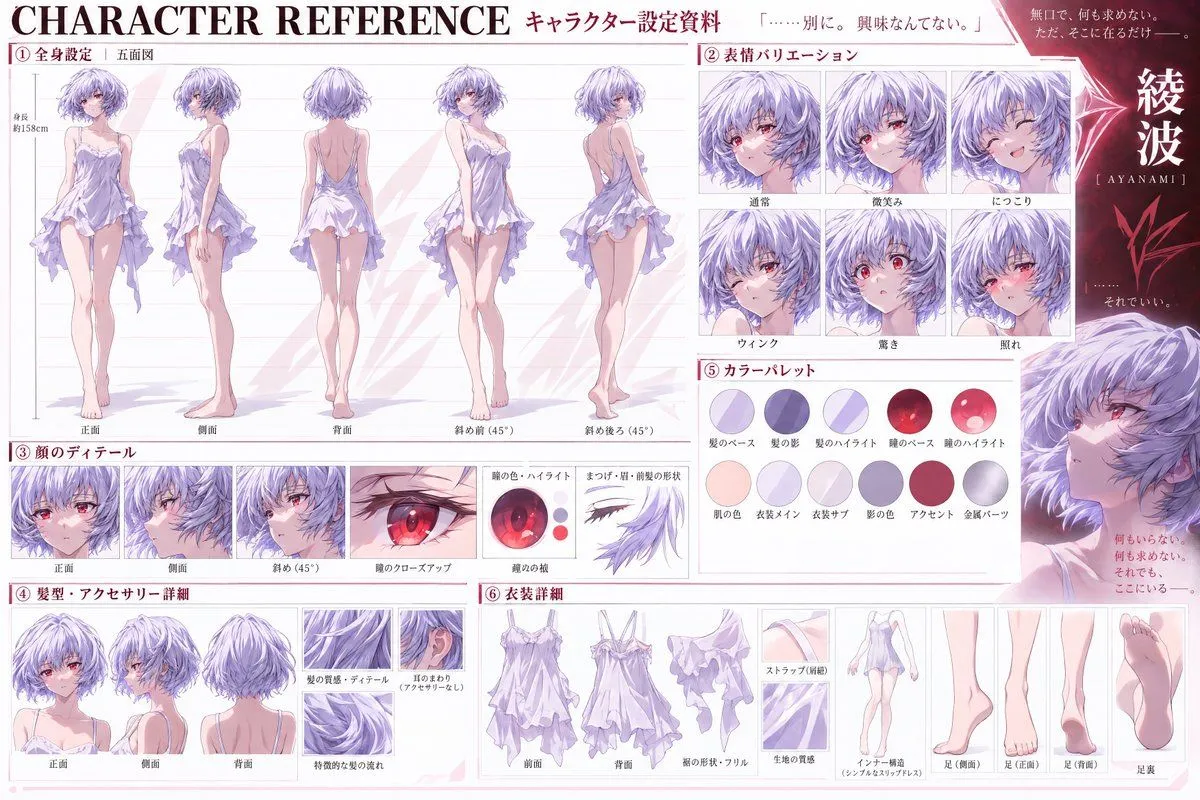
Anime Character Reference Sheet Layout
Goal: Create a detailed anime character reference sheet (setting material) for the character character_name. Canvas: Horizontal 16:9 layout with a clean, professional white background and soft pink accents. The style is high-quality digital illustration typical of official art books or production materials. Layout: Organized into six numbered sections with Japanese headers. Sections: 1. **Full Body Settings (Five Views):** Located on the left. Shows five full-body standing poses labeled Front, Side, Back, Diagonal Front (45°), and Diagonal Back (45°). The character wears a short, frilly lavender slip dress. Include a height marker indicating approx. 158cm. 2. **Expression Variations:** Top right grid. Six headshots showing specific emotions labeled Normal, Slight Smile, Smiling, Wink, Surprised, and Blushing. 3. **Face Details:** Middle left strip. Three views of the face (Front, Side, Diagonal) plus a close-up of the eye and an isolated diagram of eyelashes/eyebrows. 4. **Hair & Accessories:** Bottom left. Three views of the hair (Front, Side, Back) and close-ups of hair texture and ear area. 5. **Color Palette:** Middle right. Two rows of circular swatches representing Hair Base, Shadow, Highlight, Eye Base, Eye Highlight, Skin, Dress Main, Dress Sub, Shadow Color, Accent, and Metal Parts. 6. **Outfit Details:** Bottom center/right. Breakdown of the dress (Front, Back, Hem shape/Frills, Fabric texture) and foot details (Side, Front, Back, Sole). Visual Style: Soft cel-shading with delicate lighting. The character has short light blue hair and red eyes. Use thin lines for diagrams and clear sans-serif typography for labels. Text content: Preserve all Japanese text exactly as shown in the image, including section titles like 「全身設定」 and 「表情バリエーション」.