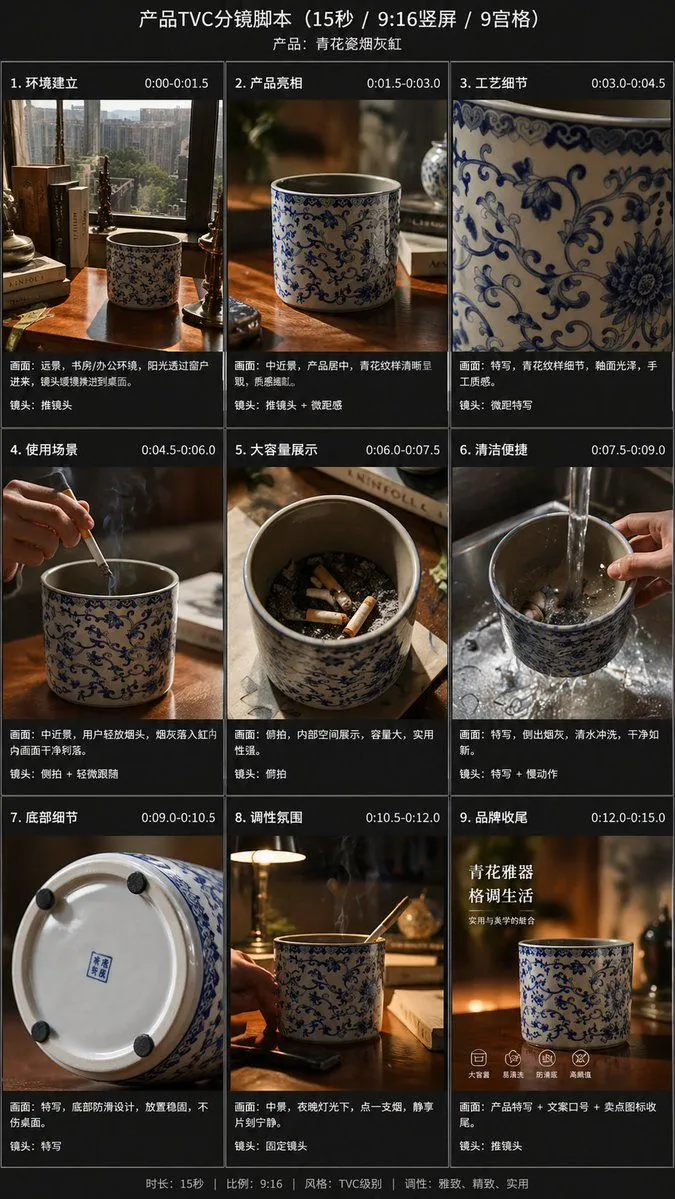
9-Panel Product TVC Storyboard
Using the provided reference image, transform the single casual product photo into a polished e-commerce TVC storyboard board for a video_duration ad in a aspect_ratio vertical format, presented as a 9-panel grid. Keep the same blue-and-white ceramic ashtray as the product base, but restage it across cinematic advertising shots with warm premium lighting, shallow depth of field, and a refined lifestyle desktop environment. Add a dark storyboard layout with Chinese titles and timing for each panel. Include exactly 9 scenes: 1) environment-establishing wide shot with desk, books, window, and the product placed in context; 2) hero product medium shot on the table; 3) extreme close-up of the blue floral craftsmanship pattern; 4) use case showing a hand placing a cigarette into the ashtray with visible smoke; 5) top-down capacity display showing multiple cigarette butts inside; 6) cleaning scene under running water in a sink with a hand holding the product; 7) bottom-detail close-up showing the underside and anti-slip pads; 8) mood/lifestyle scene at night with the product on a desk, smoke rising, and ambient lamp light; 9) brand closing frame with the product as the hero plus Chinese marketing text. Add the overall header text “产品TVC分镜脚本(15秒 / 9:16竖屏 / 9宫格)” and a product subtitle naming it product_name. Give each of the 9 panels a Chinese scene title and timestamp, plus small descriptive Chinese copy beneath each image in the style of a professional commercial shot list. Use premium, realistic commercial photography throughout, consistent product identity, elegant Chinese aesthetic, and a clean high-end storyboard presentation.