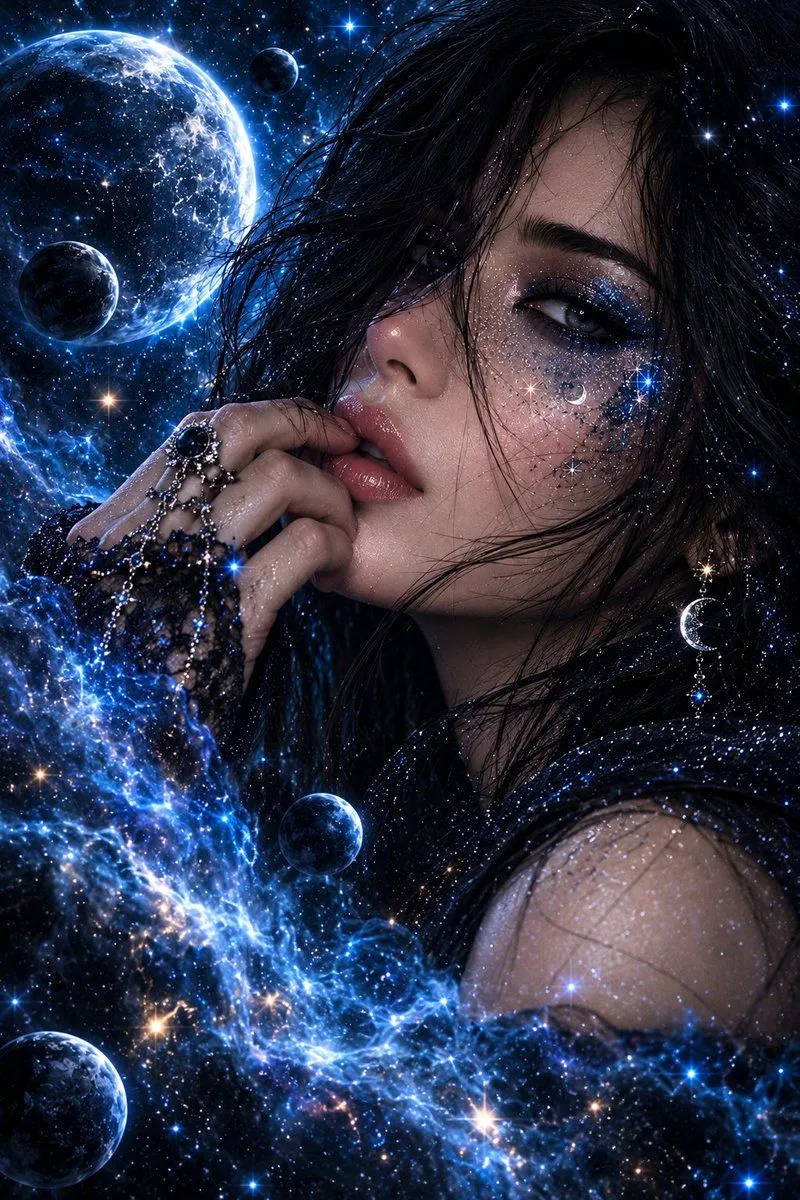
Cosmic Galaxy Dual Portrait Template
Create two separate ultra-detailed cinematic fantasy portraits from one prompt, both using the exact same deep blue cosmic galaxy theme and visual style. IMAGE 1 — WOMAN: Create a beautiful clearly adult woman with long flowing black hair, luminous smooth skin, glamorous blue-and-silver celestial eye makeup, glossy lips, and sparkling star-like details across her face. Add elegant crescent moon and star jewelry, subtle crystal accents, and glowing cosmic particles around her. Her expression is confident, mysterious, and attractive. Surround her with deep blue nebula clouds, glowing stars, large planets, moons, cosmic dust, and electric-blue light. The galaxy energy should naturally blend around her face, hair, shoulder, and clothing. IMAGE 2 — MAN: Create a handsome clearly adult man in the exact same blue cosmic theme. He has thick slightly messy black hair, a neat dark beard, strong facial features, intense glowing blue eyes, and a confident mysterious expression. Add subtle galaxy-like glowing patterns and tiny stars across one side of his face. His hand is near his chin in a stylish fashion pose with an elegant dark metallic ring. Surround him with the same deep blue nebula clouds, glowing planets, moons, stars, cosmic dust, and electric-blue energy. IMPORTANT: Generate the woman and man as two separate images, not together in one frame. Keep the same lighting, same blue galaxy color palette, same premium fantasy fashion style, same level of detail, and matching visual identity so both images look like a coordinated pair. Ultra-realistic, premium cinematic lighting, high contrast, glossy luxury fantasy look, sharp focus, detailed skin and hair, magical blue glow, no text, no watermark. Vertical portrait composition, 9:16 for both images.