Tell us anything

An idea, a bug, something you love. We read every note.

⌘↵ to send. The page you're on comes along.

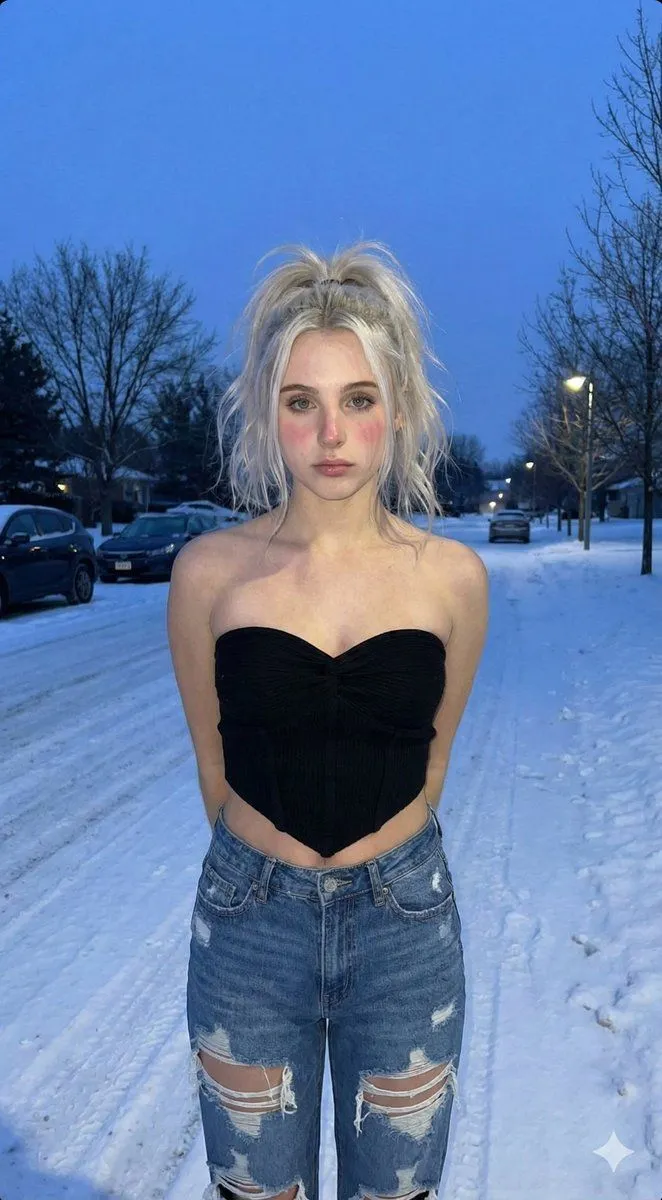
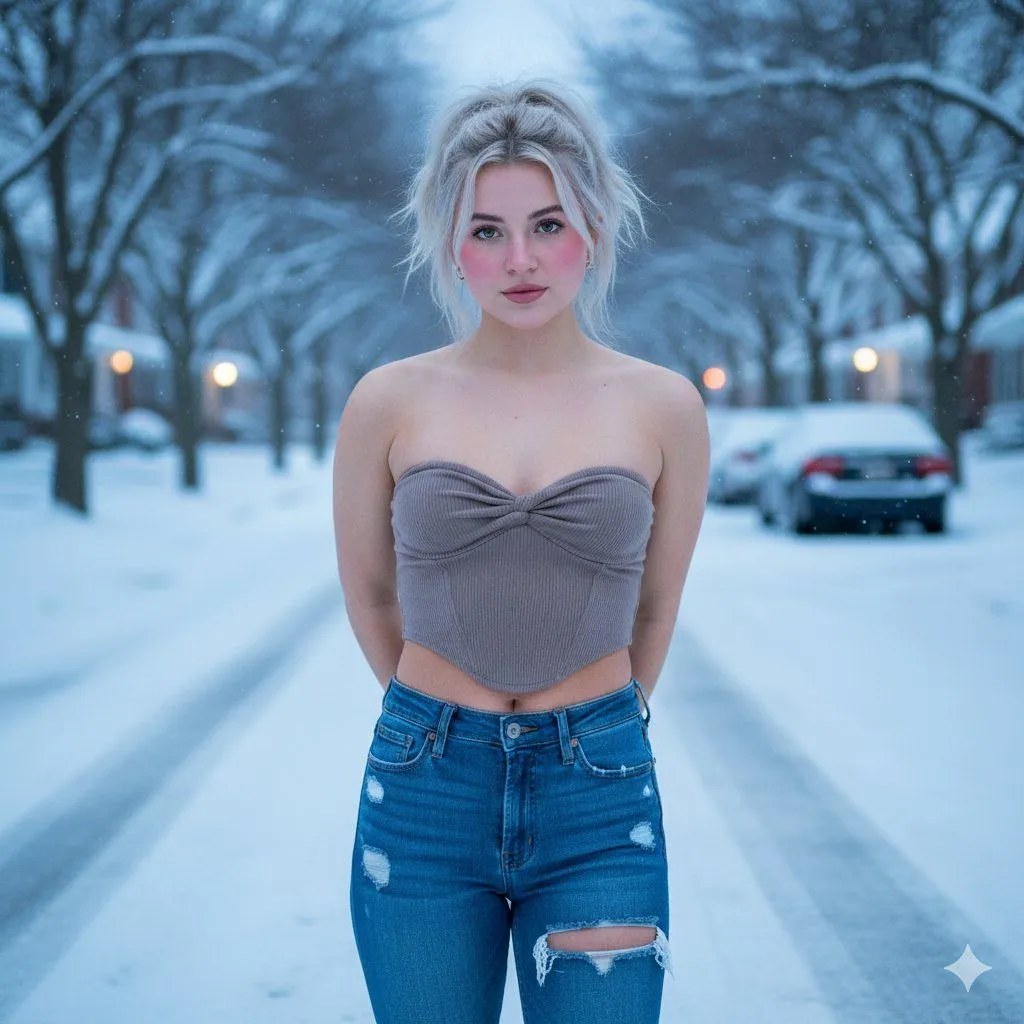
Winter Streetwear Portrait at Blue Hour

Made with Nano Banana Pro in Gemini by Library Social. Promptclay never generates images.

Did it work?

No reports yet. Tell others if it worked for you.

No comments yet. Be the first.

    Winter Streetwear Portrait at Blue Hour

    Nano Banana Pro9:16AI-generated

    Prompt

    { "visual_details": { "subject": { "gender": "Female", "age_demographic": "Young adult", "hair": { "color": "Platinum blonde", "style": "Messy high ponytail or updo", "details": "Loose strands framing the face, wind-blown texture" }, "face": { "skin_tone": "Fair", "eyes": "Light (green or hazel)", "cheeks": "Rosy/flushed (indicating cold)", "expression": "Neutral, direct gaze, soft pout" }, "pose": "Standing center frame, facing forward, arms held behind back" }, "clothing": { "top": { "type": "Strapless corset-style crop top", "color": "Dark Black", "fabric": "Ribbed texture", "design_features": [ "Twisted knot at the bust", "Pointed/handkerchief hemline", "Sweetheart neckline" ] }, "bottoms": { "type": "Jeans", "material": "Blue denim", "design_features": [ "Large distressed rips on thighs", "fitted waist" ] } }, "setting": { "location": "Residential street", "season": "Winter", "weather": "Overcast, snowy", "ground": "Road completely covered in packed snow", "background_elements": [ "Rows of bare trees covered in snow", "Parked cars with snow on them", "Streetlights glowing in the distance", "Residential houses visible in background" ] }, "lighting_and_atmosphere": { "time_of_day": "Dusk / Twilight (Blue Hour)", "lighting_type": "Soft, diffuse natural light", "color_palette": [ "Cool blues", "White", "Grey", "Skin tones" ], "mood": "Cold, serene, contrast between outfit and weather" } } }

    Works in
    Gemini, ChatGPT
    Status
    Free to copy
    0
    DetailsVersions, settings and questions

    Written for

    What's in the prompt

    Subject
    Model
    Nano Banana Pro

    If your face changes

    keep my face exactly the same

    Questions

    Does this work in the Gemini app?
    Yes. Gemini runs Nano Banana, so paste the prompt and attach your photo if it uses one.
    It changed my face. What do I do?
    Add "keep my face exactly the same" to the end and run it again.
    Can I use the images I make?
    Check the terms of the app you use. Promptclay never generates images and claims nothing you make.
    Similar prompts

    See more
    • Winter Street Fashion Portrait Prompt (Blue Hour)
    • Structured Minimalist Winter Portrait Prompt
    • Photorealistic Winter Portrait with Snowflakes
    • Image-to-Image Fusion for Identity and Attire Transfer
    • System Prompt for High-Control Photorealistic Image Generation
    • Ethereal Night Selfie Portrait
    • Consistent Character Street Photography Prompt
    • Golden Hour Urban Street Portrait
    • Neon City Portrait With Face Block
    • Image Sharpening and Blur Removal
    • Arctic Fantasy Woman in Ice-Blue Gown Video PromptVideo, 0:10
    • High-Fidelity Flash Selfie Portrait Prompt
    • Low Angle Fashion Portrait
    • Authentic iPhone Night Flash Selfie
    • Man with Zootopia Characters in Alpine Cable Car
    • Surreal Botanical Fashion Editorial
    • Hand-Carved Wooden Miniature Figure
    • Human Fragments Editorial Poster
    • Hyper-realistic Cobalt Blue Coconut Still Life
    • Hyperrealistic Tattooed Elf Couple
    • Multi-Angle Scene Generation Prompt (Oshi no Ko Style)
    • Nano Banana Pro Thumbnail Generation Example
    • Newspaper Collage Shadow Portrait
    • Sophisticated Oil Portrait Painting

    Show more

    Run it on your phone

    1. Prompt copiedRead it

      { "visual_details": { "subject": { "gender": "Female", "age_demographic": "Young adult", "hair": { "color": "Platinum blonde", "style": "Messy high ponytail or updo", "details": "Loose strands framing the face, wind-blown texture" }, "face": { "skin_tone": "Fair", "eyes": "Light (green or hazel)", "cheeks": "Rosy/flushed (indicating cold)", "expression": "Neutral, direct gaze, soft pout" }, "pose": "Standing center frame, facing forward, arms held behind back" }, "clothing": { "top": { "type": "Strapless corset-style crop top", "color": "Dark Black", "fabric": "Ribbed texture", "design_features": [ "Twisted knot at the bust", "Pointed/handkerchief hemline", "Sweetheart neckline" ] }, "bottoms": { "type": "Jeans", "material": "Blue denim", "design_features": [ "Large distressed rips on thighs", "fitted waist" ] } }, "setting": { "location": "Residential street", "season": "Winter", "weather": "Overcast, snowy", "ground": "Road completely covered in packed snow", "background_elements": [ "Rows of bare trees covered in snow", "Parked cars with snow on them", "Streetlights glowing in the distance", "Residential houses visible in background" ] }, "lighting_and_atmosphere": { "time_of_day": "Dusk / Twilight (Blue Hour)", "lighting_type": "Soft, diffuse natural light", "color_palette": [ "Cool blues", "White", "Grey", "Skin tones" ], "mood": "Cold, serene, contrast between outfit and weather" } } }

    2. Open your app

    3. Paste and run

      Press and hold the message box, then tap Paste. Add your photo first if the prompt uses one. You may need to sign in.

    Winter Streetwear Portrait at Blue Hour