Tell us anything

An idea, a bug, something you love. We read every note.

⌘↵ to send. The page you're on comes along.

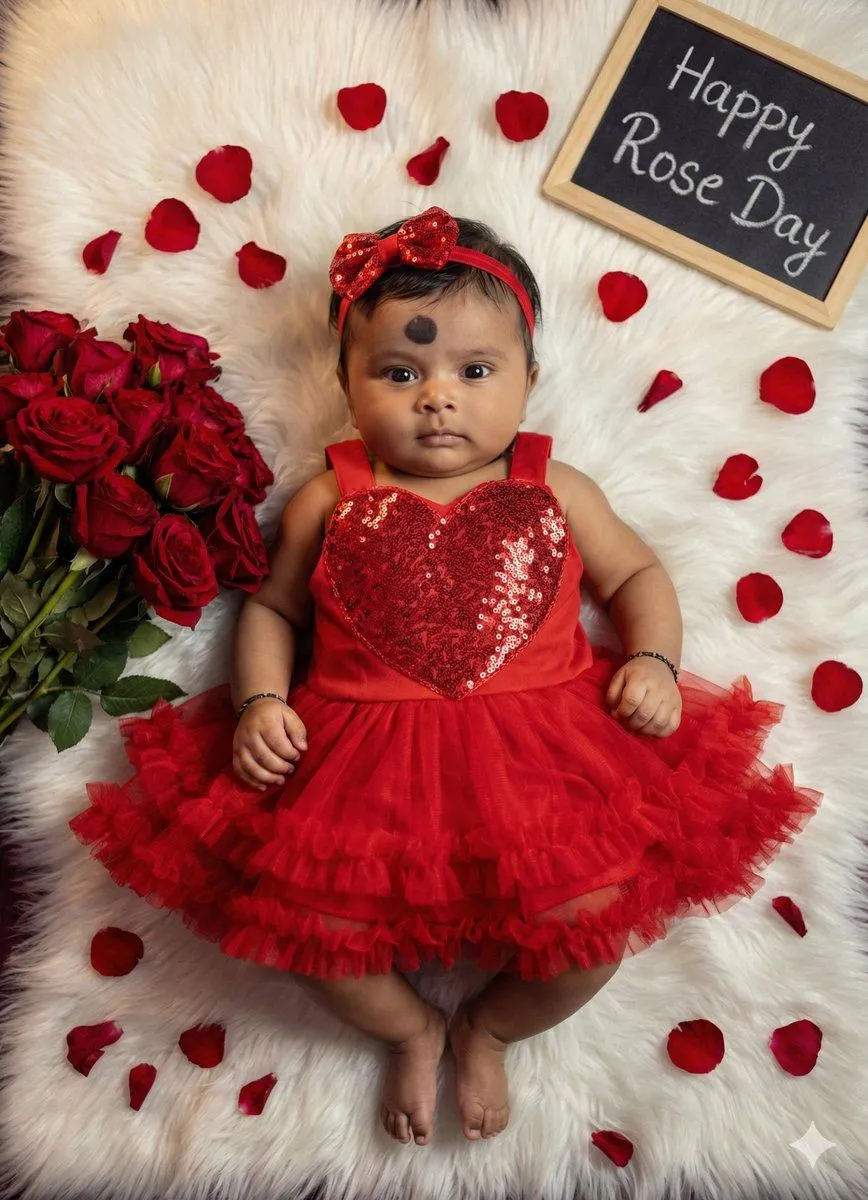
Valentine's Day Baby Girl Portrait Prompt

Made with Nano Banana Pro in Gemini by Library Social. Promptclay never generates images.

Did it work?

No reports yet. Tell others if it worked for you.

No comments yet. Be the first.

    Valentine's Day Baby Girl Portrait Prompt

    Nano Banana ProAI-generated

    Prompt

    Create a 8k hd ultra realistic picture of reference uploaded picture face 100 dont change face of, Looking straight to the cameraThe uploaded image is a professionally styled milestone portrait of an infant girl, designed with a romantic Valentine’s Day theme. The baby is lying on her back atop a plush, white faux-fur rug, dressed in a vibrant red ensemble that includes a sequined heart-shaped bodice, a ruffled tulle skirt, and a matching bow headband. To her left sits a lush bouquet of red roses, with individual petals scattered artistically across the rug to add depth and texture. In the upper right corner, a small chalkboard sign provides a personalized touch, marking her growth at five months (which we've since updated to "Happy Rose Day" in our edits). The high-contrast color palette of deep reds against the soft white background creates a warm, heartwarming aesthetic focused entirely on the infant's cheerful expression.

    Works in
    Gemini, ChatGPT
    Status
    Free to copy
    0
    DetailsVersions, settings and questions

    Written for

    What's in the prompt

    Subject
    Model
    Nano Banana Pro

    If your face changes

    keep my face exactly the same

    Questions

    Does this work in the Gemini app?
    Yes. Gemini runs Nano Banana, so paste the prompt and attach your photo if it uses one.
    It changed my face. What do I do?
    Add "keep my face exactly the same" to the end and run it again.
    Can I use the images I make?
    Check the terms of the app you use. Promptclay never generates images and claims nothing you make.
    Similar prompts

    See more
    • Valentine's Day Baby Boy Portrait Prompt
    • Teddy Bear Picnic Birthday Banner
    • Red Velvet High-Fashion Editorial Portrait
    • Cinematic Low-Key Portrait in Red Rose Room
    • Ethereal Floral Studio Portrait
    • Romantic Valentine's Day Influencer Portrait
    • Dreamy Birthday Princess Portrait
    • Soft Haze Orchid Studio Portrait
    • Anonymous Floral Crimson Portrait
    • Dream Couture Portrait: Gown of Floating Petals
    • Mysterious Butterfly Portrait Prompt
    • Kitten Heart Portrait Prompt
    • Coral Petal Dress Fashion Portrait
    • Cinematic Portrait with Harsh Flash and Floral Background (Duplicate)
    • Ana de Armas as Spider-Gwen
    • Cinematic Podcast Studio Portrait
    • Hand-Carved Wooden Miniature Figure
    • Imagination Coming to Life
    • Man with Zootopia Characters in Alpine Cable Car
    • Stylized Wicker Caricature Figurine
    • Charcoal and Pencil Couple Drawings
    • Hyperrealistic Tattooed Elf Couple
    • Multi-Angle Scene Generation Prompt (Oshi no Ko Style)
    • Nano Banana Pro Thumbnail Generation Example

    Show more

    Run it on your phone

    1. Prompt copiedRead it

      Create a 8k hd ultra realistic picture of reference uploaded picture face 100 dont change face of, Looking straight to the cameraThe uploaded image is a professionally styled milestone portrait of an infant girl, designed with a romantic Valentine’s Day theme. The baby is lying on her back atop a plush, white faux-fur rug, dressed in a vibrant red ensemble that includes a sequined heart-shaped bodice, a ruffled tulle skirt, and a matching bow headband. To her left sits a lush bouquet of red roses, with individual petals scattered artistically across the rug to add depth and texture. In the upper right corner, a small chalkboard sign provides a personalized touch, marking her growth at five months (which we've since updated to "Happy Rose Day" in our edits). The high-contrast color palette of deep reds against the soft white background creates a warm, heartwarming aesthetic focused entirely on the infant's cheerful expression.

    2. Open your app

    3. Paste and run

      Press and hold the message box, then tap Paste. Add your photo first if the prompt uses one. You may need to sign in.

    Valentine's Day Baby Girl Portrait Prompt