Tell us anything

An idea, a bug, something you love. We read every note.

⌘↵ to send. The page you're on comes along.

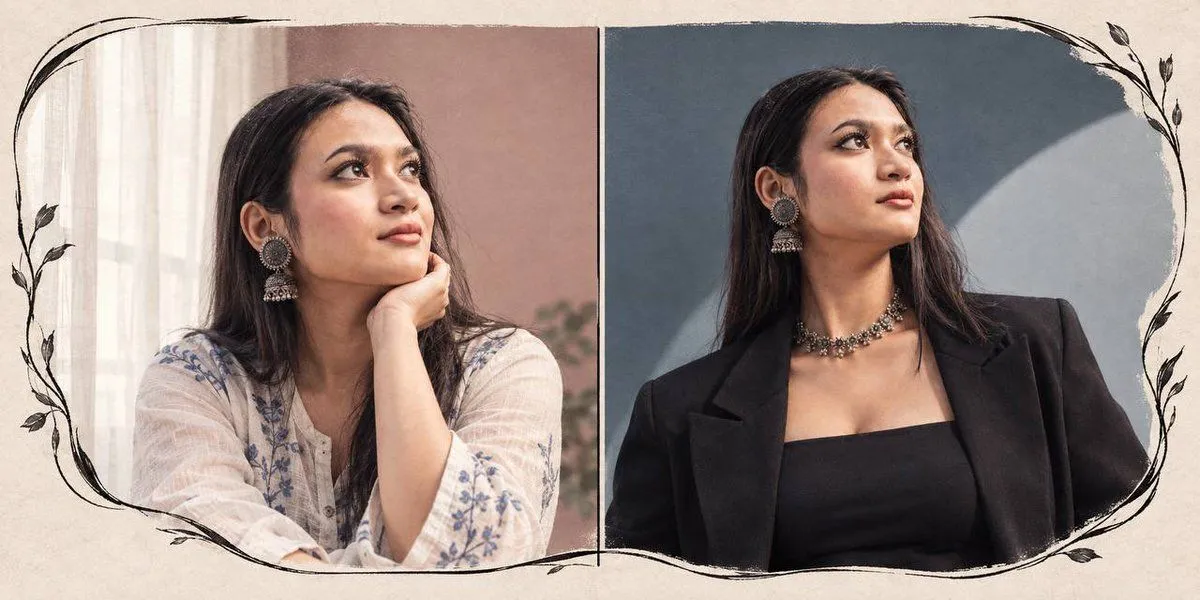
Two-Panel Portrait Diptych

Made with GPT Image 2 in ChatGPT by Library Avatars. Promptclay never generates images.

Did it work?

No reports yet. Tell others if it worked for you.

No comments yet. Be the first.

    Two-Panel Portrait Diptych

    GPT Image 22:1AI-generated

    Prompt

    Using the provided reference image as the character base, generate a horizontal two-panel diptych portrait. Preserve the subject's identity, facial features, and signature silver jhumka earrings exactly as they appear in the reference. Layout: A split composition with a thin vertical divider line separating the two panels. The entire canvas has a textured beige paper background featuring hand-drawn black ink botanical vine illustrations that frame the outer edges of both panels. Left Panel (Soft Mood): Depict the subject wearing a white kurta with delicate blue floral embroidery. She is resting her chin on her hand, looking upward to the right. The background is a warm, dusty pink wall with soft window light coming from the left. Right Panel (Bold Mood): Depict the subject wearing a structured black blazer over a black top. She is looking upward to the right with a confident expression. The background is a cool slate-blue studio setting with a large, soft circular spotlight effect behind her head.

    Works in
    ChatGPT, Gemini
    Status
    Free to copy
    0
    DetailsVersions, settings and questions

    Written for

    What's in the prompt

    Subject
    Model
    GPT Image 2

    If your face changes

    keep my face exactly the same

    Questions

    Does this work in the ChatGPT app?
    Yes. Paste the prompt and attach your photo if it uses one.
    It changed my face. What do I do?
    Add "keep my face exactly the same" to the end and run it again.
    Can I use the images I make?
    Check the terms of the app you use. Promptclay never generates images and claims nothing you make.
    Similar prompts

    See more
    • Ivory Suit Editorial Diptych
    • Cinematic Paper Tear South Asian Portrait
    • Dual Reality Vertical Panel Portrait
    • Facial Identity Portrait for GPT Image 2
    • Ultra-Realistic Editorial Portrait based on Reference Image
    • Four Seasons Portrait Collage
    • Horizontal three-panel emotional portrait from one image
    • Double Exposure Indian Woman Portrait
    • Chlorophyll Avant-Garde Editorial Portrait
    • Dream Couture Portrait: Gown of Floating Petals
    • Double Exposure Foggy Forest Portrait
    • Cinematic Double Exposure Portrait Prompt for Nano Banana Pro
    • Double Exposure Fashion Portrait
    • Split Photo and Sketch Portrait Effect
    • Double-Exposure Scrapbook Portrait Composite
    • Cinematic Profile Portrait in Crimson Field with Frame Overlay
    • Emerald Double Exposure Fashion Portrait
    • Multi-Panel Emotional State Grid
    • Cyberpunk Split Lighting Portrait
    • Professional Lighting Studio Grid
    • Family Dinner Cinematic Contact Sheet
    • Luxury Arcade with Sunlight Patterns
    • Convenience Store Fight Scene
    • Pop Idol Typography Cover Art

    Show more

    Run it on your phone

    1. Prompt copiedRead it

      Using the provided reference image as the character base, generate a horizontal two-panel diptych portrait. Preserve the subject's identity, facial features, and signature silver jhumka earrings exactly as they appear in the reference. Layout: A split composition with a thin vertical divider line separating the two panels. The entire canvas has a textured beige paper background featuring hand-drawn black ink botanical vine illustrations that frame the outer edges of both panels. Left Panel (Soft Mood): Depict the subject wearing a white kurta with delicate blue floral embroidery. She is resting her chin on her hand, looking upward to the right. The background is a warm, dusty pink wall with soft window light coming from the left. Right Panel (Bold Mood): Depict the subject wearing a structured black blazer over a black top. She is looking upward to the right with a confident expression. The background is a cool slate-blue studio setting with a large, soft circular spotlight effect behind her head.

    2. Open your app

    3. Paste and run

      Press and hold the message box, then tap Paste. Add your photo first if the prompt uses one. You may need to sign in.

    Two-Panel Portrait Diptych