Made with GPT Image 2 in ChatGPT by Library Brand. Promptclay never generates images.
Did it work?
No reports yet. Tell others if it worked for you.
Softmaple Landing Page Hero Expansion
Prompt
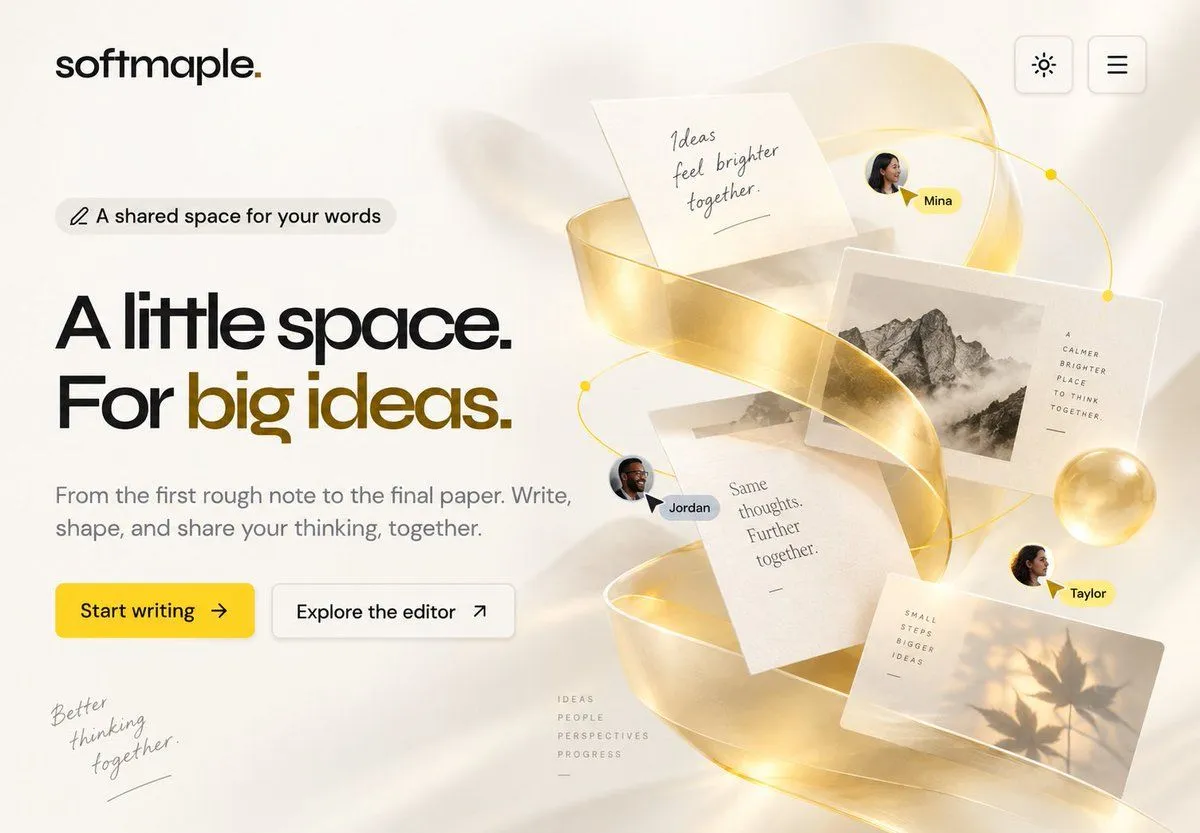
5 blanks to fillUsing the provided reference image as the base landing page, keep the existing softmaple logo, top-right theme/menu buttons, left-side badge, headline, paragraph, and the two call-to-action buttons in the same clean minimal style and approximate positions. Expand the composition into a richer hero section by adding a large collaborative writing visual on the right half of the page. Additions: Create an elegant floating 3D paper-and-ideas collage on the right: a translucent glossy golden ribbon spiraling vertically through the composition, with warm light, soft shadows, and a thin golden orbit line with small dot nodes. Include exactly 5 floating paper/photo elements: 1 handwritten note reading “Ideas feel brighter together.”, 1 black-and-white mountain photo card with small vertical text beside it reading “A CALMER BRIGHTER PLACE TO THINK TOGETHER,”, 1 central text page reading “Same thoughts. Further together.”, 1 warm photo card with leaf shadows and small text reading “SMALL STEPS BIGGER IDEAS”, and 1 subtle small taped paper fragment behind the center cards. Add exactly 3 collaborator avatars with name pills: “Mina” near the upper right, “Jordan” near the center-left of the collage, and “Taylor” near the lower right; each should have a small cursor pointer accent. Add two subtle handwritten editorial details in the empty lower area: bottom-left script reading “Better thinking together.” and a tiny stacked word list near the lower center reading “IDEAS / PEOPLE / PERSPECTIVES / PROGRESS”. Add a soft golden glass sphere near the right side of the collage. Keep the background off-white, airy, premium, and editorial, with realistic depth but no clutter. Customization slots: brand text {brand_text}, main headline {main_headline}, primary button text {primary_button_text}, collaborator names {collaborator_names}, note text {note_text}.
Preview of your prompt
Using the provided reference image as the base landing page, keep the existing softmaple logo, top-right theme/menu buttons, left-side badge, headline, paragraph, and the two call-to-action buttons in the same clean minimal style and approximate positions. Expand the composition into a richer hero section by adding a large collaborative writing visual on the right half of the page. Additions: Create an elegant floating 3D paper-and-ideas collage on the right: a translucent glossy golden ribbon spiraling vertically through the composition, with warm light, soft shadows, and a thin golden orbit line with small dot nodes. Include exactly 5 floating paper/photo elements: 1 handwritten note reading “Ideas feel brighter together.”, 1 black-and-white mountain photo card with small vertical text beside it reading “A CALMER BRIGHTER PLACE TO THINK TOGETHER,”, 1 central text page reading “Same thoughts. Further together.”, 1 warm photo card with leaf shadows and small text reading “SMALL STEPS BIGGER IDEAS”, and 1 subtle small taped paper fragment behind the center cards. Add exactly 3 collaborator avatars with name pills: “Mina” near the upper right, “Jordan” near the center-left of the collage, and “Taylor” near the lower right; each should have a small cursor pointer accent. Add two subtle handwritten editorial details in the empty lower area: bottom-left script reading “Better thinking together.” and a tiny stacked word list near the lower center reading “IDEAS / PEOPLE / PERSPECTIVES / PROGRESS”. Add a soft golden glass sphere near the right side of the collage. Keep the background off-white, airy, premium, and editorial, with realistic depth but no clutter. Customization slots: brand text softmaple., main headline A little space. For big ideas., primary button text Start writing, collaborator names Mina, Jordan, Taylor, note text Ideas feel brighter together..
DetailsVersions, settings and questions
Written for
What's in the prompt
- Subject
- Model
- GPT Image 2
If your face changes
keep my face exactly the sameQuestions
- Does this work in the ChatGPT app?
- Yes. Paste the prompt and attach your photo if it uses one.
- It changed my face. What do I do?
- Add "keep my face exactly the same" to the end and run it again.
- Can I use the images I make?
- Check the terms of the app you use. Promptclay never generates images and claims nothing you make.