Tell us anything

An idea, a bug, something you love. We read every note.

⌘↵ to send. The page you're on comes along.

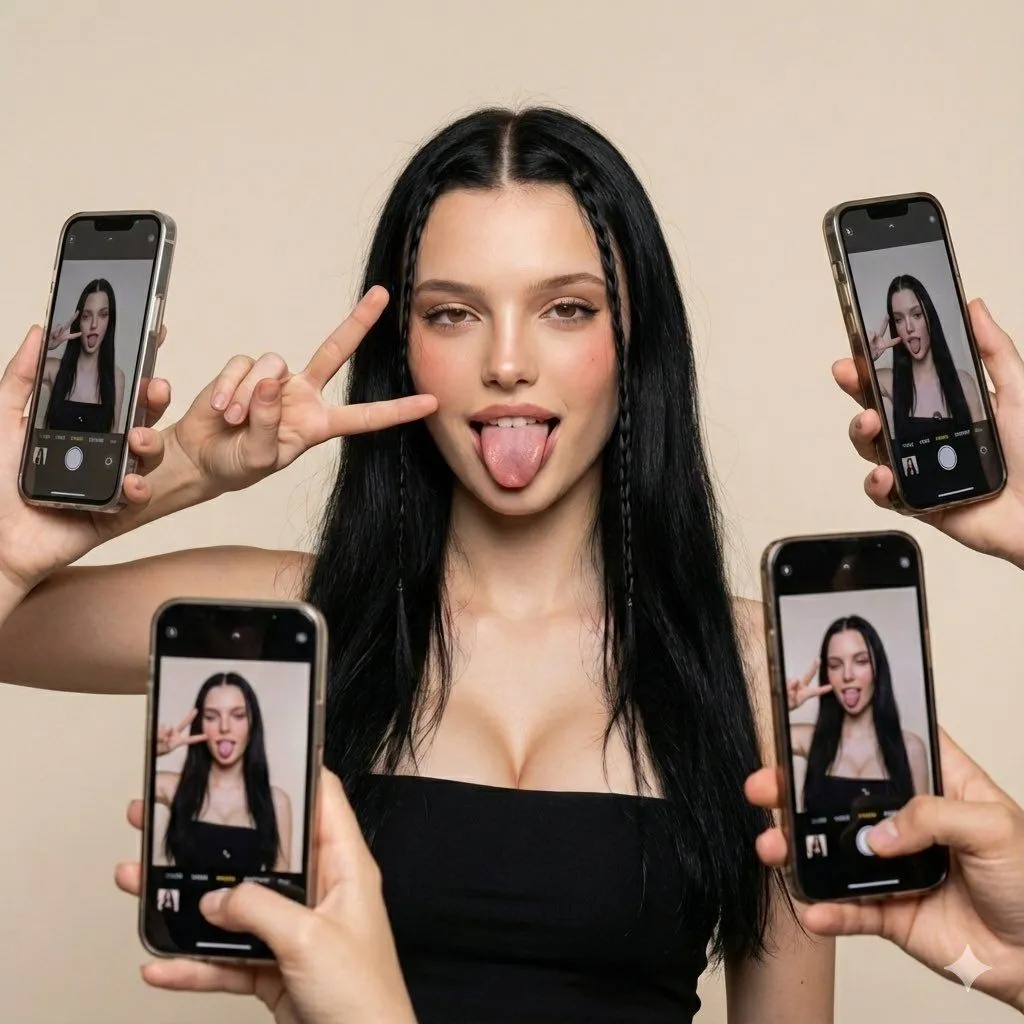
Social Media Influencer Studio Shoot with Mirrored Phones

Made with Nano Banana Pro in Gemini by Library Social. Promptclay never generates images.

Did it work?

No reports yet. Tell others if it worked for you.

No comments yet. Be the first.

    Social Media Influencer Studio Shoot with Mirrored Phones

    Nano Banana Pro1:1AI-generated

    Prompt

    { "scene": { "setting": "studio", "background": "plain light beige backdrop", "lighting": "soft even studio lighting, no harsh shadows", "mood": "fun, playful, social-media inspired composition" }, "subject": { "type": "young woman", "pose": { "expression": "tongue out playfully", "gesture": "right hand making peace sign near her cheek", "body_position": "facing forward, shoulders relaxed" }, "appearance": { "hair": { "length": "long", "color": "black", "style": "two thin braided strands framing the face, rest left natural" }, "makeup": "natural glam with defined eyes and blush", "outfit": { "top": "black strapless tube top" } } }, "composition": { "framing": "medium close-up", "special_elements": [ { "element": "multiple smartphones", "description": "Several hands holding phones around the subject, all capturing her photo from various angles", "perspective_effect": "phones on-screen display the subject in real-time, adding a mirrored visual layer" } ] }, "camera_style": { "lens": "standard portrait lens", "aesthetic": "modern influencer-style shoot", "effect": "clean digital clarity" }, "output_style": { "quality": "high-definition, ultra-realistic", "vibe": "social media selfie culture, dynamic and trendy" } }

    Works in
    Gemini, ChatGPT
    Status
    Free to copy
    0
    DetailsVersions, settings and questions

    Written for

    What's in the prompt

    Subject
    Model
    Nano Banana Pro

    If your face changes

    keep my face exactly the same

    Questions

    Does this work in the Gemini app?
    Yes. Gemini runs Nano Banana, so paste the prompt and attach your photo if it uses one.
    It changed my face. What do I do?
    Add "keep my face exactly the same" to the end and run it again.
    Can I use the images I make?
    Check the terms of the app you use. Promptclay never generates images and claims nothing you make.
    Similar prompts

    See more
    • iPhone Portrait with Phone Frame Effect
    • 2x2 Selfie Collage with Playful Poses
    • Higgsfield Nano Banana Pro Aspect Ratio Prompt
    • Playful Interior Selfie Portrait
    • Candid car selfie in sunlight
    • Photorealistic Selfie of a Young Woman in a Bikini
    • LA Streetwear Influencer Photo Prompt (Hollywood Hills)
    • Candid Winter Smartphone Portrait
    • Image-to-Image Editing Example
    • Ultra-Realistic Studio Portrait with Playful Expression
    • Oversized Smartphone Street Portrait
    • Fashion Casting Contact Sheet
    • 3x3 Grid Character Consistency Prompt
    • Early 2000s Rom-Com Movie Poster
    • Imagination Coming to Life
    • Man with Zootopia Characters in Alpine Cable Car
    • Multi-Angle Scene Generation Prompt (Oshi no Ko Style)
    • Romantic Rainy City Moment
    • RPG Status Screen Overlay
    • Sophisticated Dining Scene with Burgundy Gown (Urdu/Hindi)
    • Hand-Carved Wooden Miniature Figure
    • Human Fragments Editorial Poster
    • Nano Banana Pro Thumbnail Generation Example
    • Stylized Wicker Caricature Figurine

    Show more

    Run it on your phone

    1. Prompt copiedRead it

      { "scene": { "setting": "studio", "background": "plain light beige backdrop", "lighting": "soft even studio lighting, no harsh shadows", "mood": "fun, playful, social-media inspired composition" }, "subject": { "type": "young woman", "pose": { "expression": "tongue out playfully", "gesture": "right hand making peace sign near her cheek", "body_position": "facing forward, shoulders relaxed" }, "appearance": { "hair": { "length": "long", "color": "black", "style": "two thin braided strands framing the face, rest left natural" }, "makeup": "natural glam with defined eyes and blush", "outfit": { "top": "black strapless tube top" } } }, "composition": { "framing": "medium close-up", "special_elements": [ { "element": "multiple smartphones", "description": "Several hands holding phones around the subject, all capturing her photo from various angles", "perspective_effect": "phones on-screen display the subject in real-time, adding a mirrored visual layer" } ] }, "camera_style": { "lens": "standard portrait lens", "aesthetic": "modern influencer-style shoot", "effect": "clean digital clarity" }, "output_style": { "quality": "high-definition, ultra-realistic", "vibe": "social media selfie culture, dynamic and trendy" } }

    2. Open your app

    3. Paste and run

      Press and hold the message box, then tap Paste. Add your photo first if the prompt uses one. You may need to sign in.

    Social Media Influencer Studio Shoot with Mirrored Phones