Tell us anything

An idea, a bug, something you love. We read every note.

⌘↵ to send. The page you're on comes along.

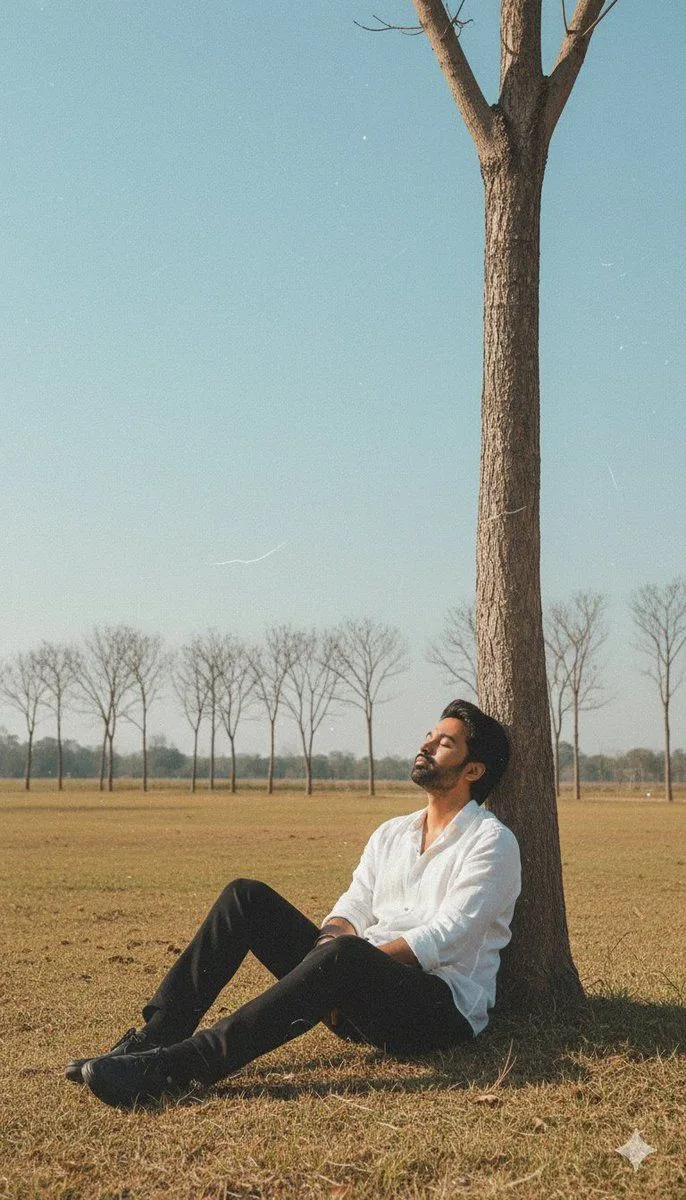
Retro Vintage Portrait from Reference Photo

Made with GPT Image 1.5 in ChatGPT by Library Concept. Promptclay never generates images.

Did it work?

No reports yet. Tell others if it worked for you.

No comments yet. Be the first.

    Retro Vintage Portrait from Reference Photo

    GPT Image 1.59:16Needs your photoAI-generated

    Prompt

    Create a retro vintage grainy but bright image of the reference picture. Use the uploaded image as exact facial reference, keeping the same features, proportions, and likeness. wearing a loose white shirt and dark trousers, is sitting on the ground with his back against the trunk of a bare tree. His eyes are closed and his head is tilted back slightly. He is in a grassy field with a line of trees in the background under a clear sky. The lighting is natural and soft, with a slightly desaturated color palette. keep my face 100% same as in reference image

    Use only photos you have the right to usePhoto tips
    • Your photo stays with your app. You upload it to Gemini, ChatGPT or the app you use. Promptclay never sees or stores it.
    • Crop to what the prompt needs. Your face for a portrait. Leave out other people, house numbers, cards and screens.
    • Check the result before you post. Apps sometimes add things that were not in your photo, like a mole, a tattoo or bare shoulders. Run it again or ask the app to remove them.
    Works in
    ChatGPT, Gemini
    Status
    Free to copy
    0
    DetailsVersions, settings and questions

    Written for

    What's in the prompt

    Subject
    Model
    GPT Image 1.5

    If your face changes

    keep my face exactly the same

    Questions

    Does this work in the ChatGPT app?
    Yes. Paste the prompt and attach your photo if it uses one.
    It changed my face. What do I do?
    Add "keep my face exactly the same" to the end and run it again.
    Can I use the images I make?
    Check the terms of the app you use. Promptclay never generates images and claims nothing you make.
    Similar prompts

    See more
    • Vintage Cinematic Car Portrait
    • Vintage Studio Portrait with Identity Preservation Prompt
    • Rustic Cabin Forest Portrait
    • Vintage Classroom Cinematic Portrait
    • 4K Ultra-Realistic Instagram Portrait from Reference
    • Cinematic Winter Portrait Prompt
    • Neo-Noir Sci-Fi Sky Portrait
    • Cinematic Autumn Portrait of Man with Vintage Motorcycle
    • Stunning Photo Prompt for Gemini Nano Banana (Generic)
    • Black-and-White Fine Art Portrait
    • Autumn Environmental Portrait
    • Cinematic Forest Campfire Portrait
    • Simple photo upscaling and repair prompt
    • Vintage Halftone Portrait Poster
    • Moody Studio Portrait Photography
    • Photorealistic Studio Portrait Prompt for Male Model
    • Minimalist Meadow Portrait
    • Retro Cheongsam Mother-Daughter Portrait
    • 1980s Vintage Retro Portrait
    • Literary Illustration Portrait
    • Minimalist Luxury Fashion Ad
    • Photoreal Character Reference Sheet
    • Themed Routine Timeline Infographic
    • Vintage Mixed-Media Muse Portrait

    Show more

    Run it on your phone

    1. Prompt copiedRead it

      Create a retro vintage grainy but bright image of the reference picture. Use the uploaded image as exact facial reference, keeping the same features, proportions, and likeness. wearing a loose white shirt and dark trousers, is sitting on the ground with his back against the trunk of a bare tree. His eyes are closed and his head is tilted back slightly. He is in a grassy field with a line of trees in the background under a clear sky. The lighting is natural and soft, with a slightly desaturated color palette. keep my face 100% same as in reference image

    2. Open your app

    3. Paste and run

      Press and hold the message box, then tap Paste. Add your photo first if the prompt uses one. You may need to sign in.

    Retro Vintage Portrait from Reference Photo