Tell us anything

An idea, a bug, something you love. We read every note.

⌘↵ to send. The page you're on comes along.

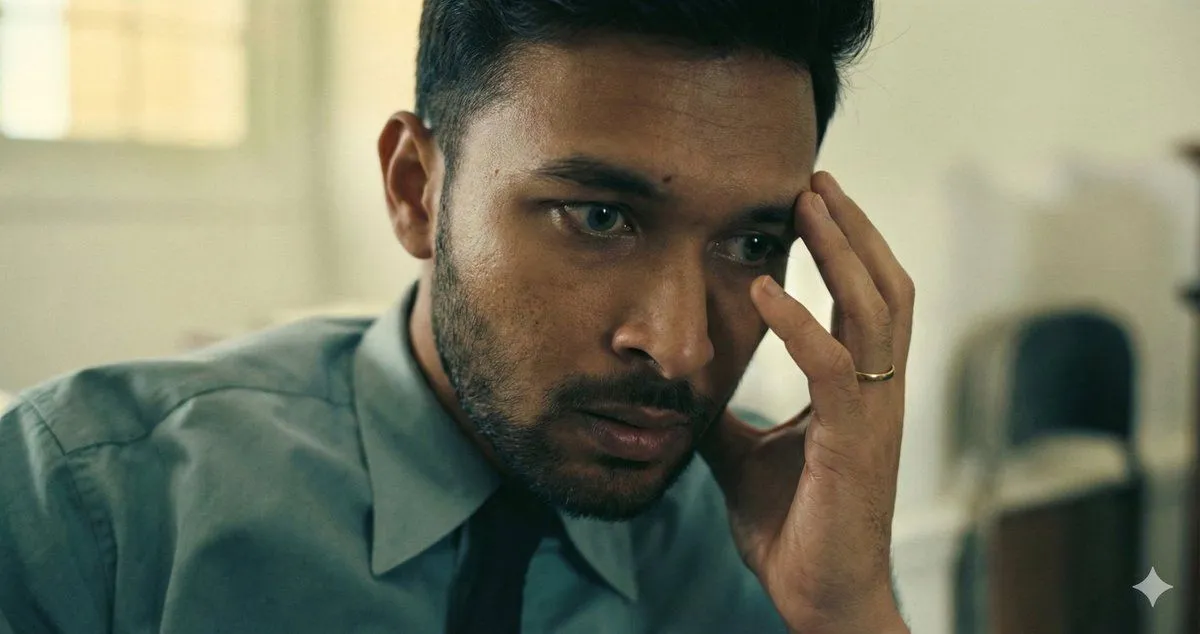
Oppenheimer Scene Face Swap and Restoration

Made with Nano Banana Pro in Gemini, collected by Library Portraits. Promptclay never generates images.

Did it work?

No reports yet. Tell others if it worked for you.

No comments yet. Be the first.

    Oppenheimer Scene Face Swap and Restoration

    Nano Banana ProNeeds your photoAI-generated

    Prompt

    Use the uploaded Oppenheimer movie frame as the PRIMARY and ONLY scene reference. Reproduce the scene EXACTLY as shown: same interior room and background blur, same soft daylight from camera-left, same muted green–yellow color temperature, same camera angle and proximity (tight close-up), same framing and crop, same shallow depth of field, same outfit (teal shirt, dark tie), same hand-to-temple gesture, same ring on finger, same anxious, mentally strained expression, same posture and head tilt. DO NOT reinterpret the scene. DO NOT change the environment, lighting, or composition. Replace ONLY the face with my uploaded face reference. My face must remain 100% identical: exact facial structure, skin tone, eye shape, nose, lips, jawline, hairline, stubble pattern preserved. Face swap must perfectly match: original head angle, original facial muscle tension, original eye direction, original lighting and shadow falloff. Ultra-realistic cinematic realism. Natural film grain preserved. No stylization, no creative liberty. Aspect ratio: 1.90:1 (IMAX digital frame). Full headroom preserved. No crop, no zoom, no reframing. No background change No lighting change No pose change No hand movement No expression change No color grading No stylization No AI artifacts No face morphing No resemblance to Cillian Murphy

    Use only photos you have the right to usePhoto tips
    • Your photo stays with your app. You upload it to Gemini, ChatGPT or the app you use. Promptclay never sees or stores it.
    • Crop to what the prompt needs. Your face for a portrait. Leave out other people, house numbers, cards and screens.
    • Check the result before you post. Apps sometimes add things that were not in your photo, like a mole, a tattoo or bare shoulders. Run it again or ask the app to remove them.
    Works in
    Gemini, ChatGPT
    Status
    Free to copy
    0
    DetailsVersions, settings and questions

    Written for

    What's in the prompt

    Subject
    Model
    Nano Banana Pro

    If your face changes

    keep my face exactly the same

    Questions

    Does this work in the Gemini app?
    Yes. Gemini runs Nano Banana, so paste the prompt and attach your photo if it uses one.
    It changed my face. What do I do?
    Add "keep my face exactly the same" to the end and run it again.
    Can I use the images I make?
    Check the terms of the app you use. Promptclay never generates images and claims nothing you make.
    Similar prompts

    See more
    • Moody Cinematic Close-up Male Portrait
    • Chiaroscuro Smoke Exhale Portrait
    • Ultra-Realistic Cinematic Spotlight Portrait
    • High-Contrast Black and White Portrait Prompt
    • Cinematic Chiaroscuro Portrait Prompt
    • Cinematic Selective Color Portrait
    • Dexter Morgan Cinematic Portrait with Banana Prop Prompt
    • Cinematic Dark Movie Poster
    • Melancholic Subway Commuter Portrait
    • Existential Cinematic Solitude Film Still
    • Cinematic Double-Exposure Beach Portrait
    • Cinematic Action Movie Portrait
    • Cyberpunk Cinematic Close-up Portrait
    • Body Swap Mirror Reflection
    • Sophisticated Dark Editorial Portrait
    • Cinematic Dark Thriller Movie Poster
    • Dark Fantasy Doppelganger Portrait
    • Gritty Urban Superhero Portrait
    • Fire and Ice Elemental Man Portrait
    • Xiaohongshu Moody Portrait Cover
    • Behind-the-scenes filming setup visualization
    • Cinematic Genius Portrait
    • Anonymous Blue Tech Thumbnail
    • Cinematic Portrait with Dual-Color Lighting

    Show more

    Run it on your phone

    1. Prompt copiedRead it

      Use the uploaded Oppenheimer movie frame as the PRIMARY and ONLY scene reference. Reproduce the scene EXACTLY as shown: same interior room and background blur, same soft daylight from camera-left, same muted green–yellow color temperature, same camera angle and proximity (tight close-up), same framing and crop, same shallow depth of field, same outfit (teal shirt, dark tie), same hand-to-temple gesture, same ring on finger, same anxious, mentally strained expression, same posture and head tilt. DO NOT reinterpret the scene. DO NOT change the environment, lighting, or composition. Replace ONLY the face with my uploaded face reference. My face must remain 100% identical: exact facial structure, skin tone, eye shape, nose, lips, jawline, hairline, stubble pattern preserved. Face swap must perfectly match: original head angle, original facial muscle tension, original eye direction, original lighting and shadow falloff. Ultra-realistic cinematic realism. Natural film grain preserved. No stylization, no creative liberty. Aspect ratio: 1.90:1 (IMAX digital frame). Full headroom preserved. No crop, no zoom, no reframing. No background change No lighting change No pose change No hand movement No expression change No color grading No stylization No AI artifacts No face morphing No resemblance to Cillian Murphy

    2. Open your app

    3. Paste and run

      Press and hold the message box, then tap Paste. Add your photo first if the prompt uses one. You may need to sign in.

    Oppenheimer Scene Face Swap and Restoration