Tell us anything

An idea, a bug, something you love. We read every note.

⌘↵ to send. The page you're on comes along.

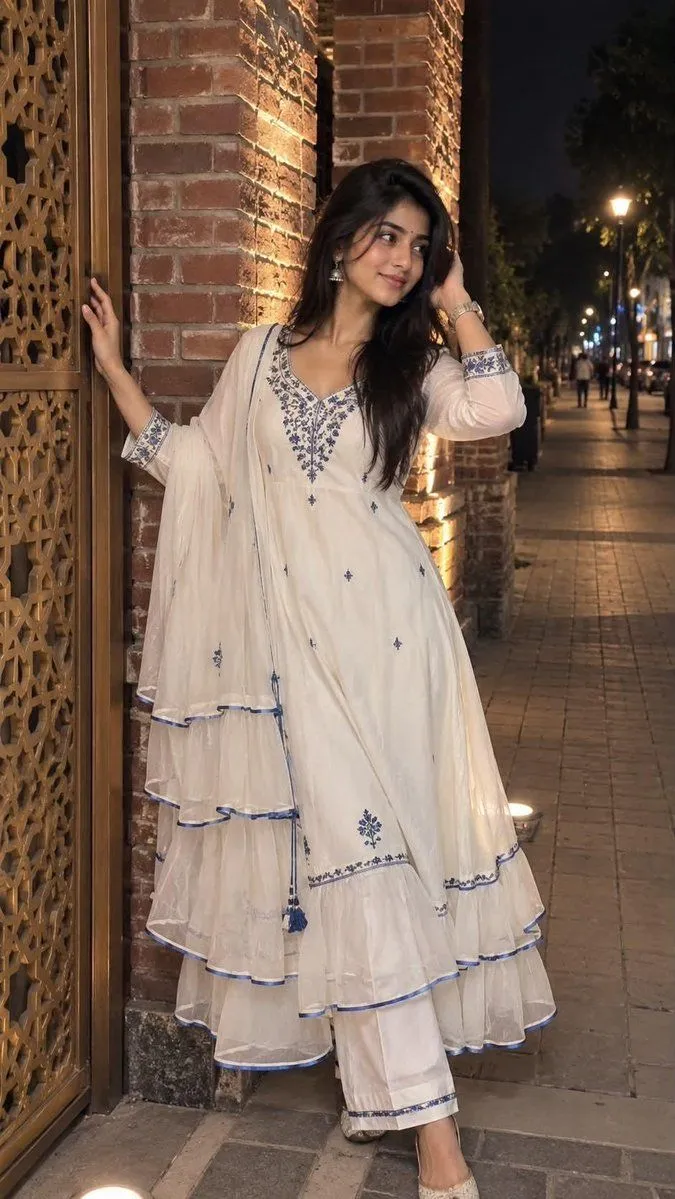
Nighttime Traditional Portrait Portrait

Made with GPT Image 2 in ChatGPT by Library Lifestyle. Promptclay never generates images.

Did it work?

No reports yet. Tell others if it worked for you.

No comments yet. Be the first.

    Nighttime Traditional Portrait Portrait

    GPT Image 29:16AI-generated

    Prompt

    Create an image shows a young woman posing outdoors at night in front of a brick structure. She is wearing a stylish, long white traditional outfit featuring layered sheer frills and vibrant blue accents along the hemline and cuffs. Her ensemble includes embroidered patterns near the neckline and is paired with matching white trousers. She has dark, shoulder-length hair and is smiling gently while resting one hand near her hair and touching a decorative door or gate with the other.The background consists of a exposed brick pillar illuminated by bright artificial lighting. Adjacent to her is an intricate golden-brown decorative gate or wooden screen. To her right, a paved sidewalk extends down a city street under dim nighttime lighting. In the distant background, streetlights and faint figures of pedestrians can be seen along the pathway. The overall atmosphere is warm and brightly lit around the subject, contrasting with the darker ambient urban street scene.

    Works in
    ChatGPT, Gemini
    Status
    Free to copy
    0
    DetailsVersions, settings and questions

    Written for

    What's in the prompt

    Subject
    Model
    GPT Image 2

    If your face changes

    keep my face exactly the same

    Questions

    Does this work in the ChatGPT app?
    Yes. Paste the prompt and attach your photo if it uses one.
    It changed my face. What do I do?
    Add "keep my face exactly the same" to the end and run it again.
    Can I use the images I make?
    Check the terms of the app you use. Promptclay never generates images and claims nothing you make.
    Similar prompts

    See more
    • Asian Woman Candid Street Portrait
    • Pakistani Fashion Portrait in Mughal Courtyard
    • Modern Beauty to Ancient Warrior Transformation PromptVideo, 0:25
    • Night City Urban Portrait
    • Raw Realistic Amateur Photography Style
    • Y2K Dreamy Close-up Portrait with Identity Lock
    • Fine Art Model Portrait
    • Young Woman Night Street Portrait
    • Chiaroscuro Golden Hour Portrait Prompt
    • Editorial Urban Fashion Portrait Prompt
    • Summer Day Blue Wall Portrait
    • Golden Hour Street Style Portrait Prompt
    • Stylish Man Street Lamp Portrait
    • LLM prompt for generating a detailed travel itinerary for a trip to Japan
    • Premium Editorial Split-Canvas Poster
    • Change clothing to match reference outfit
    • Low Angle Fashion Portrait
    • Floral Dress Vanity Portrait
    • Intimate Club VIP Lounge Moment
    • Vintage Store Shopping Scene
    • Before After Makeup Transformation
    • Golden Hour Luxury Car Selfie
    • Realistic Casual Mirror Selfie
    • Retro CCD Hanfu Lifestyle Photo

    Show more

    Run it on your phone

    1. Prompt copiedRead it

      Create an image shows a young woman posing outdoors at night in front of a brick structure. She is wearing a stylish, long white traditional outfit featuring layered sheer frills and vibrant blue accents along the hemline and cuffs. Her ensemble includes embroidered patterns near the neckline and is paired with matching white trousers. She has dark, shoulder-length hair and is smiling gently while resting one hand near her hair and touching a decorative door or gate with the other.The background consists of a exposed brick pillar illuminated by bright artificial lighting. Adjacent to her is an intricate golden-brown decorative gate or wooden screen. To her right, a paved sidewalk extends down a city street under dim nighttime lighting. In the distant background, streetlights and faint figures of pedestrians can be seen along the pathway. The overall atmosphere is warm and brightly lit around the subject, contrasting with the darker ambient urban street scene.

    2. Open your app

    3. Paste and run

      Press and hold the message box, then tap Paste. Add your photo first if the prompt uses one. You may need to sign in.

    Nighttime Traditional Portrait Portrait