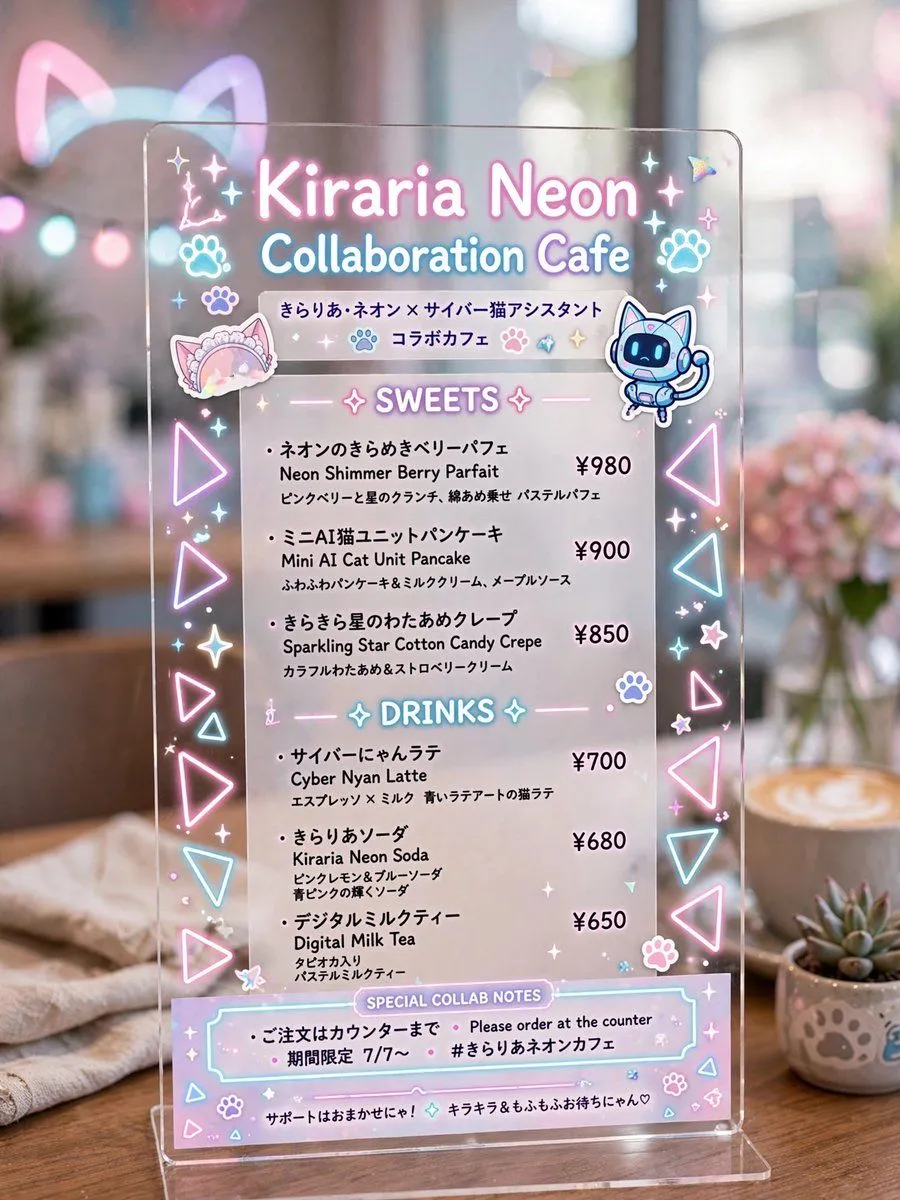
Made with GPT Image 2 in ChatGPT, collected by Library Brand. Promptclay never generates images.
Did it work?
No reports yet. Tell others if it worked for you.
Kiraria Neon Collaboration Cafe Menu
Prompt
2 blanks to fillGoal: Create a photorealistic vertical image of a transparent acrylic tabletop menu sign for a cute futuristic anime collaboration cafe, styled with glowing pastel neon graphics and Japanese cafe-menu typography. Canvas: Vertical 3:4 composition, close-up product-photography framing. The acrylic sign is centered and fills most of the image, standing on a clear base on a wooden cafe table. Background is softly blurred with warm cafe bokeh, a latte on the right, a small succulent in a paw-print pot, pink flowers, soft window light, and faint glowing cat-ear shapes in the distance. Main sign: A clear rectangular acrylic board with rounded corners, subtle reflections, glossy edges, and printed/neon-looking pastel graphics. Use pink, cyan, lavender, and white glow effects as if the graphics are lit from within. Headline text: Large glowing title at top: {cafe_name}. Under it, glowing subtitle: {event_subtitle}. Beneath that, include Japanese collaboration text: 「きらりあ・ネオン × サイバー猫アシスタント」 and 「コラボカフェ」. Decorations: Include exactly 2 character stickers near the top area: 1 pastel frilly cat-ear headband sticker on the left, and 1 cute blue cyber cat robot assistant sticker on the right. Include exactly 2 paw icons near the headline, many small star sparkles, tiny hearts, flowers, and holographic accents. Along both vertical edges, place repeated glowing triangle icons in pink and cyan; make exactly 10 large triangle outlines total, 5 on the left edge and 5 on the right edge. Menu layout: White semi-transparent printed menu panel on the acrylic, with two centered neon section headers. Section 1 header: “SWEETS” with sparkle symbols. Include exactly 3 sweets items, each with Japanese name, English name, short Japanese description, and price aligned on the right: 1. 「ネオンのきらめきベリーパフェ」 / “Neon Shimmer Berry Parfait” / price “¥980”. 2. 「ミニAI猫ユニットパンケーキ」 / “Mini AI Cat Unit Pancake” / price “¥900”. 3. 「きらきら星のわたあめクレープ」 / “Sparkling Star Cotton Candy Crepe” / price “¥850”. Section 2 header: “DRINKS” with sparkle symbols. Include exactly 3 drinks items, each with Japanese name, English name, short Japanese description, and price aligned on the right: 1. 「サイバーにゃんラテ」 / “Cyber Nyan Latte” / price “¥700”. 2. 「きらりあソーダ」 / “Kiraria Neon Soda” / price “¥680”. 3. 「デジタルミルクティー」 / “Digital Milk Tea” / price “¥650”. Bottom notes: Add a pastel outlined box labeled “SPECIAL COLLAB NOTES”. Inside, include exactly 3 note lines: 「ご注文はカウンターまで」, “Please order at the counter”, and 「期間限定 7/7〜」 plus hashtag “#きらりあネオンカフェ”. At the very bottom, add a tiny support message in Japanese: 「サポートはおまかせにゃ! キラキラ&もふもふお待ちにゃん♡」. Visual style: Hyper-detailed realistic cafe photography mixed with kawaii cyber-neon graphic design, shallow depth of field, soft pastel lighting, clean readable printed text, glossy transparent acrylic, dreamy bokeh, cozy wood tabletop, no people, no watermark. Keep the menu cute, polished, and highly legible.
Goal: Create a photorealistic vertical image of a transparent acrylic tabletop menu sign for a cute futuristic anime collaboration cafe, styled with glowing pastel neon graphics and Japanese cafe-menu typography. Canvas: Vertical 3:4 composition, close-up product-photography framing. The acrylic sign is centered and fills most of the image, standing on a clear base on a wooden cafe table. Background is softly blurred with warm cafe bokeh, a latte on the right, a small succulent in a paw-print pot, pink flowers, soft window light, and faint glowing cat-ear shapes in the distance. Main sign: A clear rectangular acrylic board with rounded corners, subtle reflections, glossy edges, and printed/neon-looking pastel graphics. Use pink, cyan, lavender, and white glow effects as if the graphics are lit from within. Headline text: Large glowing title at top: Kiraria Neon. Under it, glowing subtitle: Collaboration Cafe. Beneath that, include Japanese collaboration text: 「きらりあ・ネオン × サイバー猫アシスタント」 and 「コラボカフェ」. Decorations: Include exactly 2 character stickers near the top area: 1 pastel frilly cat-ear headband sticker on the left, and 1 cute blue cyber cat robot assistant sticker on the right. Include exactly 2 paw icons near the headline, many small star sparkles, tiny hearts, flowers, and holographic accents. Along both vertical edges, place repeated glowing triangle icons in pink and cyan; make exactly 10 large triangle outlines total, 5 on the left edge and 5 on the right edge. Menu layout: White semi-transparent printed menu panel on the acrylic, with two centered neon section headers. Section 1 header: “SWEETS” with sparkle symbols. Include exactly 3 sweets items, each with Japanese name, English name, short Japanese description, and price aligned on the right: 1. 「ネオンのきらめきベリーパフェ」 / “Neon Shimmer Berry Parfait” / price “¥980”. 2. 「ミニAI猫ユニットパンケーキ」 / “Mini AI Cat Unit Pancake” / price “¥900”. 3. 「きらきら星のわたあめクレープ」 / “Sparkling Star Cotton Candy Crepe” / price “¥850”. Section 2 header: “DRINKS” with sparkle symbols. Include exactly 3 drinks items, each with Japanese name, English name, short Japanese description, and price aligned on the right: 1. 「サイバーにゃんラテ」 / “Cyber Nyan Latte” / price “¥700”. 2. 「きらりあソーダ」 / “Kiraria Neon Soda” / price “¥680”. 3. 「デジタルミルクティー」 / “Digital Milk Tea” / price “¥650”. Bottom notes: Add a pastel outlined box labeled “SPECIAL COLLAB NOTES”. Inside, include exactly 3 note lines: 「ご注文はカウンターまで」, “Please order at the counter”, and 「期間限定 7/7〜」 plus hashtag “#きらりあネオンカフェ”. At the very bottom, add a tiny support message in Japanese: 「サポートはおまかせにゃ! キラキラ&もふもふお待ちにゃん♡」. Visual style: Hyper-detailed realistic cafe photography mixed with kawaii cyber-neon graphic design, shallow depth of field, soft pastel lighting, clean readable printed text, glossy transparent acrylic, dreamy bokeh, cozy wood tabletop, no people, no watermark. Keep the menu cute, polished, and highly legible.
DetailsVersions, settings and questions
Written for
What's in the prompt
- Subject
- Model
- GPT Image 2
If your face changes
keep my face exactly the sameQuestions
- Does this work in the ChatGPT app?
- Yes. Paste the prompt and attach your photo if it uses one.
- It changed my face. What do I do?
- Add "keep my face exactly the same" to the end and run it again.
- Can I use the images I make?
- Check the terms of the app you use. Promptclay never generates images and claims nothing you make.