Tell us anything

An idea, a bug, something you love. We read every note.

⌘↵ to send. The page you're on comes along.

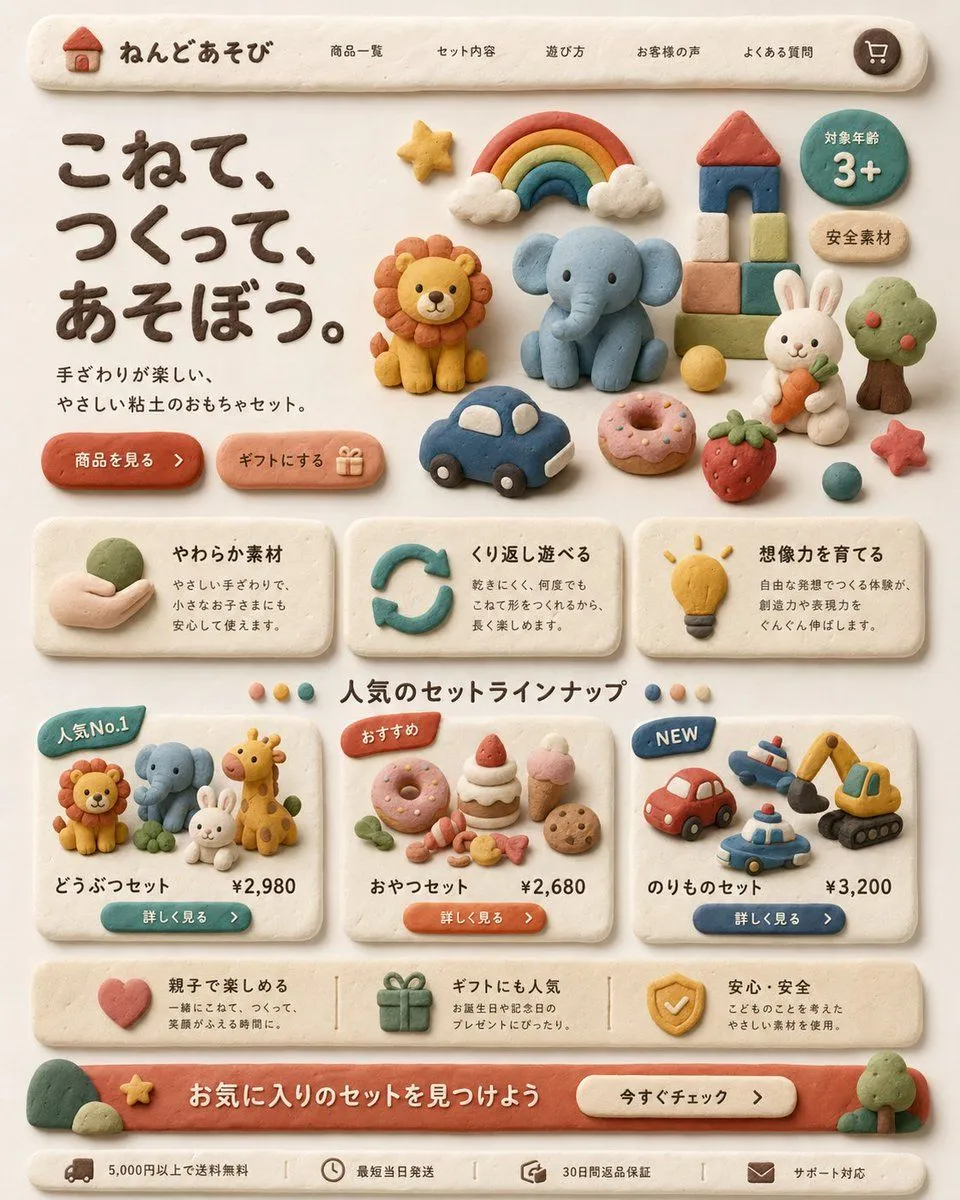
Clay Toy Landing Page UI

Made with GPT Image 2 in ChatGPT by Library Brand. Promptclay never generates images.

Did it work?

No reports yet. Tell others if it worked for you.

No comments yet. Be the first.

    Clay Toy Landing Page UI

    GPT Image 24:5AI-generated

    Prompt

    Create a warm, playful Japanese landing page for a children's clay toy brand, designed entirely in a handmade soft clay diorama style. The whole interface should look sculpted from pastel modeling clay with rounded edges, slight finger-pressed imperfections, matte texture, soft shadows, and a cozy cream background. At the top, show a pill-shaped navigation bar with a small clay house logo and the brand name "ねんどあそび", followed by 5 navigation items: "商品一覧", "セット内容", "遊び方", "お客様の声", "よくある質問", plus a round cart icon on the far right. In the hero section, place a large dark-brown clay headline on the left reading "こねて、つくって、あそぼう。" and a smaller supporting sentence beneath it reading "手ざわりが楽しい、やさしい粘土のおもちゃセット。" Add 2 rounded clay call-to-action buttons below: "商品を見る" and "ギフトにする" with a small gift icon. On the right side of the hero area, arrange 12 clay toy illustrations: a rainbow with clouds, a lion, an elephant, a block tower with red roof, a green circular badge reading "対象年齢 3+", a beige oval badge reading "安全素材", a white rabbit holding a carrot, a tree, a yellow ball, a blue toy car, a pink donut, and a strawberry, plus a small red star near the lower right. Below, create a 3-card benefits row, each card made from off-white clay with icon, title, and short Japanese description. Card 1 title: "やわらか素材" with a hand holding clay icon. Card 2 title: "くり返し遊べる" with a circular arrow icon. Card 3 title: "想像力を育てる" with a lightbulb icon. Under that, add a centered section title "人気のセットラインナップ" with 4 small colored dots around it. Then show 3 product cards. Card 1 has a blue badge "人気No.1", shows 4 animal figures: lion, elephant, rabbit, giraffe, and includes the title "どうぶつセット" and price "¥2,980" with a teal button "詳しく見る". Card 2 has an orange badge "おすすめ", shows 7 snack items: donut, cake slice, strawberry shortcake, pink ice cream cone, cookie, candy pieces, and small leaves, and includes the title "おやつセット" and price "¥2,680" with an orange button "詳しく見る". Card 3 has a blue badge "NEW", shows 4 vehicle toys: red car, airplane, police car, excavator, and includes the title "のりものセット" and price "¥3,200" with a navy button "詳しく見る". Add a horizontal reassurance strip with 3 items: a heart icon with text about parent-child fun, a gift icon with text about gift popularity, and a shield icon with text about safety and安心・安全. At the bottom, create a large coral clay banner with the headline "お気に入りのセットを見つけよう" and a cream button reading "今すぐチェック". Finally add a slim footer bar with 4 compact items and icons: "5,000円以上で送料無料", "最短当日発送", "30日間返品保証", and "サポート対応". Use a balanced, grid-based web layout, front-facing view, soft natural lighting, subtle shadows, highly polished product-design mockup quality, charming handcrafted claymation aesthetic, and a premium yet child-friendly feel.

    Works in
    ChatGPT, Gemini
    Status
    Free to copy
    0
    DetailsVersions, settings and questions

    Written for

    What's in the prompt

    Subject
    Model
    GPT Image 2

    If your face changes

    keep my face exactly the same

    Questions

    Does this work in the ChatGPT app?
    Yes. Paste the prompt and attach your photo if it uses one.
    It changed my face. What do I do?
    Add "keep my face exactly the same" to the end and run it again.
    Can I use the images I make?
    Check the terms of the app you use. Promptclay never generates images and claims nothing you make.
    Similar prompts

    See more
    • Cute Totoro Puzzle Game UI
    • Cozy Claymation Style World
    • Glossy 3D Website Category Icons
    • Minimalist 3D Clay Render
    • Cute AI Doodle Generator Landing Page
    • Claymation day phases infographic for kids
    • Handmade Play-Doh City Scene
    • Handcrafted Clay Store Diorama
    • Clay-Style Soft Minimal 3D Illustration Template
    • Clay Velocity Product Ad
    • Voxel AI Website Building Infographic
    • Skincare Landing Page Mockup
    • Men's Skincare Website Landing Page Mockup
    • Selfie to Claymation Transformation
    • Product ad-style image for a raccoon figure
    • SenseNova U1 Pro Landing Page
    • 3D Artsy Video Game Controller Grid
    • Mechanical Keyboard Product Page Mockup
    • Handmade Clay Figurine Style with Wire Elements
    • Felt Cat Character Reference Sheet
    • Japanese Beagle Character Design Sheet
    • Cute handwritten profile summary poster
    • Crayon Style Profile Transformation
    • Geometric Abstract Dual-Layer Poster

    Show more

    Run it on your phone

    1. Prompt copiedRead it

      Create a warm, playful Japanese landing page for a children's clay toy brand, designed entirely in a handmade soft clay diorama style. The whole interface should look sculpted from pastel modeling clay with rounded edges, slight finger-pressed imperfections, matte texture, soft shadows, and a cozy cream background. At the top, show a pill-shaped navigation bar with a small clay house logo and the brand name "ねんどあそび", followed by 5 navigation items: "商品一覧", "セット内容", "遊び方", "お客様の声", "よくある質問", plus a round cart icon on the far right. In the hero section, place a large dark-brown clay headline on the left reading "こねて、つくって、あそぼう。" and a smaller supporting sentence beneath it reading "手ざわりが楽しい、やさしい粘土のおもちゃセット。" Add 2 rounded clay call-to-action buttons below: "商品を見る" and "ギフトにする" with a small gift icon. On the right side of the hero area, arrange 12 clay toy illustrations: a rainbow with clouds, a lion, an elephant, a block tower with red roof, a green circular badge reading "対象年齢 3+", a beige oval badge reading "安全素材", a white rabbit holding a carrot, a tree, a yellow ball, a blue toy car, a pink donut, and a strawberry, plus a small red star near the lower right. Below, create a 3-card benefits row, each card made from off-white clay with icon, title, and short Japanese description. Card 1 title: "やわらか素材" with a hand holding clay icon. Card 2 title: "くり返し遊べる" with a circular arrow icon. Card 3 title: "想像力を育てる" with a lightbulb icon. Under that, add a centered section title "人気のセットラインナップ" with 4 small colored dots around it. Then show 3 product cards. Card 1 has a blue badge "人気No.1", shows 4 animal figures: lion, elephant, rabbit, giraffe, and includes the title "どうぶつセット" and price "¥2,980" with a teal button "詳しく見る". Card 2 has an orange badge "おすすめ", shows 7 snack items: donut, cake slice, strawberry shortcake, pink ice cream cone, cookie, candy pieces, and small leaves, and includes the title "おやつセット" and price "¥2,680" with an orange button "詳しく見る". Card 3 has a blue badge "NEW", shows 4 vehicle toys: red car, airplane, police car, excavator, and includes the title "のりものセット" and price "¥3,200" with a navy button "詳しく見る". Add a horizontal reassurance strip with 3 items: a heart icon with text about parent-child fun, a gift icon with text about gift popularity, and a shield icon with text about safety and安心・安全. At the bottom, create a large coral clay banner with the headline "お気に入りのセットを見つけよう" and a cream button reading "今すぐチェック". Finally add a slim footer bar with 4 compact items and icons: "5,000円以上で送料無料", "最短当日発送", "30日間返品保証", and "サポート対応". Use a balanced, grid-based web layout, front-facing view, soft natural lighting, subtle shadows, highly polished product-design mockup quality, charming handcrafted claymation aesthetic, and a premium yet child-friendly feel.

    2. Open your app

      This prompt is long, so it is copied instead of sent in the link. Paste it in the app.

    3. Paste and run

      Press and hold the message box, then tap Paste. Add your photo first if the prompt uses one. You may need to sign in.

    Clay Toy Landing Page UI