Tell us anything

An idea, a bug, something you love. We read every note.

⌘↵ to send. The page you're on comes along.

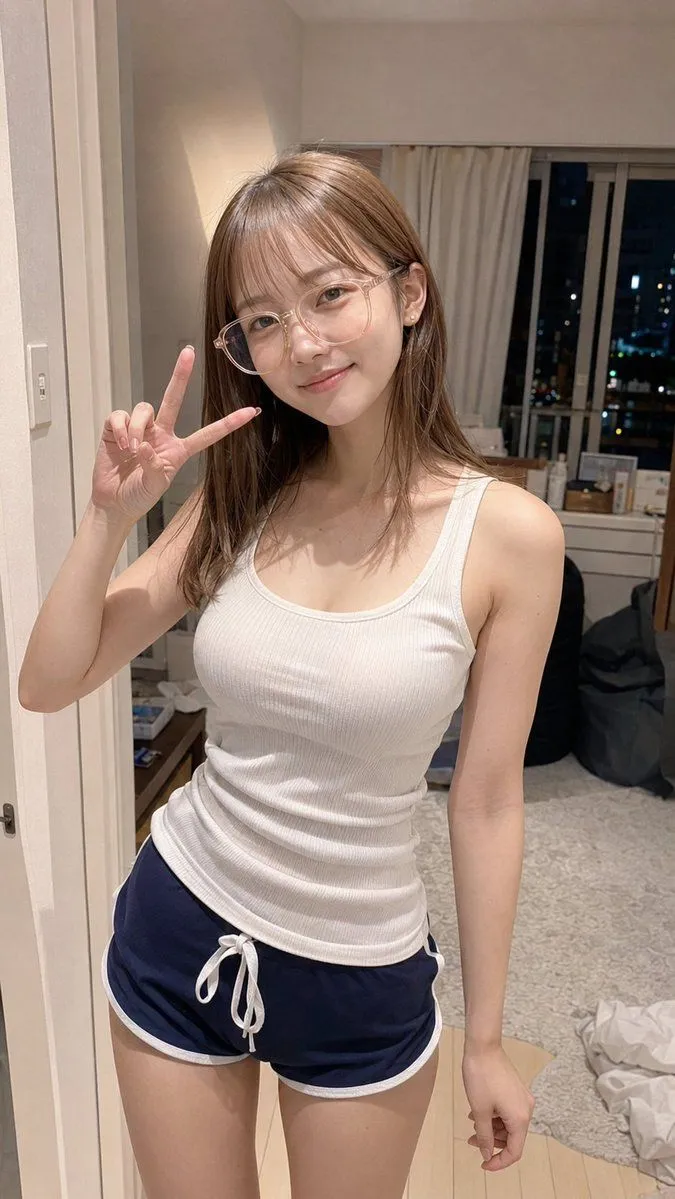
Apartment Standing Pose Transformation

Made with GPT Image 2 in ChatGPT by Library Avatars. Promptclay never generates images.

Did it work?

No reports yet. Tell others if it worked for you.

No comments yet. Be the first.

    Apartment Standing Pose Transformation

    GPT Image 29:16AI-generated

    Prompt

    Using the provided reference image, regenerate the same person and outfit as a realistic vertical smartphone photo, but change the setting and pose. Make her standing indoors in a casual apartment room at night instead of sitting in a gaming chair. Keep the white ribbed tank top and navy athletic shorts with white trim and drawstring, and preserve the face anonymization block. Pose her with one hand raised beside her face making a peace sign, while the other arm hangs down naturally; crop from head to upper thighs. Replace the gaming desk background with a lived-in bedroom/apartment interior: cream walls, doorway edge on the left, light wood floor, gray rug, bed or soft clutter in the lower right, a dark beanbag/chair, and a window with curtains showing city lights at night. Use natural indoor lighting, realistic phone-camera perspective, slight candid snapshot feel, and avoid neon gaming lights or bookshelf décor.

    Works in
    ChatGPT, Gemini
    Status
    Free to copy
    0
    DetailsVersions, settings and questions

    Written for

    What's in the prompt

    Subject
    Model
    GPT Image 2

    If your face changes

    keep my face exactly the same

    Questions

    Does this work in the ChatGPT app?
    Yes. Paste the prompt and attach your photo if it uses one.
    It changed my face. What do I do?
    Add "keep my face exactly the same" to the end and run it again.
    Can I use the images I make?
    Check the terms of the app you use. Promptclay never generates images and claims nothing you make.
    Similar prompts

    See more
    • Realistic Nighttime Smartphone Selfie
    • Late-Night City Walk Smartphone Selfie
    • Simulated iPhone 14 Pro Selfie in Harsh Lighting
    • Detailed JSON prompt for a mirror selfie image generation
    • Realistic Kitchen Portrait
    • Seedance 2.0 Prompt: Travel Vlog Montage with Seamless TransitionsVideo, 0:15
    • Hyper-Realistic Urban Fashion Portrait
    • Super Cute Japanese Woman in Silk Camisole
    • Candid Winter Smartphone Portrait
    • Kamen Rider Villain Transformation Sequence VideoVideo, 0:10
    • Sunlit Park Bench Portrait
    • Cute Student Photo Doodle
    • Luxury Arcade with Sunlight Patterns
    • Natural iPhone Photo Challenge
    • Retro Synthwave Podcast Host
    • AI Chat Screenshot With Censored Women
    • Cinematic Dark Movie Poster
    • Convenience Store Fight Scene
    • Finished Baby Sensory Bottle
    • Futuristic Fashion in Neon Seoul
    • Japanese Creator Branding Poster
    • Monochrome Scribble Ink Sketch
    • Mysterious Dark Forest Ritual Portrait
    • Pop Idol Typography Cover Art

    Show more

    Run it on your phone

    1. Prompt copiedRead it

      Using the provided reference image, regenerate the same person and outfit as a realistic vertical smartphone photo, but change the setting and pose. Make her standing indoors in a casual apartment room at night instead of sitting in a gaming chair. Keep the white ribbed tank top and navy athletic shorts with white trim and drawstring, and preserve the face anonymization block. Pose her with one hand raised beside her face making a peace sign, while the other arm hangs down naturally; crop from head to upper thighs. Replace the gaming desk background with a lived-in bedroom/apartment interior: cream walls, doorway edge on the left, light wood floor, gray rug, bed or soft clutter in the lower right, a dark beanbag/chair, and a window with curtains showing city lights at night. Use natural indoor lighting, realistic phone-camera perspective, slight candid snapshot feel, and avoid neon gaming lights or bookshelf décor.

    2. Open your app

    3. Paste and run

      Press and hold the message box, then tap Paste. Add your photo first if the prompt uses one. You may need to sign in.

    Apartment Standing Pose Transformation