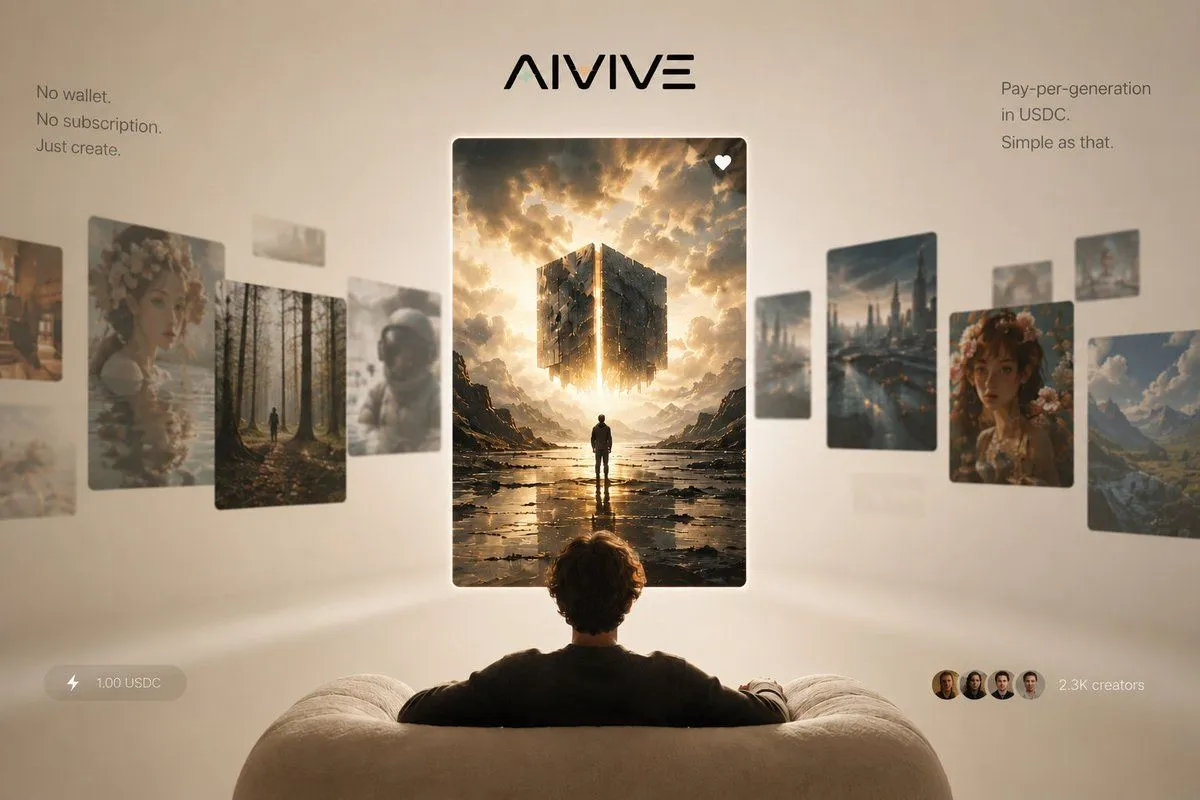
Made with GPT Image 2 in ChatGPT by Library Brand. Promptclay never generates images.
Did it work?
No reports yet. Tell others if it worked for you.
AIVIVE Immersive AI Gallery Hero
Prompt
1 blank to fillGoal: Create a premium landing-page hero image for {brand_name}, presenting an AI image-generation social feed as an immersive gallery viewed from behind a seated user. Canvas: Wide 16:9 composition, 1200×768 style, warm beige studio background with soft vignette, shallow depth of field, cinematic lighting, minimal luxury tech aesthetic. Layout: Center the stylized black {brand_name} logo at the top. Below it, place one large vertical featured image card in the exact center, floating in front of the viewer. Show the back of a person seated on a cream, rounded sofa in the bottom foreground, arms resting along the couch, looking toward the central card. Arrange a curved horizontal carousel of floating image cards receding into depth on both sides, with the side cards slightly blurred and angled to imply a social feed gallery. Text content: Add a small left copy block near the upper left reading exactly: “No wallet. / No subscription. / Just create.” Add a small right copy block near the upper right reading exactly: “Pay-per-generation / in USDC. / Simple as that.” Add a bottom-left translucent pill with a lightning icon and the text “1.00 USDC”. Add a bottom-right social proof element with four small circular creator avatars and the text “2.3K creators”. Image card count and subjects: Use exactly 14 floating image cards total: 1 central featured card, 7 left-side cards, and 6 right-side cards. The central featured card is a crisp vertical fantasy/sci-fi image of a lone figure standing in a reflective rocky landscape beneath a glowing fragmented cube suspended in dramatic golden clouds, with a small white heart icon in the top-right corner of the card. The 7 left-side cards are: 1 partial warm city/street image at the far left edge, 1 large floral portrait card, 1 forest path card with a tiny walking figure, 1 small pale abstract card near the upper middle, 1 blurred pale landscape card behind the forest, 1 astronaut helmet portrait card, and 1 faint low blurred card near the lower left. The 6 right-side cards are: 1 tall futuristic rainy city skyline card, 1 small blurred vertical card behind it, 1 large floral portrait card, 1 mountain valley landscape card at the far right, 1 small card near the upper right edge, and 1 faint small distant card between the city and portrait cards. Visual style: Photorealistic 3D product advertising render, warm cream and gold palette, soft global illumination, floating glassy cards with rounded corners and subtle shadows, elegant minimal typography, slight background blur, premium startup launch campaign look. The central card should be the sharpest and brightest element, while surrounding cards are softer and more atmospheric. Constraints: No clutter, no browser chrome, no visible app interface beyond the logo, text blocks, price pill, creator avatars, and heart icon. Keep all text legible and spelled exactly. Avoid adding extra cards, extra buttons, watermarks, or decorative icons beyond those specified.
Preview of your prompt
Goal: Create a premium landing-page hero image for AIVIVE, presenting an AI image-generation social feed as an immersive gallery viewed from behind a seated user. Canvas: Wide 16:9 composition, 1200×768 style, warm beige studio background with soft vignette, shallow depth of field, cinematic lighting, minimal luxury tech aesthetic. Layout: Center the stylized black AIVIVE logo at the top. Below it, place one large vertical featured image card in the exact center, floating in front of the viewer. Show the back of a person seated on a cream, rounded sofa in the bottom foreground, arms resting along the couch, looking toward the central card. Arrange a curved horizontal carousel of floating image cards receding into depth on both sides, with the side cards slightly blurred and angled to imply a social feed gallery. Text content: Add a small left copy block near the upper left reading exactly: “No wallet. / No subscription. / Just create.” Add a small right copy block near the upper right reading exactly: “Pay-per-generation / in USDC. / Simple as that.” Add a bottom-left translucent pill with a lightning icon and the text “1.00 USDC”. Add a bottom-right social proof element with four small circular creator avatars and the text “2.3K creators”. Image card count and subjects: Use exactly 14 floating image cards total: 1 central featured card, 7 left-side cards, and 6 right-side cards. The central featured card is a crisp vertical fantasy/sci-fi image of a lone figure standing in a reflective rocky landscape beneath a glowing fragmented cube suspended in dramatic golden clouds, with a small white heart icon in the top-right corner of the card. The 7 left-side cards are: 1 partial warm city/street image at the far left edge, 1 large floral portrait card, 1 forest path card with a tiny walking figure, 1 small pale abstract card near the upper middle, 1 blurred pale landscape card behind the forest, 1 astronaut helmet portrait card, and 1 faint low blurred card near the lower left. The 6 right-side cards are: 1 tall futuristic rainy city skyline card, 1 small blurred vertical card behind it, 1 large floral portrait card, 1 mountain valley landscape card at the far right, 1 small card near the upper right edge, and 1 faint small distant card between the city and portrait cards. Visual style: Photorealistic 3D product advertising render, warm cream and gold palette, soft global illumination, floating glassy cards with rounded corners and subtle shadows, elegant minimal typography, slight background blur, premium startup launch campaign look. The central card should be the sharpest and brightest element, while surrounding cards are softer and more atmospheric. Constraints: No clutter, no browser chrome, no visible app interface beyond the logo, text blocks, price pill, creator avatars, and heart icon. Keep all text legible and spelled exactly. Avoid adding extra cards, extra buttons, watermarks, or decorative icons beyond those specified.
DetailsVersions, settings and questions
Written for
What's in the prompt
- Subject
- Model
- GPT Image 2
If your face changes
keep my face exactly the sameQuestions
- Does this work in the ChatGPT app?
- Yes. Paste the prompt and attach your photo if it uses one.
- It changed my face. What do I do?
- Add "keep my face exactly the same" to the end and run it again.
- Can I use the images I make?
- Check the terms of the app you use. Promptclay never generates images and claims nothing you make.