Tell us anything

An idea, a bug, something you love. We read every note.

⌘↵ to send. The page you're on comes along.

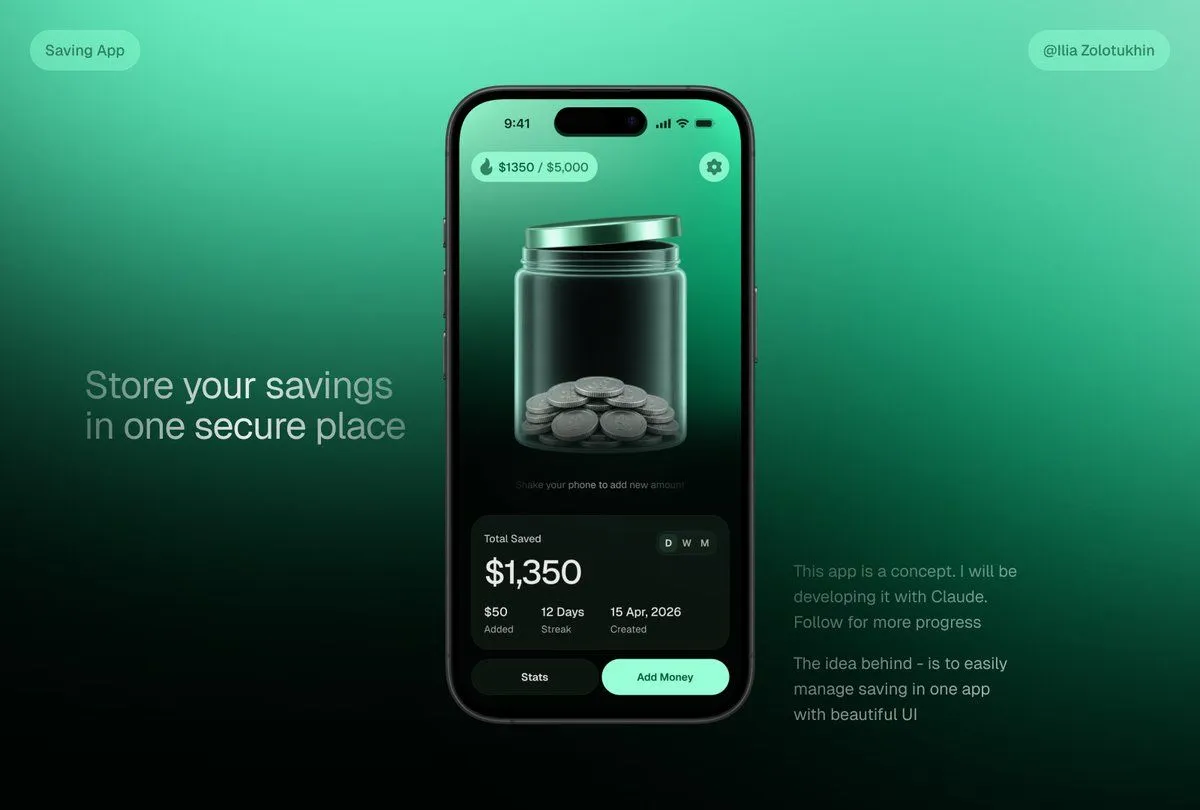
3D Savings App Jar UI Mockup

Made with GPT Image 2 in ChatGPT by Library Brand. Promptclay never generates images.

Did it work?

No reports yet. Tell others if it worked for you.

No comments yet. Be the first.

    3D Savings App Jar UI Mockup

    GPT Image 23:2AI-generated

    Prompt

    {"type":"premium fintech app concept hero mockup","style":"sleek 3D glassmorphism UI, dark mint green gradients, realistic smartphone render, soft studio lighting, high contrast, polished product-design presentation, subtle blur and glow, cinematic shadows","canvas":{"aspect_ratio":"16:9 landscape","background":"smooth teal-to-emerald gradient fading to near-black at the bottom, minimalist tech presentation backdrop"},"layout":{"centerpiece":"one large black iPhone-style smartphone centered slightly right, front-facing, rounded corners, dynamic-island camera cutout, thin black bezel, realistic side buttons and reflections","left_text_block":{"position":"left middle","headline":"{argument name=\"headline text\" default=\"Store your savings in one secure place\"}","style":"large light-gray sans-serif text, two lines, soft opacity"},"right_text_block":{"position":"lower right","paragraph_count":2,"text":["This app is a concept. I will be developing it with Claude. Follow for more progress","The idea behind - is to easily manage saving in one app with beautiful UI"],"style":"small muted gray sans-serif text"},"top_badges":{"count":2,"items":[{"position":"top left","text":"Saving App","shape":"rounded translucent mint pill"},{"position":"top right","text":"{argument name=\"creator handle\" default=\"@Ilia Zolotukhin\"}","shape":"rounded translucent mint pill"}]}},"phone_screen":{"status_bar":{"time":"9:41","icons":"cell signal, Wi-Fi, battery","count":4},"top_controls":{"count":2,"items":[{"position":"top left","text":"{argument name=\"savings progress\" default=\"$1350 / $5,000\"}","icon":"small flame or droplet icon","shape":"mint translucent rounded pill"},{"position":"top right","icon":"settings gear","shape":"mint circular button"}]},"main_visual":"large translucent glass jar with metallic mint lid, centered on screen, jar filled at the bottom with stacked silver coins; glossy refractions, vertical highlights, 3D depth, dark green interior background","micro_instruction":"Shake your phone to add new amount","stats_card":{"position":"bottom of phone screen","shape":"large dark rounded rectangle glass card","title":"Total Saved","main_amount":"{argument name=\"saved amount\" default=\"$1,350\"}","time_toggle":{"count":3,"labels":["D","W","M"],"active":"D"},"metrics":{"count":3,"items":[{"value":"$50","label":"Added"},{"value":"12 Days","label":"Streak"},{"value":"15 Apr, 2026","label":"Created"}]}},"bottom_buttons":{"count":2,"items":[{"text":"Stats","style":"dark rounded button"},{"text":"Add Money","style":"bright mint rounded button"}]}},"rendering_notes":"make the jar the visual focus, realistic glass transparency and coin geometry, clean modern typography, balanced negative space, no clutter, product-shot quality, suitable for a savings app landing-page teaser"}

    Works in
    ChatGPT, Gemini
    Status
    Free to copy
    0
    DetailsVersions, settings and questions

    Written for

    What's in the prompt

    Subject
    Model
    GPT Image 2

    If your face changes

    keep my face exactly the same

    Questions

    Does this work in the ChatGPT app?
    Yes. Paste the prompt and attach your photo if it uses one.
    It changed my face. What do I do?
    Add "keep my face exactly the same" to the end and run it again.
    Can I use the images I make?
    Check the terms of the app you use. Promptclay never generates images and claims nothing you make.
    Similar prompts

    See more
    • C4D-Style Finance App UI (Variant)
    • 3D Glass Wallet and Coins Icon
    • Cinematic Sci-Fi Landscape and Fintech UI Design Prompts
    • Immersive Music Player UI Poster
    • Smart Library Music App Concept
    • AI Assistant App UI Mockup
    • Cosmic Gravity Glass UI System
    • Xiaohongshu 3D Creator Profile Card
    • Futuristic Music UI Poster
    • Product in Ice Cube Minimalist
    • Premium Loot App Screenshot Upgrade
    • Video Generation Prompt: Animating Mobile ScreensVideo, 0:10
    • Neumorphic Smart Dashboard UI
    • Clean Authenticator Onboarding UI
    • Five High-Efficiency Nano Banana Pro Prompts for Business Graphics
    • Futuristic Fashion Shot on Giant Smartphone Screen
    • Structural Image Inpainting Prompt
    • Live E-commerce UI Mockup
    • AI Inspiration Gallery Grid
    • UI/UX Redesign Prompt (Pop Design Style)
    • Cyberpunk Fantasy Trading Card App
    • Fluent-style App Ad Generation PromptVideo, 0:15
    • Apple Style Website Design for Nike
    • Autonomous Financial Artist Prompt for 3D Stock Visualization

    Show more

    Run it on your phone

    1. Prompt copiedRead it

      {"type":"premium fintech app concept hero mockup","style":"sleek 3D glassmorphism UI, dark mint green gradients, realistic smartphone render, soft studio lighting, high contrast, polished product-design presentation, subtle blur and glow, cinematic shadows","canvas":{"aspect_ratio":"16:9 landscape","background":"smooth teal-to-emerald gradient fading to near-black at the bottom, minimalist tech presentation backdrop"},"layout":{"centerpiece":"one large black iPhone-style smartphone centered slightly right, front-facing, rounded corners, dynamic-island camera cutout, thin black bezel, realistic side buttons and reflections","left_text_block":{"position":"left middle","headline":"{argument name=\"headline text\" default=\"Store your savings in one secure place\"}","style":"large light-gray sans-serif text, two lines, soft opacity"},"right_text_block":{"position":"lower right","paragraph_count":2,"text":["This app is a concept. I will be developing it with Claude. Follow for more progress","The idea behind - is to easily manage saving in one app with beautiful UI"],"style":"small muted gray sans-serif text"},"top_badges":{"count":2,"items":[{"position":"top left","text":"Saving App","shape":"rounded translucent mint pill"},{"position":"top right","text":"{argument name=\"creator handle\" default=\"@Ilia Zolotukhin\"}","shape":"rounded translucent mint pill"}]}},"phone_screen":{"status_bar":{"time":"9:41","icons":"cell signal, Wi-Fi, battery","count":4},"top_controls":{"count":2,"items":[{"position":"top left","text":"{argument name=\"savings progress\" default=\"$1350 / $5,000\"}","icon":"small flame or droplet icon","shape":"mint translucent rounded pill"},{"position":"top right","icon":"settings gear","shape":"mint circular button"}]},"main_visual":"large translucent glass jar with metallic mint lid, centered on screen, jar filled at the bottom with stacked silver coins; glossy refractions, vertical highlights, 3D depth, dark green interior background","micro_instruction":"Shake your phone to add new amount","stats_card":{"position":"bottom of phone screen","shape":"large dark rounded rectangle glass card","title":"Total Saved","main_amount":"{argument name=\"saved amount\" default=\"$1,350\"}","time_toggle":{"count":3,"labels":["D","W","M"],"active":"D"},"metrics":{"count":3,"items":[{"value":"$50","label":"Added"},{"value":"12 Days","label":"Streak"},{"value":"15 Apr, 2026","label":"Created"}]}},"bottom_buttons":{"count":2,"items":[{"text":"Stats","style":"dark rounded button"},{"text":"Add Money","style":"bright mint rounded button"}]}},"rendering_notes":"make the jar the visual focus, realistic glass transparency and coin geometry, clean modern typography, balanced negative space, no clutter, product-shot quality, suitable for a savings app landing-page teaser"}

    2. Open your app

      This prompt is long, so it is copied instead of sent in the link. Paste it in the app.

    3. Paste and run

      Press and hold the message box, then tap Paste. Add your photo first if the prompt uses one. You may need to sign in.

    3D Savings App Jar UI Mockup